GEN2U™ Printer
© 2016, JCM Global Corporation 10 Part No. 960-000177R_Rev. A
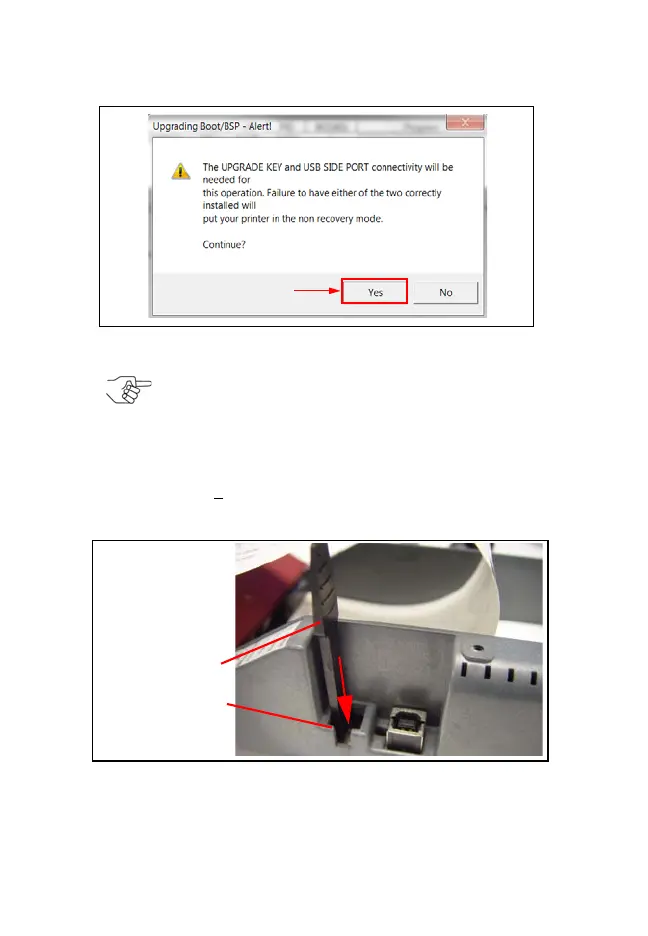
Figure 9 Upgrading Boot/BSP Alert! Screen
NOTE: If the “Upgrading Boot/BSP - Alert!” message
appears (Figure 9), the Upgrade Key must be
installed to complete the Upgrade. To do so:
1. Remove the Rubber Cap from the 4-Pin Connector
(on the Printer’s right side).
2. Insert the Upgrade Key into the 4-Pin Connector
(Figure 10 a).
3. Click Y
es in the Upgrading Boot/BSP-Alert! dialog
box (Figure 9 a).
Figure 10 Inserting Upgrade Key in 4-pin Connector (Right side)
GEN2U_FlipBookRevA_v12.fm Page 10 Thursday, October 6, 2016 1:29 PM


 To Next Page