GEN2U™ Printer
© 2016, JCM Global Corporation 4 Part No. 960-000177R_Rev. A
B
EZEL
O
PERATION
Table 2 identifies the Front Bezel Display indications, which allow
you to determine the Printer Status from a distance.
Self-Test Procedures
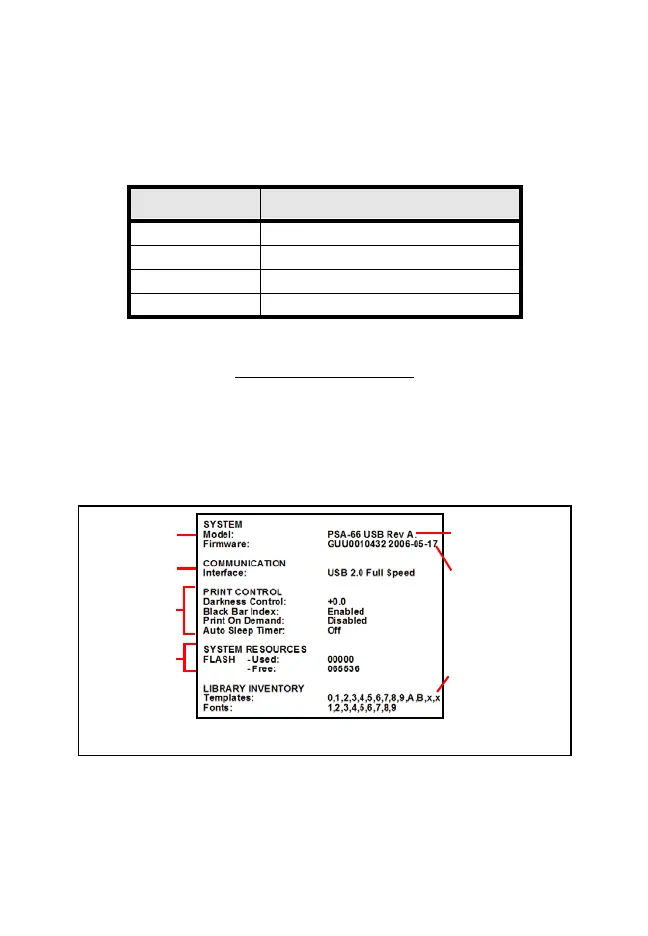
The Self-Test Procedures can be used to print a “Configuration
Ticket” and verify that the GEN2U Print function operates normally.
The “Configuration Ticket” can be used to check print quality.
To run a Self-Test, press and hold down the FEED button during
Power-up until the Configuration Ticket starts to print (Figure 3):
Table 2 GEN2U Bezel Display Status Indicators
Bezel Display Status
Solid On Printer Idle and Ready
Slow Blink Paper Low or Printer Error
Fast Blink Ticket Printing/Ticket In Chute
OFF Printer Power Off
System
Communications
Setup
Resident Ticket
Template Package
Version
List of fonts
available in the
printer by TCL
page mode
Figure 3 GEN2U Printer Configuration Ticket
GEN2U_FlipBookRevA_v12.fm Page 4 Thursday, October 6, 2016 1:29 PM


 To Next Page