© 2016, JCM Global Corporation 7 Part No. 960-000177R_Rev. A
GEN2U™ Printer
UPDATING FIRMWARE ON THE PRINTER
To update Firmware on the GEN2U Printer:
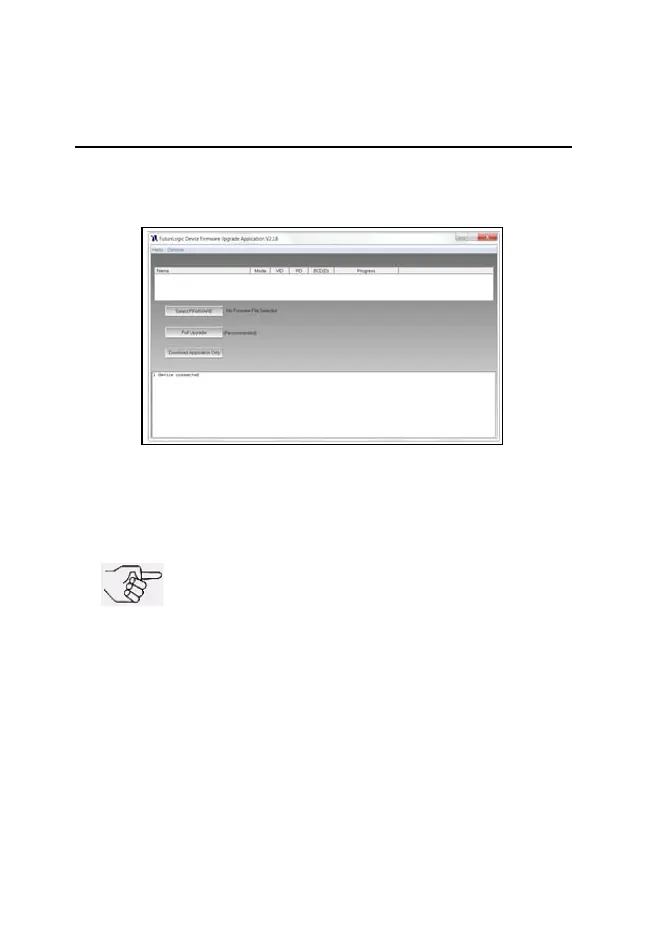
1. From your PC Desktop, launch the FutureLogic Device
Firmware Upgrade Application (FLDFU) (Figure 4).
2. Make sure the GEN2U Printer is powered ON.
3. Connect a USB cable from the PC to the Printer’s USB port
(right side).
Figure 4 FutureLogic Device Firmware Upgrade
Application UI Window
NOTE: A USB Hub is recommended. Connect
the USB Hub between the PC and the GEN2U
Printer.
GEN2U_FlipBookRevA_v12.fm Page 7 Thursday, October 6, 2016 1:29 PM


 To Next Page