GEN2U™ Printer
© 2016, JCM Global Corporation 8 Part No. 960-000177R_Rev. A
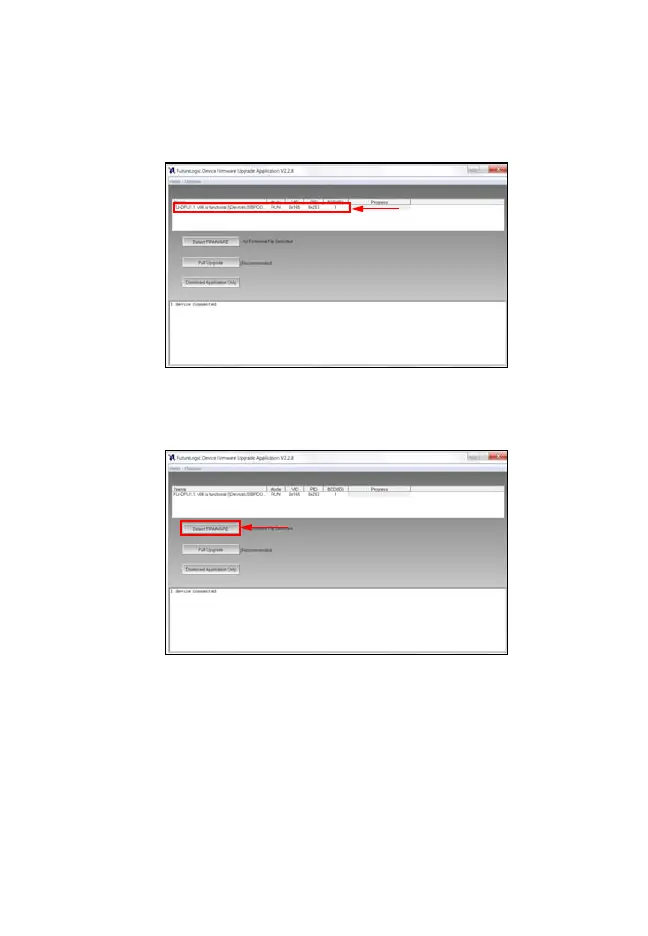
4. To verify communication between the GEN2U Printer and
the Device Firmware Upgrade Application, look for the
Printer Detected indicator (Figure 5
a) in the window.
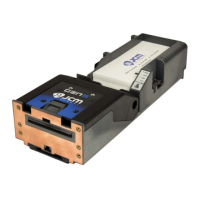
5. Click the Select FIRMWARE button to select the desired
Firmware Upgrade file to be downloaded (Figure 6 a).
Figure 5 “Printer Detected” Indicator
Figure 6 Click Select Firmware
GEN2U_FlipBookRevA_v12.fm Page 8 Thursday, October 6, 2016 1:29 PM


 To Next Page