GEN2U™ Printer
© 2016, JCM Global Corporation 16 Part No. 960-000177R_Rev. A
Manual Cleaning
Use the following procedure for Manual Cleaning of the Printer:
1. Slide the Printer out of the EGM.
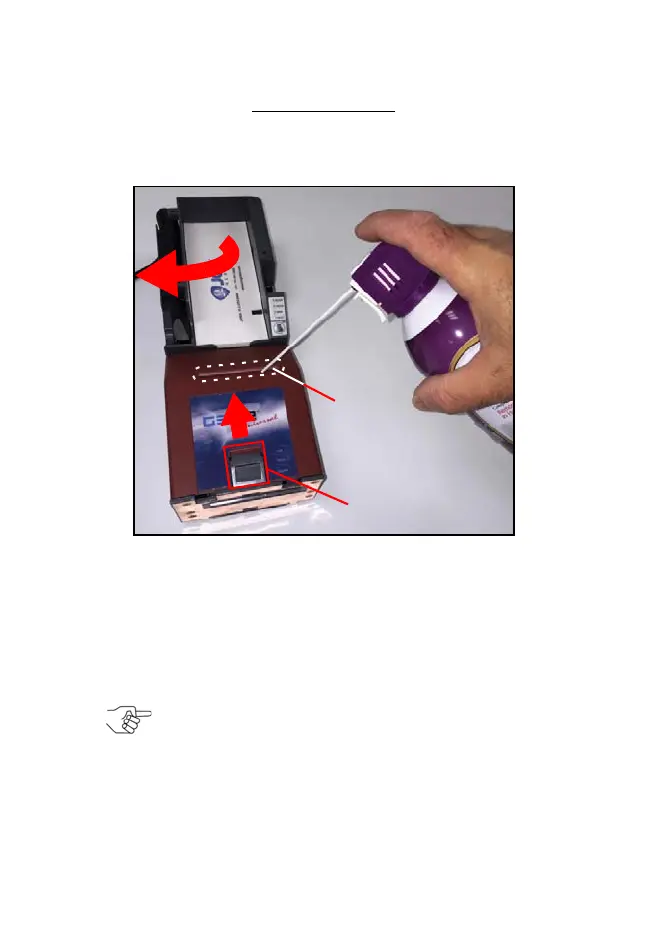
2. Remove Tickets from the Printer’s Paper Tray (Figure 13 a).
3. Press the Lid Release Lever toward the rear of the Printer to release the lid
(Figure 13 c).
4. Rotate the Lid up in the direction indicated by the red arrow (refer to
Figure 14 a on page 17) to access the Printer interior.
5. Use Non-Flammable Compressed Air to blow out excessive dust and dirt
from the following areas within the Printer:
– Ticket-In Slot (Figure 13 b)
– Presenter Assembly (refer to Figure 14 b on page 17)
– Print Head (refer to Figure 15 b on page 17)
– Paper Tray (Figure 13 a)
Figure 13 Cleaning the Ticket-In Slot w/ Compressed Air
NOTE: Insert the Compressed Air canister’s tube into
the Ticket-In Slot approximately 1 inch from the right
edge of the Slot.
GEN2U_FlipBookRevA_v12.fm Page 16 Thursday, October 6, 2016 1:29 PM


 To Next Page