GEN2U™ Printer
© 2016, JCM Global Corporation 12 Part No. 960-000177R_Rev. A
ABOUT THE JCM PRINTER BASIC DRIVER
The JCM
®
Printer Basic Driver allows full testing of a connected
Printer.
C
ONNECTING
TO
THE
JCM P
RINTER
B
ASIC
D
RIVER
To connect to the JCM Printer Basic Driver:
1. Click the Start Button on the PC Desktop, then click on Programs.
2. Scroll down to
JCM, then click the JCM Printer Basic Driver icon.
The
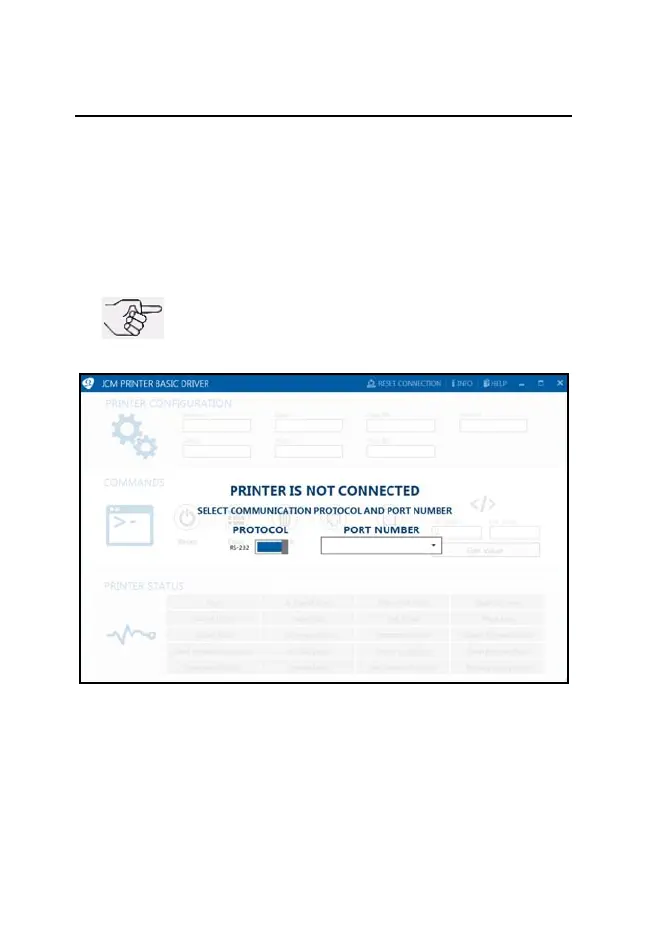
JCM PRINTER BASIC DRIVER Opening Screen appears (Figure 11).
3. Select the PROTOCOL (RS-232 or Netplex) and PORT NUMBER.
NOTE: Printers supporting USB
Communications also have RS-232 Active.
Test connectivity using an RS-232 connection.
Figure 11 JCM Printer Basic Driver Opening Screen
GEN2U_FlipBookRevA_v12.fm Page 12 Thursday, October 6, 2016 1:29 PM


 To Next Page