5. Tap the PRESET BUTTON (#9) repeatedly to select the preset number you want to
assign the station to.
6. Tap the PROGRAM/PLAY MODE BUTTON (#3) to confirm the setting.
7. Repeat above steps 3 - 6 to preset up to 30 FM stations.
Hints
This unit features an AUTO SEARCH function that will automatically save the first 30 strong
stations found. To use this feature, make sure the unit is in FM mode. Tap the SCAN
BUTTON (#8), the unit will scan from the lowest frequency to the highest frequency within the
frequency band. The first strong radio stations found will be stored in the preset locations
starting from P01.
RECALLING PRESET RADIO STATIONS
Press the PRESET BUTTON (#9) repeatedly to select the location of the station you want to
listen to.
BLUETOOTH TRANSMITTER MODE
PAIRING TO A BLUETOOTH SPEAKER
The CD player, FM radio can act as a Bluetooth transmitter to a Bluetooth speaker. Follow
the below steps to connect to a Bluetooth speaker and play music from a loaded CD. FM
radio, When the CD player is stopped for approximately 120 seconds, the power will be
Automatically turn off ,The user will need to repeat below connection
steps to play
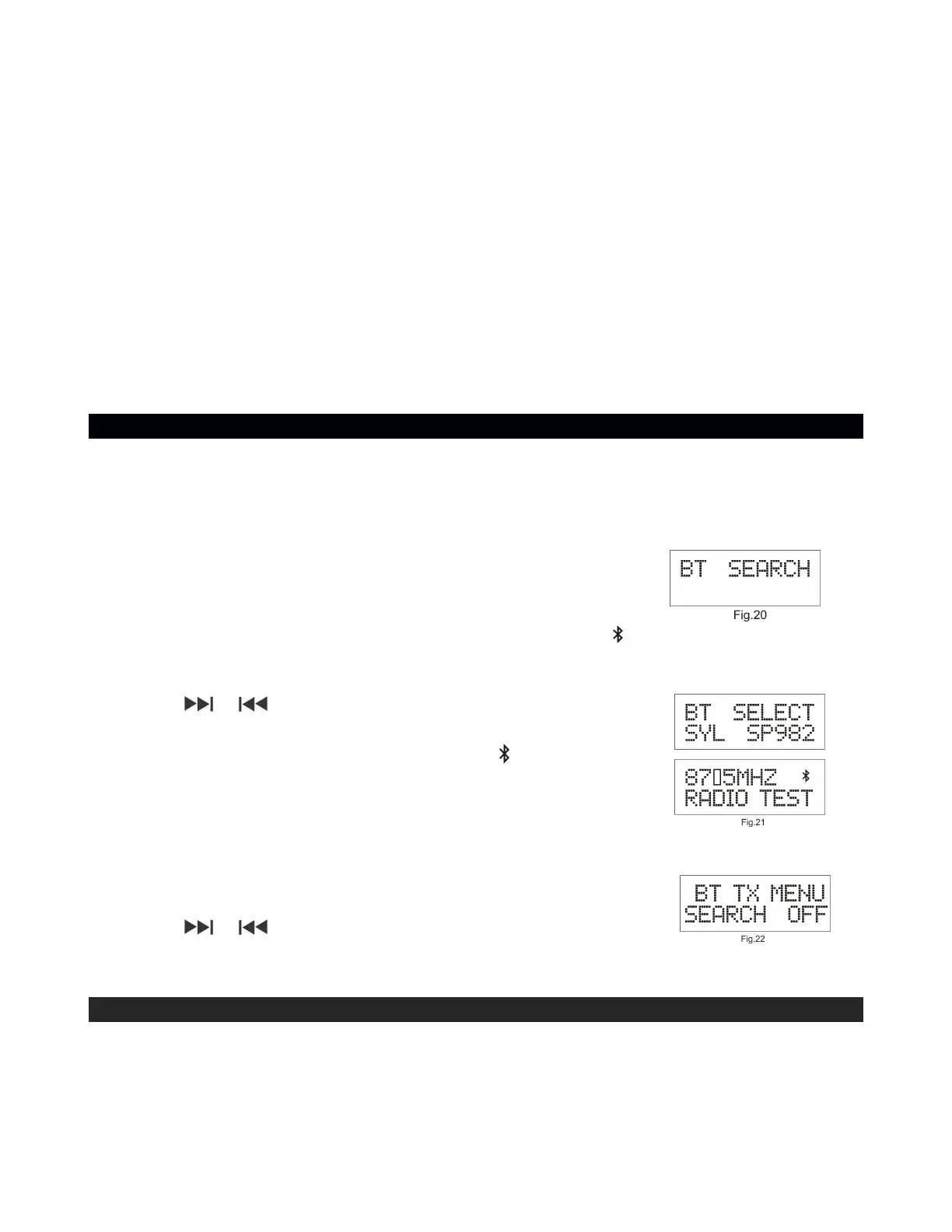
1. Press and hold the TX button (#9) to switch to Bluetooth Search
Mode to Fig.20.
2. When CD player of FM radio is in Bluetooth Search mode ,” ” will be seen flashing on the
LCD display. The pairing process could take up to 30 seconds. For best results, stay
within 3 ft. of the Bluetooth speaker you are pairing to.
3. Tap the or Buttons repeatedly to select the Bluetooth
speaker Device. Push the STOP button (#4) to confirm.
4. When the Bluetooth connection is made, the “ ” icon on the LCD
display when the connection has been made as well.
TURN OFF PAIRING TO A BLUETOOTH SPEAKER
1. Press hold the TX button (#9) to select BT TX MENU on the
display Fig 22
2. Tap the or Buttons repeatedly to select the OFF. Push the
ENTER button to confirm.
BBS FUNCTION
Tap the BBS ON/OFF BUTTON (#11) to turn on the BBS to enhance the bass effect of the
music. Tap again to turn off the BBS.


 To Next Page