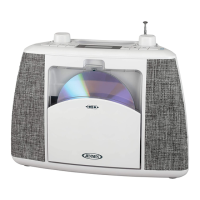
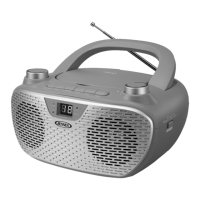
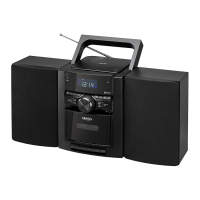
The JENSEN CD-785 is a portable Bluetooth CD music system that also features a cassette player and a digital AM/FM radio. This versatile unit is designed for both desktop and portable use, offering a range of audio playback options.
Function Description:
The CD-785 serves as a comprehensive audio entertainment system. It includes a CD player capable of playing commercial CDs as well as self-compiled CD-R/RW discs. The integrated Bluetooth functionality allows for wireless streaming of audio from compatible devices such as smartphones, tablets, and computers. For traditional audio playback, it features a cassette deck for playing and recording tapes. The digital AM/FM radio provides access to broadcast stations, with the ability to preset up to 20 FM and 20 AM stations. An auxiliary input jack allows for wired connection of external audio devices like MP3 players or older iPods. The unit also incorporates an alarm clock with two independent alarms, offering wake-up options via CD, alarm tone, or radio. A sleep timer function allows users to set a duration after which the unit will automatically turn off. For enhanced audio, a Bass Boost function is included.
Important Technical Specifications:
- Power Source: Operates on standard 120V~ 60Hz AC household power or 8 "D" size (UM-1) batteries (not included).
- Power Consumption: 18W (AC).
- Remote Control: Uses 1 x 3V CR2025 battery.
- Frequency Range:
- FM: 87.5 ~ 108 MHz
- AM: 520 ~ 1710 KHz
- CD Player: Compatible with commercial CDs and self-compiled CD-R/RW discs. Not compatible with CD-ROM, CDI, VCD, DVD, or computer CDs.
- Bluetooth: Supports pairing with Bluetooth-enabled devices, with a pass code of "0000" if required.
- Auxiliary Input: 3.5mm stereo jack.
- Speakers: Removable, with speaker cables and locks for secure attachment.
- Display: LCD display with backlight dimmer function (Low or High).
- Safety: Class 1 Laser Product, double insulated. FCC ID: 2AB4KMETYH1480.
Usage Features:
- Speaker Connection: The speakers are removable, allowing for flexible placement. They can be attached to the main unit for portable use or detached for desktop setups. Speaker cables connect the speakers to the main unit's SPEAKER OUT L/R JACKs.
- Powering the Unit: Can be powered by AC or batteries. When operating on AC, internal battery power is automatically disconnected.
- Clock Setting: The LCD display flashes upon initial AC power connection, indicating standby mode. Time is set using the TIME SET button and TUNE+/- buttons, with AM/PM indication.
- Alarm Setting: Two independent alarms (ALARM 1 and ALARM 2) can be set with wake-up options including CD, alarm tone, or radio. The alarm volume gradually increases.
- Snooze Function: Temporarily silences the alarm for 9 minutes.
- Radio Operation:
- Mode Selection: FM or AM radio mode is selected using the FUNCTION button.
- Tuning: Manual tuning is done by repeatedly tapping TUNE+/- buttons. Auto tuning is initiated by pressing and holding TUNE+/- buttons.
- Reception: The telescopic FM antenna should be fully extended and rotated for best FM reception. The built-in AM bar antenna requires slight unit rotation for optimal AM reception.
- Presets: Up to 20 FM and 20 AM stations can be stored using the MEMORY/PROG button and TUNE+/- buttons.
- Bluetooth Operation:
- Pairing: Select Bluetooth mode via the FUNCTION button. "bt" will appear on the LCD, and the Bluetooth icon will flash. Enable Bluetooth on your device, search for "CD-785," and select it. The icon will light steadily upon successful pairing.
- Re-pairing: To pair with a new device, press and hold the BLUETOOTH PAIR button until the icon flashes, entering pairing/discoverable mode.
- CD Operation:
- Loading: Open the CD door, place the CD with the printed side facing up, and close the door. The unit will search for tracks.
- Playback: PLAY/PAUSE button for starting and pausing playback. STOP button to stop.
- Track Navigation: SKIP UP/DOWN buttons to move to the next or previous track.
- Search: Press and hold SKIP UP/DOWN buttons for fast forward/backward searching.
- Repeat Play: MODE button cycles through REPEAT ONCE, REPEAT ALL, RANDOM, and OFF.
- Programming: Up to 20 tracks can be programmed to play in a specific order using the PROGRAM button.
- Cassette Operation:
- Playback: Insert cassette, select Cassette mode, and press PLAY.
- Recording: Features Automatic Volume Level Control. Can record from radio, CD, or AUX input. To record, press RECORD & PLAY buttons simultaneously.
- Controls: FAST FORWARD, REWIND, PAUSE, STOP/EJECT buttons.
- Auxiliary Input: Connect external audio devices using a 3.5mm audio cable. Select AUX mode via the FUNCTION button.
- Bass Boost: Activates or deactivates enhanced bass output.
- Dimmer: Adjusts the brightness of the LCD display.
- Headphone Jack: Allows for private listening, disconnecting the speakers when in use.
Maintenance Features:
- General Care: Avoid excessive force, shock, dust, or extreme temperatures. Do not tamper with internal components. Clean with a dry cloth; avoid solvents or detergents. Keep away from direct sunlight, heat, humidity, and electrical noise sources.
- Battery Care: Use alkaline batteries for best performance. Ensure correct polarity. Do not mix old and new batteries, or different battery types. Remove batteries if the unit will not be used for an extended period to prevent leakage.
- Battery Replacement: Replace all exhausted batteries simultaneously when sound becomes distorted to prevent leakage.
- CD Care: Handle discs by their edges. Do not attach adhesive labels. Clean periodically with a soft, lint-free, dry cloth, wiping in straight lines from the center to the edge. Avoid circular motions.
- Cassette Care:
- Tape Jamming/Tangling Prevention: Check for loose tape layers and take them up with a pencil before inserting. Fast wind cassettes from end to end to remove ridges. Use only well-known brands of tape; avoid C-120 cassettes.
- Head Cleaning: Periodically clean tape heads, pinch roller, and capstan with a soft cloth or cotton pad dampened in isopropyl alcohol or special tape head cleaner.
- Unit Cleaning: Disconnect from AC power before cleaning. Use a dust cloth for the finish. For dirty front panels, use a soft cloth slightly dampened with mild soap and water solution. Avoid abrasive cloths or polishes. Do not allow water or liquids inside the unit.
- Resetting: In case of erratic operation due to electrostatic discharge or power surge, unplug the power cord and remove all batteries. Wait 3 minutes, then reinstall batteries and plug in AC power to reset the unit. This will erase FM presets.


 To Next Page
 General