PROGRAMMING MP3 TRACKS
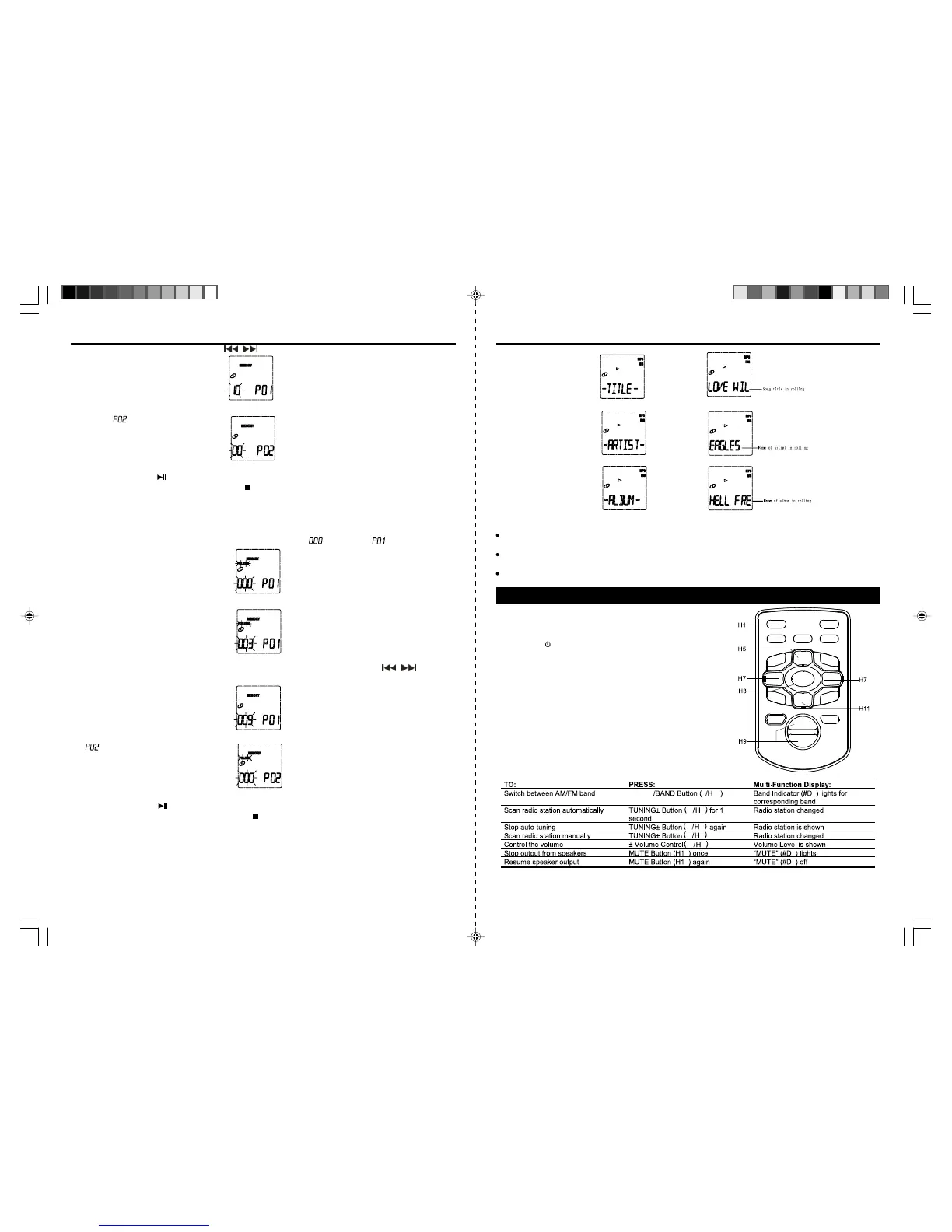
With this function you can program up to 10 titles in the order you desire.This functioncan only be done
in stop mode.
1.Press the MEMORY Button
(7/H6),“ FOLDER”indicator and‘ ’blink, and‘ ’/ MEMORY
indicator appears in the display.
2. Select the desired folder by pressing FOLDER UP or DOWN button (6/H12,&H8).The selected folder
blinks.
3.Press the MEMORY Button
(7/H6) again to enter the selected folder.Then press / Buttons
(11/H7)to select your desired track.The selected track blinks.
4. Press the MEMORYButton
(7/H6) again to enterthe selected track.The program number advances to
‘
’.
5. Repeat 2 to 4 to program additional tracks,10 tracks can be memorized.
6.Press PLAY/PAUSE
Button to start playing the tracks in your programmed order.
7.To clear the programmed tracks, press STOP
Button until the MEMORY indicator disappear.
ID3 DISPLAY (FOR MP3-CDONLY)
This unitcan support ID3 displaywhen play the MP3-CD(if the MP3-CD havethis information in the disc).
Press button ID3(5/H2)once, theID3 iconwill appearon theLCD display, and thetitle ofthe song,artist and
the album willshow onLCD displayby rolling,press thisbutton againto resumeto showthe folder and track
number, theID3 iconwill disappear.
2. Select the desired track by pressingthe
/ Button (11/H7) to selectthe track you wantto program.
3. Press theMEMORY Button(7/H6) againto enterthe selected track in program memory#1. Theprogram
number
advances to.
4.Repeat steps 2 & 3 toprogram addiitonal tracks, 20tracks can be memorized.
5.Press PLAY/PAUSE
Button tostart playingthe tracks in yourprogrammed order.
6.To clear theprogrammed tracks, press STOP
Button until theMEMORYindicator disappear.
Note: Random functionsare disabled in program play.
Notes on CD-R/RW Discs
Because of non-standardized format definition/production of CD-R/RW/MP3-CD, playback quality and
performance are not guaranteed.
Manufacturer is not responsible for the playability of CD-R/RW/MP3-CD due to recording conditions
such as PC performance, writing software, media ability, etc.
Do not attach a label or seal to either side of the CD-R/RW/MP3-CD disc. It may cause a malfunction.
RADIO OPERATIONS
RADIOTUNING
1. Press the Button (10/H1) to turnon the unit.
2. Press the Function Button (3/H3) to operate the unit in
radio mode.
E-11 E-12
JMC-670 INSTRUCTION MANUAL
811
11 7
7
4
4
11 7
6
6
15 9
11 7
STOP
HX-1056M3 IB JENS 001 REV0.P65 7/20/2005, 2:55 PM7
JMC-670 INSTRUCTION MANUAL



 To Next Page