EasyManua.ls Logo

Jensen VM9314 - CD DVD Audio Remote Control Functions; Track Scan Select CD DA Discs

Jensen VM9314
95 pages
Print Icon
To Next Page IconTo Next Page
To Previous Page IconTo Previous Page
Loading...
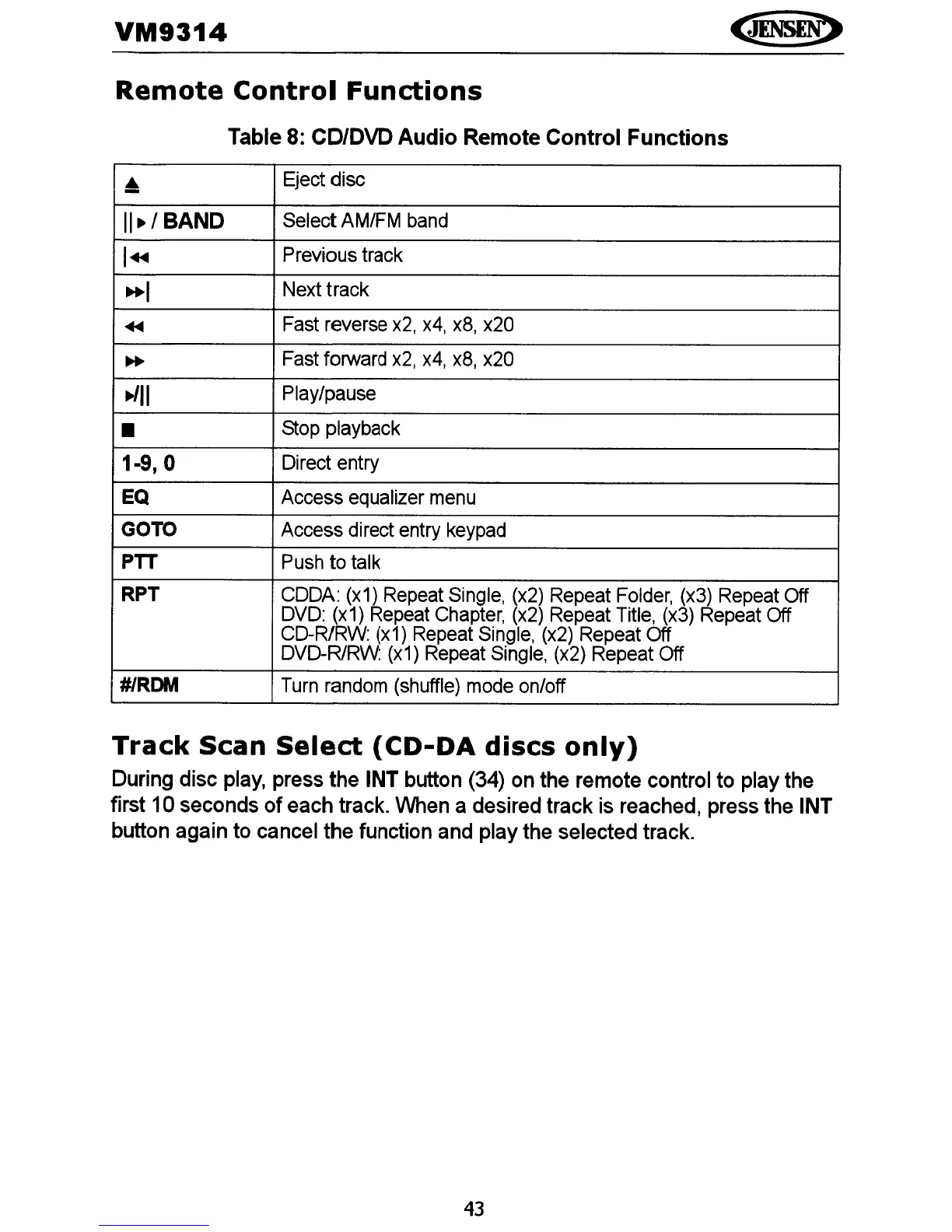
VM9314
Remote
Control
Functions
Table
8:
CD/OVD Audio Remote Control Functions
Eject disc
11.1
BAND
Select
AM/FM
band
I~
Previous track
..
,
Next track
~
Fast
reverse
x2,
x4,
x8,
x20
..
Fast forward
x2,
x4,
x8,
x20
·/11
Play/pause
Stop
playback
1·9, 0
Direct entry
EQ Access equalizer
menu
GOTO
Access direct
entry
keypad
PTT
Push
to
talk
RPT
CODA:
(x1)
Repeat
Single,
(x2)
Repeat
Folder,
(x3)
Repeat
Off
DVO:
(x1)
Repeat
Chapter,
(x2)
Repeat
Title,
(x3)
Repeat
Off
CO-R/RW:
(x1)
Repeat
Single,
(x2)
Repeat Off
DVD-R/RW:
(x1)
Repeat
Single,
(x2)
Repeat Off
#/RDM
Turn
random
(shuffle)
mode
on/off
Track
Scan
Select
(CD-DA
discs
only)
During disc play, press the INT button (34) on the remote control to play the
first 10 seconds
of
each track. When a desired track is reached, press the
INT
button again to cancel the function and play the selected track.
43

Related product manuals