74
VX7010
PANDORA RADIO OPERATION
Pandora Radio is available via your iPhone® (data usage will occur), iPod® touch
(via Wi-Fi) or Android™ device (via Bluetooth®).
NOTE: The Pandora app must be installed on your iPhone®/iPod® touch or Android
device.
NOTE: For basic iPod®/ iPhone® connectivity, you can use the white 30-pin to USB
iPod cable that came with your Apple device.
Note: To play Pandora Radio on this radio using an Android device, it is necessary to
rst establish a connection using Bluetooth® wireless technology.
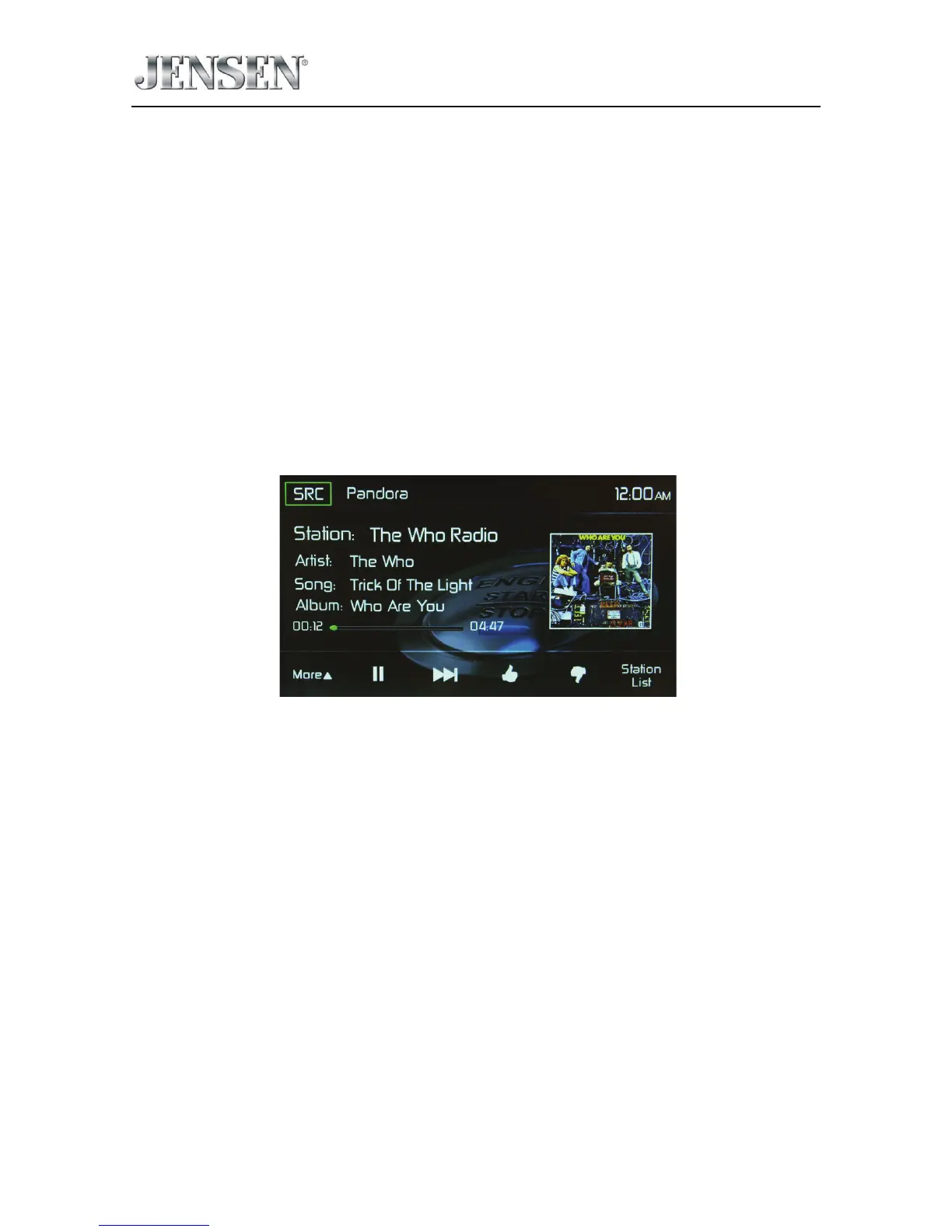
Pandora Radio TFT Display
The on-screen indicators and touch key areas for Pandora Radio functions are
outlined below.
Pandora Radio User Interface Screen
SRC Icon - Touch this icon to return to the Main Menu Screen.
Pandora - Displays the current source.
Time Display - This indicator displays the time as entered by the user in the
Settings Menu.
Pandora Radio Information Display - Displays the Pandora station, artist, song,
and album information.
Elapsed Time indicator - Displays the elapsed and total playing time of the
current track playing.
Pandora Preview Window - Displays album art, if available.
More S - Touch to display the bookmark sub-menu.



 To Next Page