EN
6 Firmware update
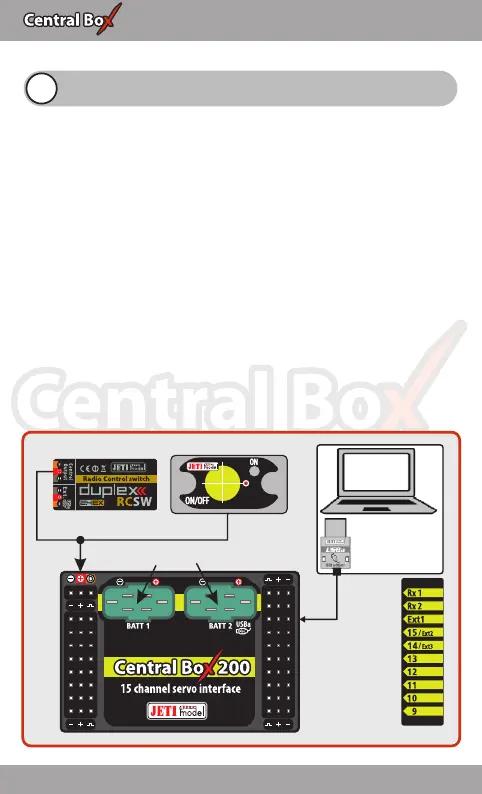
Either Central Box allows firmware update via a PC. The update is
performed using the JETI USBa. The procedure is as shown below:
O n t h e m a n u f a c t u r e r / d i s t r i b u t o r i n t e r n e t p a g e s
(www.jetimodel.com), under „Downloads“, you will find an
update program with the most recent firmware. Download it to
your PC.
1. Connect the Central Box output labeled Ext1 with the USB
adapter by means of interconnection cable.
2. Start the firmware update program for the Central Box on your
PC.
3. For Central Box 100: Connect the Central Box to the power
supply.
For Central Box 200: Switch on the Central Box using the
magnetic switch or the RC switch.
The USB-adapter driver installation instructions can be found in the
USB-adapter instruction booklet.
RC Switch Magnetic Switch
USBa
USB adapter
PC
Power supply
input voltage
4-14V
25 EN


 To Next Page