28 - 40
cube
18
CLICK!
CLICK!
CLICK!
CLICK!
SIFIRLA (5")
19
ON
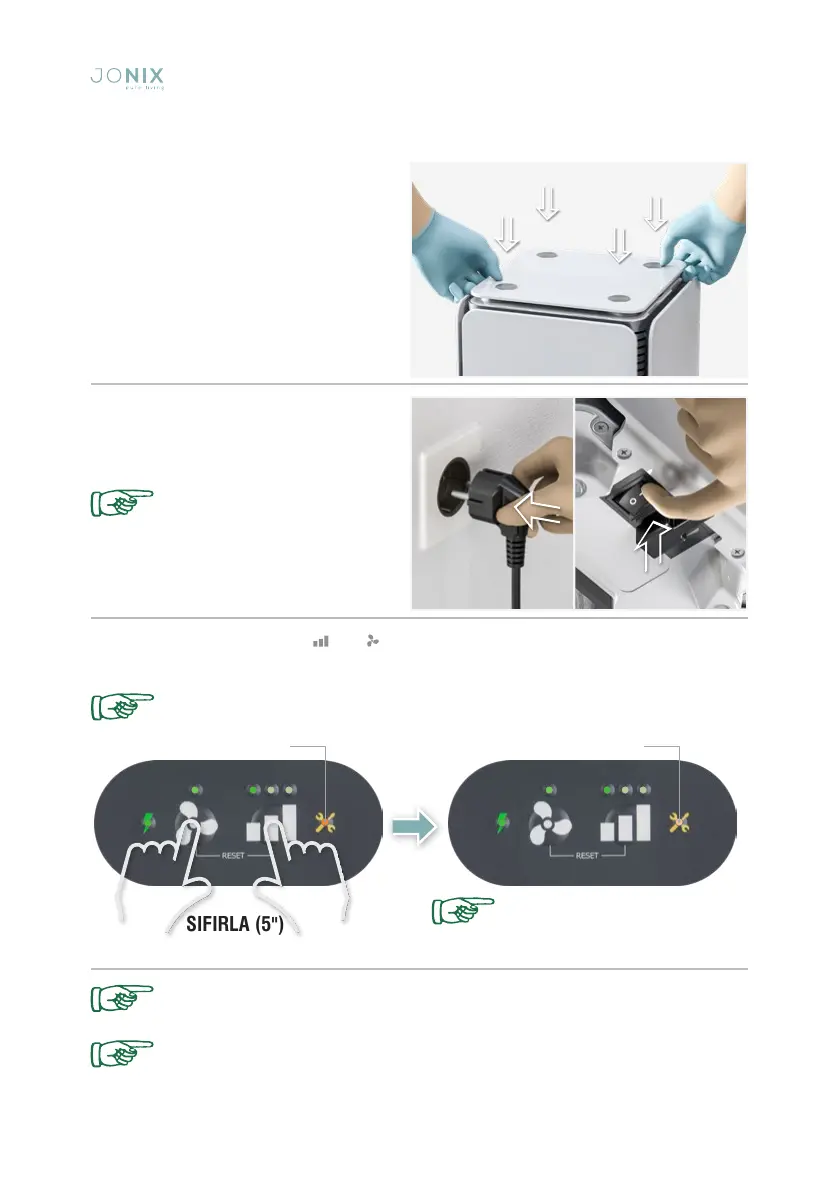
Fig. 18: Put the lid back on the device
by pushing it until the parts are locked in
place.
Fig. 19: Reconnect the plug. Switch the
ionising device on by switching the On/Off
button to I.
Fig. 20: To reset, keep the keys and pressed for 5" until maintenance LED will go off.
The presence of high voltage
inside the device is indicated
by the relevant light, located
on the front panel, when the
device is switched on.
The ionising tubes can be re-enabled only after the light has gone off.
Check that the device works,
you should hear a slight hissing
sound.
Failure to clean the ionizing tube when indicated by the device leads to a drop in
system performance.
In the event that a device malfunction persists, disconnect the device from the
mains and contact qualified staff authorized by the manufacturer.
Fig. 19
LED on LED off


 To Next Page