8
|
Arm-type Fully Automatic Blood Pressure Monitor DBP-6191
. UNIT OPERATION
. Battery Installation
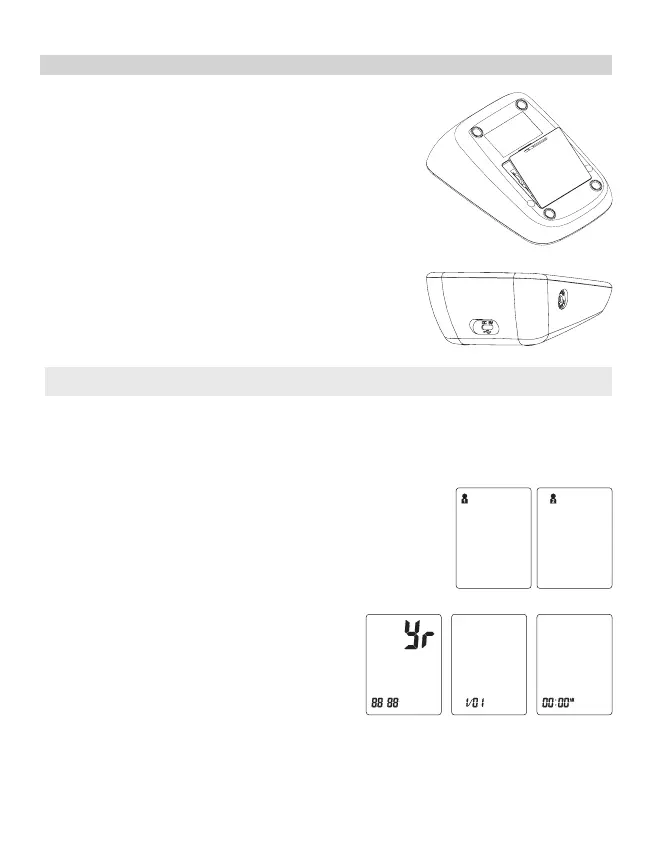
Slide battery cover off as indicated by arrow.
Install 3 new AAA alkaline batteries according to polarity.
Close battery cover.
. Medical AC Adapter
AC Adapter jack is on the back side of the monitor. Medical
AC adapter(DC 5.0 V, 1000 mA) can be used with the device
(recommended, not provided). The adapter connect pin
should be positive inside and negative outside with a 2.1
mm coaxial joint.
Do not use any other type of AC adapter as it may harm
the unit.
Note: Power supply is specified as part of ME EQUIPMENT.
. System Settings
With power off, press “START/STOP“ button about 3 seconds to activate System Settings.
The Memory Group icon flashes.
1. Select Memory Group
While in the System Setting mode, you may accumulate test
results into 2 different groups. This allows multiple users to
save individual test results (up to 150 memories per group.)
Press “MEM“ button to choose a group setting. Test results will
automatically store in each selected group.
2. Time/Date setting.
Press“START/STOP” button again to set the
Time/Date mode. Set the year first by adjusting
the “MEM” button.
Press“START/STOP” button again to confirm cur-
rent month. Continue setting the date, hour and
minute in the same way.


 To Next Page