|
9ENGLISH
Every time the “START/STOP” button is pressed, it will lock
in your selection and continue in succession (month, day,
hour, minute, 12/24 hours)
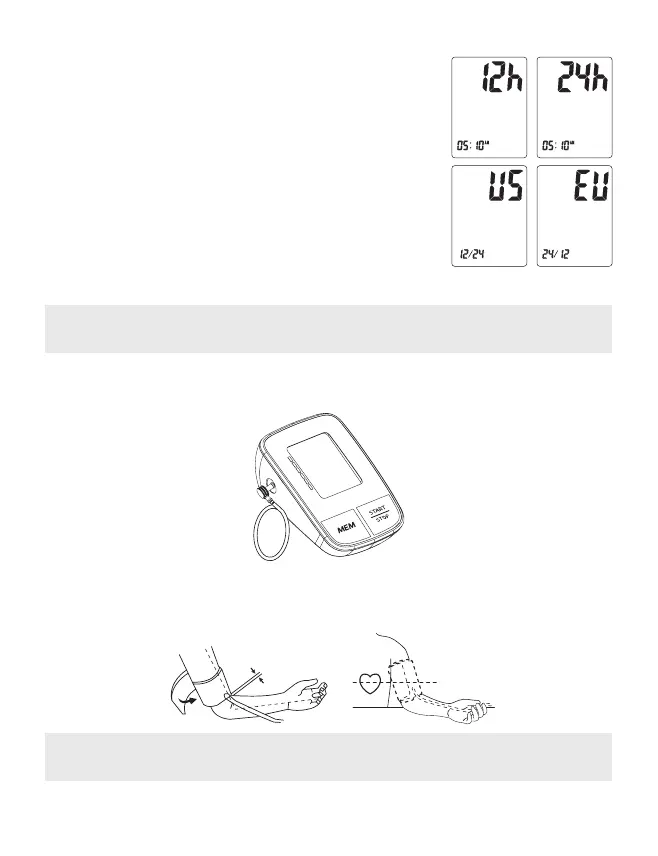
3. Time Format setting
Press “START/STOP”button again to set the time format setting
mode. Set the time format by adjusting the“MEM” button. EU
means European Time US means U.S Time.
4. Saved Settings
While in any setting mode, press and hold “START/STOP“ but-
ton to turn the unit off. All information will be saved.
Note: If unit is left on and not in use for 3 minutes, it will automatically save all infor-
mation and shut off.
. Applying the Arm Cuff
1. Insert the tip of the air hose into the cuff socket on the left side of the blood pressure
monitor.
2. Insert the end of the cuff under the metal cuff buckle with the Velcro facing outward.
3. Fasten cuff about 1–2cm (0.4–0.8’’) above the elbow joint. For best results apply cuff
to bare arm and keep level with heart while testing.
Note: Do not insert the end of the air hose into the hole located at the back of the
monitor. This opening is only for connecting the optional power supply.
1–2 cm (0,4–0,8'')


 To Next Page