12
|
Arm-type Fully Automatic Blood Pressure Monitor DBP-6191
. Memory Deletion
Memory for a selected group may be deleted while in Memory Check
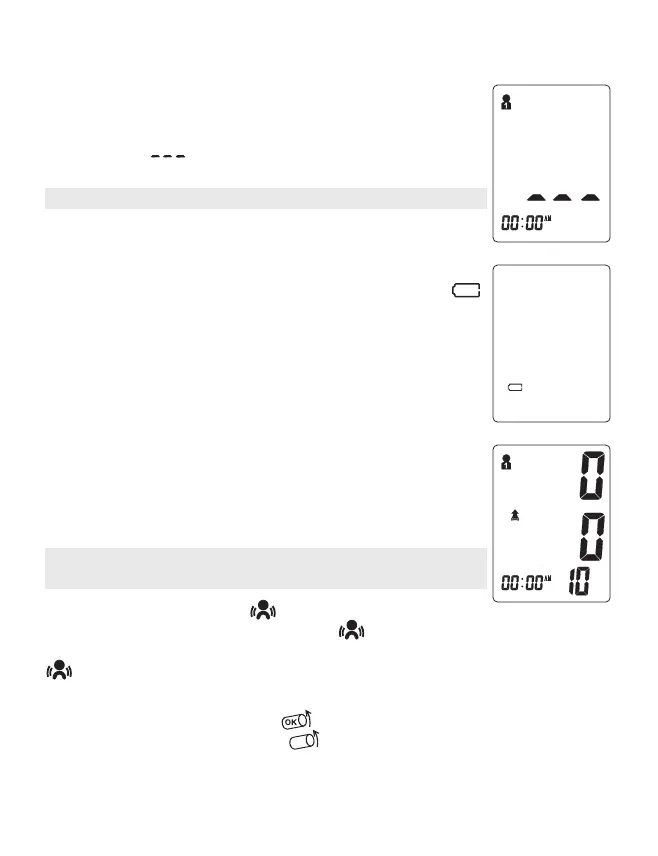
mode. Press and hold the “START/STOP“ button for approximately 3
seconds to delete all memory records from the selected group. LCD
screen display „ ”. Thentransfer into testing mode. Press the
“START/STOP “ button to turn the unit off.
Note: Memory cannot be recovered once it has been deleted.
. Low Battery Indicator
When the battery life runs out and you cannot inflate the cuff for
measurement the device will display the low battery symbol .
No memory loss will occur throughout this process.
. Static Pressure Measurement
In the power down state, press and hold the “ START/STOP” button,
and then install the batteries. Until the LCD screen is full, release
the “ START/STOP” button. When the LCD screen displays the double
zero, the bloodpressure meter is in static state. Software version is
displayed: 10 is a software version in the figure.
Note: Only Service personnel permitted to access to this mode, the
mode unavailable in normal use.
mmHg
. Arm Shake Indicator „ ”
If the arm moves during the measurement, „ ” the icon will be displayed, indicating
that this may lead to abnormal measurement results, and the LCD screen will be displayed
„ ” after the measurement is finished.
. Cuff loose Indicator
When starting the measurement, „ ”.will be displayed when the cuff is properly
wound. When the cuff is too loose, „ ”will be displayed. At this time, please wear
the cuff correctly and start measuring again.


 To Next Page