13
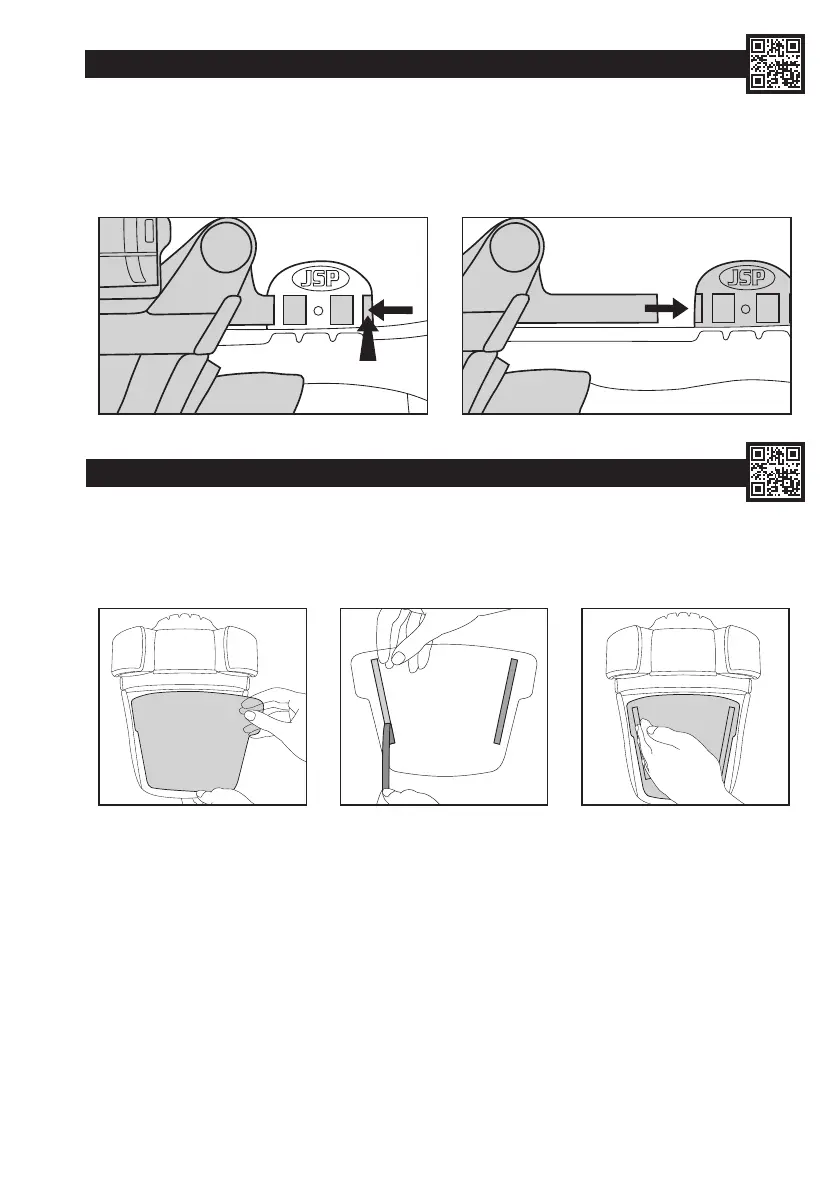
REMOVING & REPLACING THE DRIVE UNIT & VISOR CARRIER ASSEMBLY:
See Battery & Airow Check, Removing & Replacing Filters, Removing & Replacing the Visor and Removing & Replacing the
Face Seal Skirt sections to remove the battery cable, lters, visor and skirt.
1. To release the visor carrier, press the rear of the visor side arms on both sides of the helmet towards the helmet shell and slide forwards.
2. When replacing the drive unit & visor carrier assembly, simply slide the visor side arms back into the visor carrier adaptors on both sides of
the helmet. Dispose of used drive unit & visor carrier assembly in accordance with local legislation.
1
2
1 2 3
REMOVING & REPLACING THE VISOR COVER:
1. Peel used visor cover from visor. Dispose of used visor cover in accordance with local legislation.
2. Peel backing tape from either side of the new visor cover.
3. Position visor cover centrally, using the side of the hand, smooth visor cover on to visor and press adhesive tape in place. Repeat for the
other side.


 To Next Page
 Loading...