18
ACCESSORIES:
Hearing protection can be added to the PowerCap
®
Innity
®
by tting the Sonis
®
helmet mounted ear defenders. The Sonis
®
range of helmet
mounted ear defenders and the PowerCap
®
Innity
®
have been designed to be compatible. Use of non-compatible hearing protection may
reduce the performance of PowerCap
®
Innity
®
. Contact JSP Ltd to check compatibility of other hearing protection/accessories.
Fitting the Sonis
®
:
Remove the PowerCap
®
Innity
®
visor complete with the PowerCap
®
Innity
®
drive unit & visor carrier assembly. Unhook the sealing
skirt from the harness (see Removing & Replacing the Visor) and disconnect the power cable from the battery box (see Battery and Airow
Check). To remove the visor carrier, press the rear of the visor side arms towards the helmet shell and push forwards. (see Removing &
Replacing the Drive Unit and Visor Carrier Assembly).
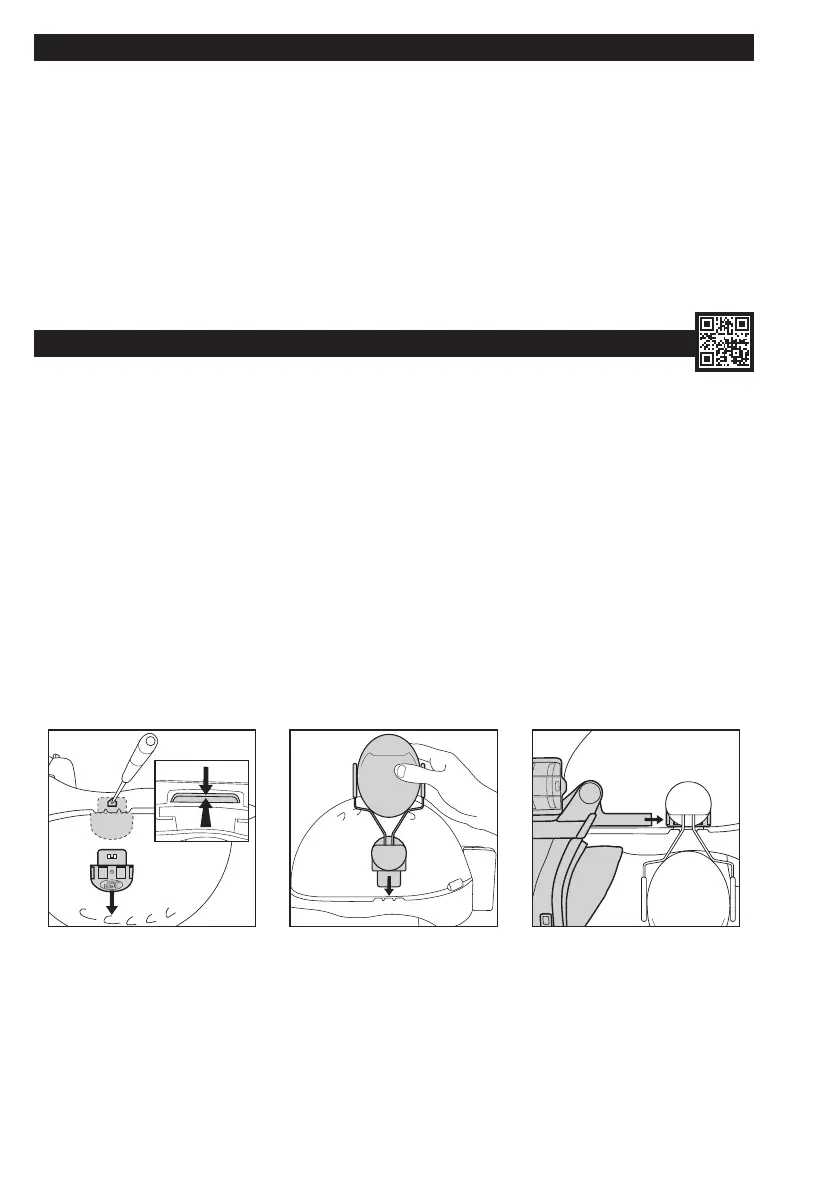
1. Remove the visor carrier adaptors from the helmet shell. Inverting the helmet, push the adaptor blade towards the outside of the helmet and then
down. Insert a ball point pen or similar into the hole in the side of the helmet shell, at the same time press the adaptor blade whilst pulling
from shell as shown.
2. Fit the ear defender as the instructions supplied with the ear defender of your choice.
3. Once the ear defenders are tted, slide the visor side arms into the slot on the ear defender helmet adaptor.
• Ensure that the face seal skirt is correctly attached as stated in Removing & Replacing the Visor.
• When donning the helmet, adjust the ear defenders as stated in user instructions supplied with the ear defender. Ensure that both the ear
defender and the PowerCap
®
Innity
®
are correctly adjusted and comfortable. Failure to do so may result in the levels of protection offered
by either or both products being severely reduced.
1 2 3
‘BLADE’
CLEANING:
The product should only be cleaned with a cloth lightly dampened with a mild detergent and non-agressive solution. Care must be taken to avoid
any liquids entering the motor/fan assembly or the lters. The elements of PowerCap
®
Innity
®
should be cleaned as detailed below:-
Pre-lter cover – wipe clean using a soft cloth, run under a tap and allow to dry.
Filter Case – remove and wipe down with a damp cloth.
Visor – refrain from rub rinsing, simply rinse and pat dry with a non abrasive cloth.
Helmet – wipe down with a damp cloth.
Face Seal Skirt – machine or hand wash in mild detergent at 30°C. Leave to dry naturally (Do NOT dry on a heat source or hang by skirt tabs
when wet). Do not allow water or other liquids to enter the inside of the drive unit or lters. Do not use solvents or abrasive cleaners on any part of
PowerCap
®
Innity
®
.


 To Next Page
 Loading...