77
3) Selection of communication method
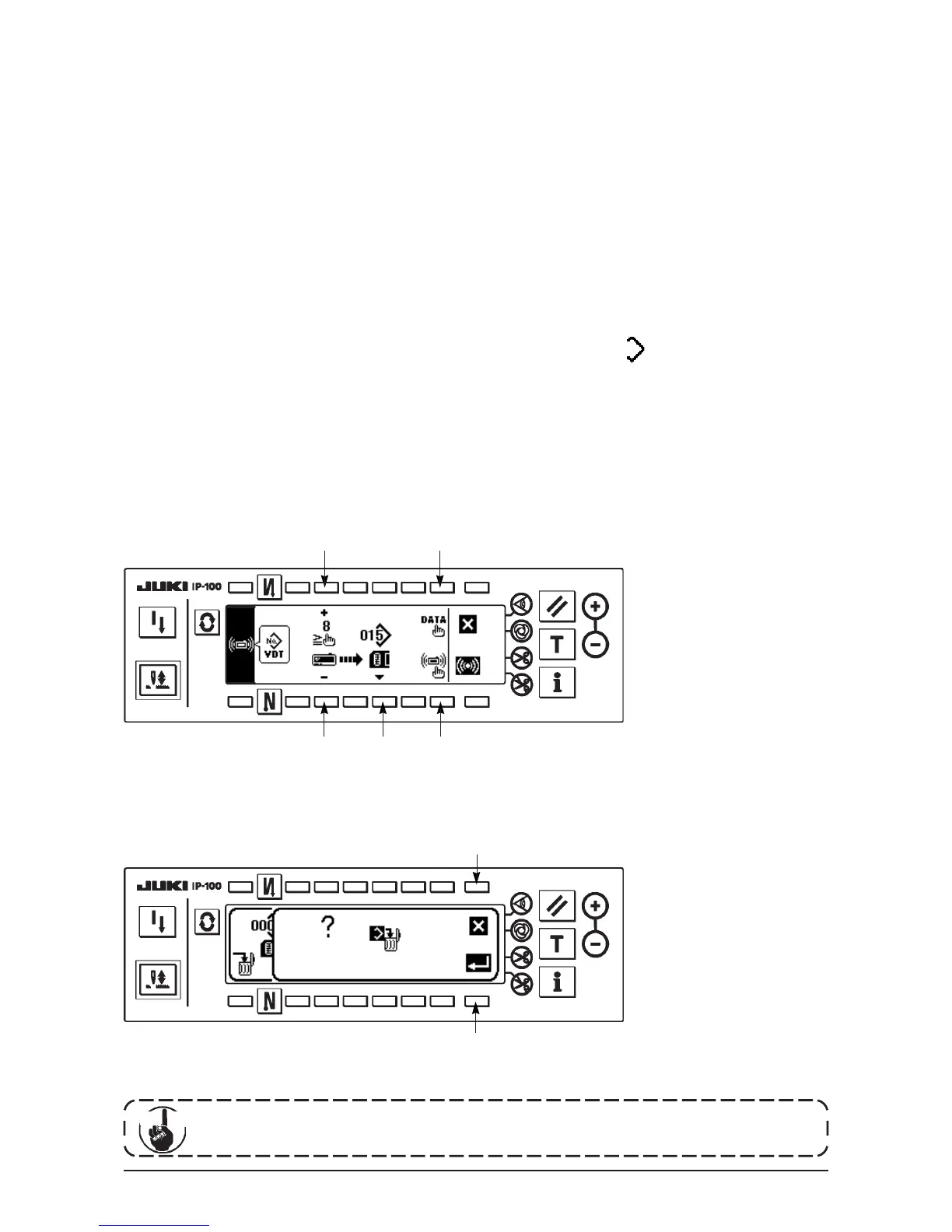
Press 2 in the communication setting screen to display the communication method setting screen.
[Explanation of the pictograph]
1 : Download from the smart media
2 : Download from SU-1
3 : Upload to the smart media
4 : Upload to SU-1
Press 3 to select the upload to the smart media. Then press 5 to determine.
4) Setting of the custom pattern No.
Press 4 and 5 in the communication setting screen to set the custom pattern No.
5) Selection of the file No. of the smart media
Press 3 in the communication setting screen to display the file No. of the smart media input screen.
Input the file No. of the smart media. The inputted file No. is displayed in . After inputting the file No.,
determine it with 1.
6) Start of the upload
When all setting procedures have been completed, press 6 in the communication setting screen to start
uploading.
When the screen returns to the communication setting screen after display of the during communication
screen, communication is completed.
■Communication setting screen
[How to delete the file of the smart media]
Press switch 3 after selecting the No. you desire to delete in the file No. of the smart media input screen, and
the screen moves to the deletion confirmation screen.
4 1
5 3 2
Press 1 and the deletion is discontinued. Then the screen returns to the file No. input screen. Press 2 and the
deletion is executed. Then the screen returns to the file No. input screen.
■Deletion confirmation screen
1
2
The deleted file is not restored. Be very careful when executing the deletion.
Cau tion












 To Next Page