Menu functions
42
Menu level 1
Analog inputs/outputs Page 68
Recorder output – CHANNEL 1, 2, 3
EPROG – External programmer input
EX-STBY - STAND-BY input
ALARM - output
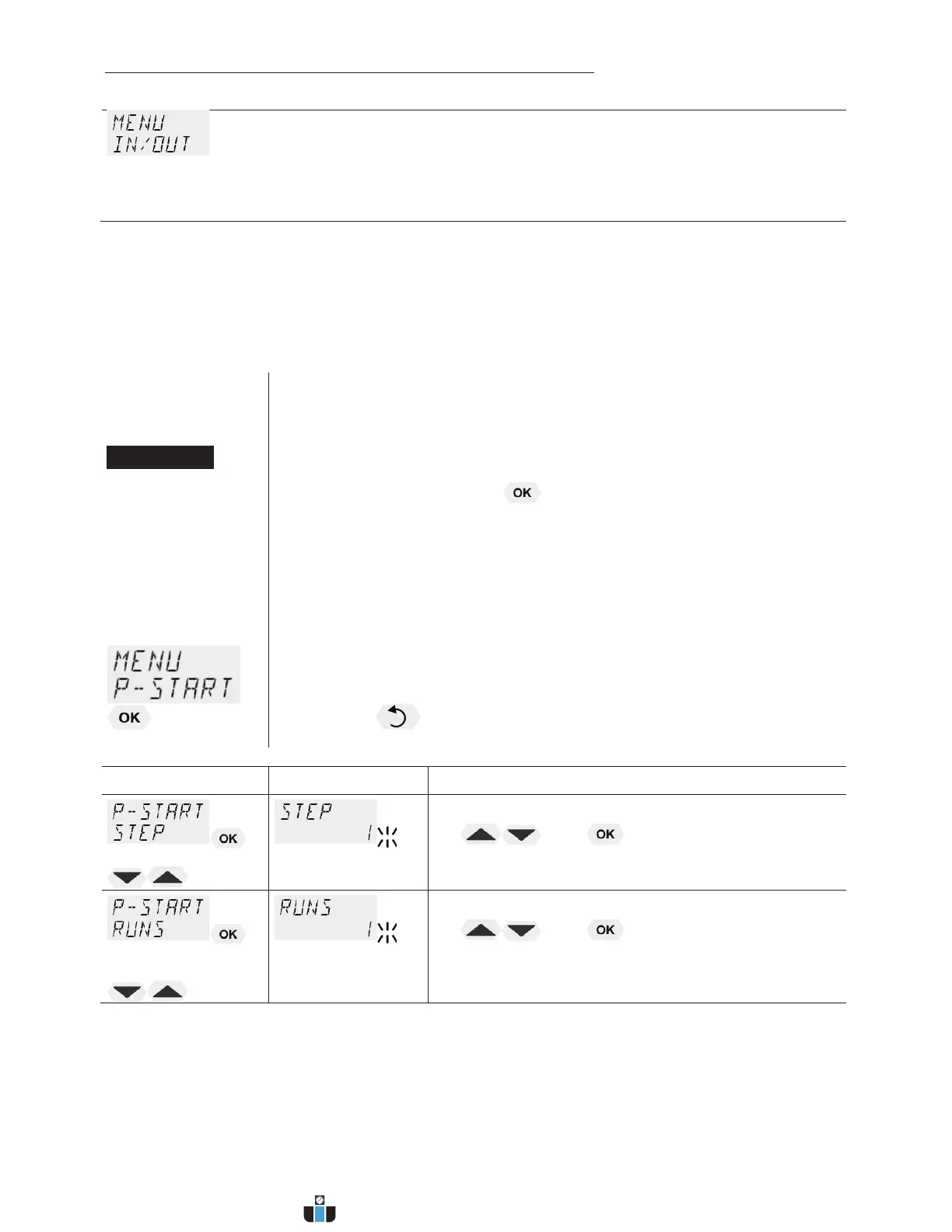
9.1. MENU PROGRAM – START
Start-Menu
This menu will start a previously set program.
L Requirements:
1. Create a program. (refer to next chapter)
2. Return to the Start-MENU and confirm the desired setting of each
MENU item with the key
3. Set a start time (>TIME< >DATE< >YEAR<) if the program is to be
started by the internal timer.
Menu level 1
Ð
> STEP< Program start at section 1 … 10
> RUNS < Number of repetitions 1 ... 99
> END< Status at end of program (STDBY/SETPNT)
Standby or last setpoint
> GO < Time of start (NOW/TIMER)
L Press the key if a parameter is to be retained.
Correction function for parameters or values (prior to OK)
Level 2 Parameter level
Î
x Set program step with
and
example: STEP 1
Î
x Set number of runs with
and
example: 1 run
www.calcert.com sales@calcert.com1.888.610.7664
0
5
10
15
20
25
30



 To Next Page