78 Mesa Rugged Notepad Owner’s Manual
General Tab
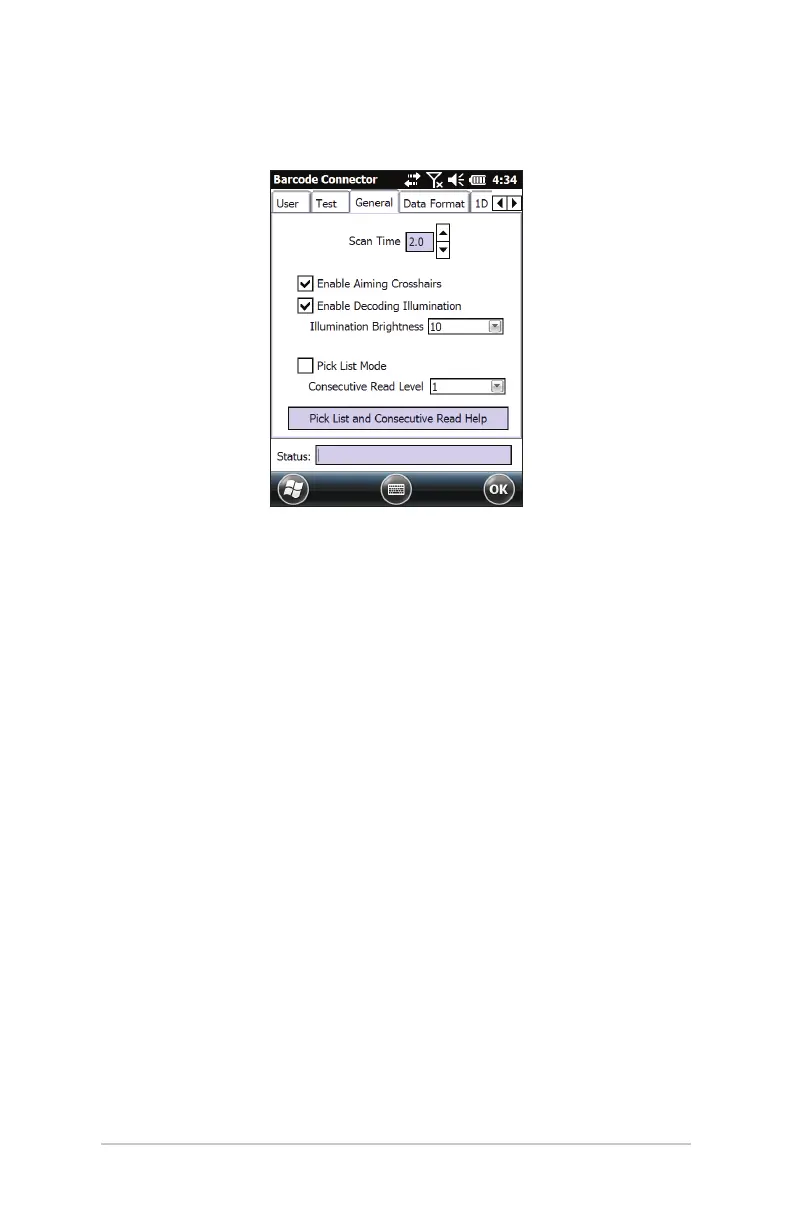
The General tab has the following functions:
Scan Time – Adjust the scan time which is the duration of
time before the scanner times out.
Enable/Disable Aiming Crosshairs.
Enable/Disable Decoding Illumination (red light).
Illumination Brightness – You can adjust the illumination
brightness, but for performance reasons, it is recommended
you leave this at the maximum value of 10.
Pick List Mode – Enable this mode if barcodes are close
together. The scanner only decodes barcodes aligned
directly under the center of the aiming crosshairs. Disable
this mode if only one barcode is viewable. The aiming
crosshairs do not have to line up directly on the barcode
in order for the scanner to read it. Just aim the scanner in
the general area where the barcode is located. This can be
helpful in situations where it might be dicult to precisely
aim the scanner, such as in locations with bright sunlight.
Read the Help on this topic for more information.
Consecutive Read Level – Select how many successful
consecutive reads the barcode must get before being
decoded. Read the Help on this topic for more information.



 To Next Page