(No.PA045<Rev.001>)1-17
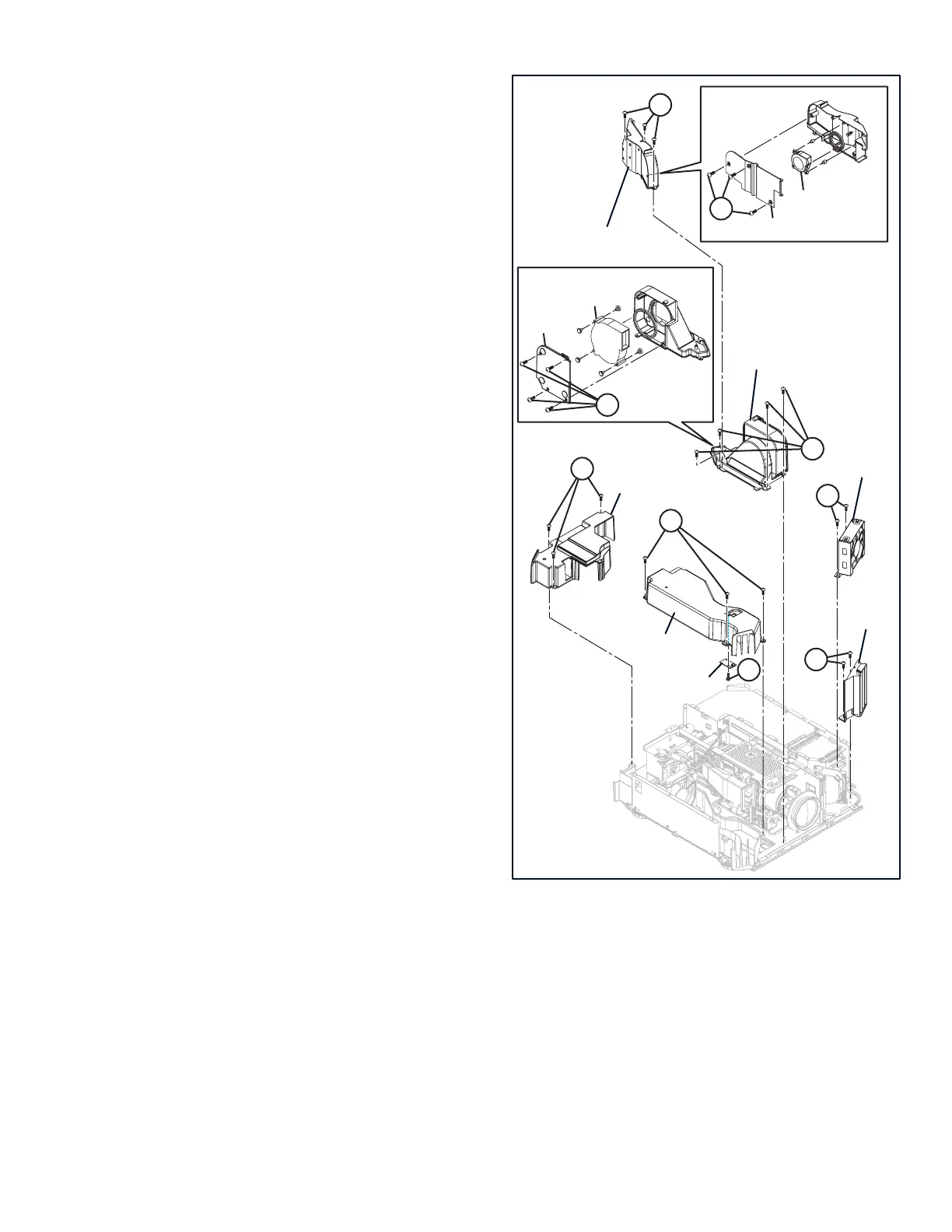
3.2.13 REMOVING THE BLIND INTAKE (Fig.3-3)
(1) Remove the 2 screws [A], then remove the BLIND IN-
TAKE.
3.2.14 REMOVING THE INTAKE FAN (Fig.3-3)
(1) Remove the 2 screws [B], then remove the INTAKE FAN.
3.2.15 REMOVING THE PCS COOLING FAN [X75R/XC7800R/
X95R/XC9800R] (Fig.3-3)
(1) Remove the 3 screws [C], then remove the FAN UNIT-1.
(2) Remove the 3 screws [D], then remove the IRIS DUCT
COVER.
(3) Remove the PCS COOLING FAN.
3.2.16 REMOVING THE DEVICE COOLING FAN (Fig.3-3)
(1) Remove the 4 screws [E], then remove the FAN UNIT-2.
(2) Remove the 4 screws [F], then remove the OE COVER.
(3) Remove the DEVICE COOLING FAN.
3.2.17 REMOVING THE EXHAUST DUCT COVER (Fig.3-3)
(1) Remove the 3 screws [G], then remove the EXHAUST
DUCT COVER.
3.2.18 REMOVING THE TOP DUCT (Fig.3-3)
(1) Remove the 3 screws [H], then remove the TOP DUCT.
3.2.19 REMOVING THE TEMP SENSOR PWB (Fig.3-3)
(1) Remove the 1 screw [J], then remove the TEMP SENSOR
PWB.
Fig.3-3
3.2.20 REMOVING THE LAMP COOLING FAN (Fig.3-4)
(1) Remove the 2 hooks [A], then remove the LAMP COOL-
ING FAN.
3.2.21 REMOVING THE EXHAUST DUCT FAN (Fig.3-4)
(1) Remove the 4 hooks [B], then remove the EXHAUST
DUCT FAN.
3.2.22 REMOVING THE OPTICAL BLOCK (Fig.3-4)
(1) Remove the 3 screws [C], then remove the TEMP SEN-
SOR.
(2) Remove the 3 screws [D], then remove the CONNECTOR
BRACKET and CONNECTOR.
(3) Remove the 3 screws [E], then remove the OPTICAL
BLOCK.
3.2.23 REMOVING THE MOTOR PWB (Fig.3-4)
(1) Remove the 4 screws [F], then remove the MOTOR PWB.
[X75R/XC7800R/X95R/XC9800R]
AA
JJ
BB
CC
DD
HH
GG
EE
FF
EXHAUST DUCT COVER
TOP DUCT
FAN UNIT-1
FAN UNIT-2
BLIND INTAKE
TEMP SENSOR PWB
IRIS DUCT COVER
PCS COOLING FAN
OE COVER
DEVICE COOLING FAN
INTAKE FAN


 To Next Page