1-18 (No.PA045<Rev.001>)
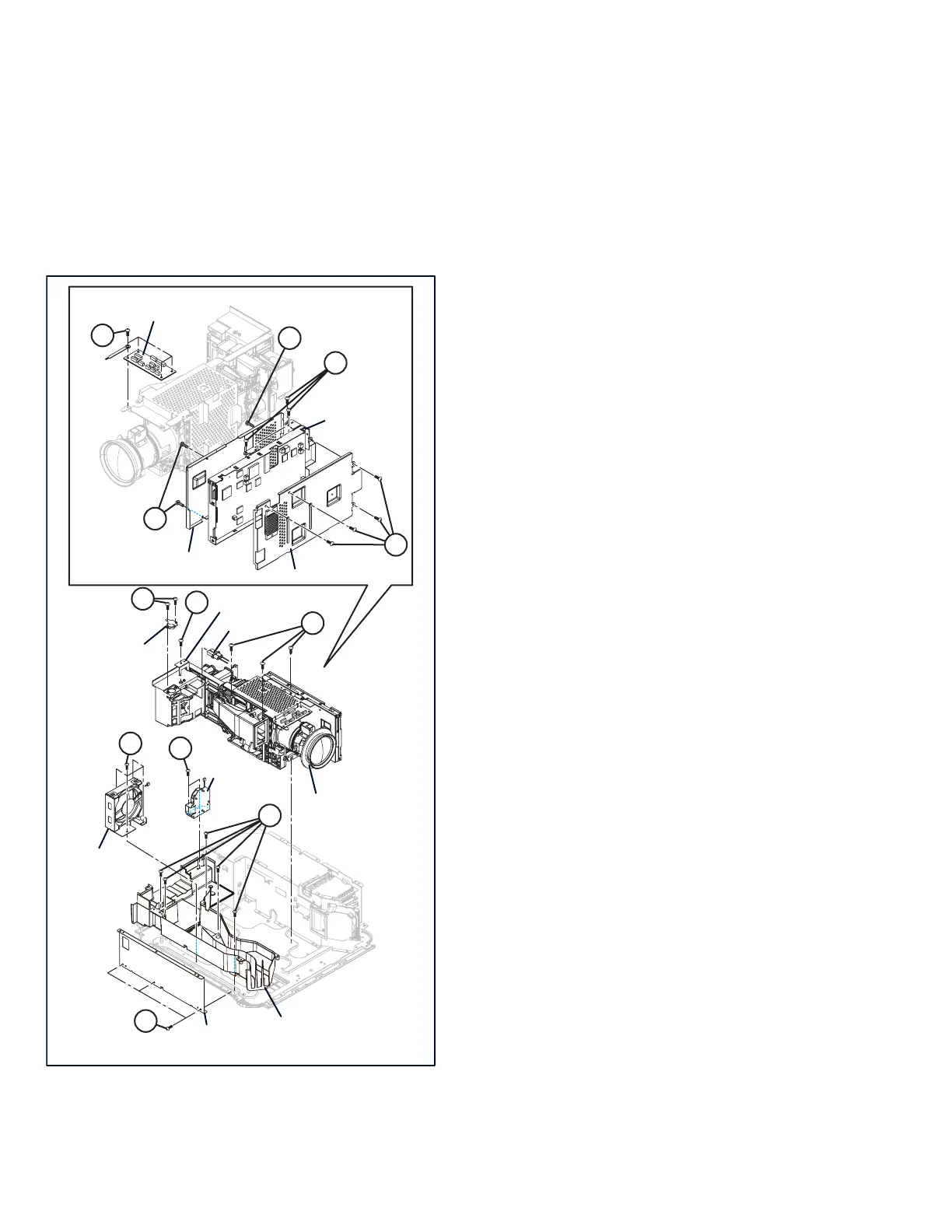
3.2.24 REMOVING THE DD PWB (Fig.3-4)
(1) Remove the 4 screws [G], then remove the DD SHIELD
CASE.
(2) Remove the 4 screws [H], then remove the DD SHIELD
TOP.
(3) Remove the 4 screws [J], then remove the DD PWB.
3.2.25 REMOVING THE BOTTOM DUCT (Fig.3-4)
(1) Remove the 5 screws [K], then remove the BOTTOM
DUCT.
3.2.26 REMOVING THE SHIELD LEFT (Fig.3-4)
(1) Remove the 3 screws [L], then remove the SHIELD LEFT.
Fig.3-4
3.2.27 REMOVING THE LD PWB (Fig.3-5)
(1) Remove the 3 screws [A], then remove the LD PWB.
3.2.28 REMOVING THE PROCESSOR PWB (Fig.3-5)
(1) Remove the 6 screws [B], then remove the PROCESSOR
PWB.
3.2.29 REMOVING THE DD COOLING FAN (Fig.3-5)
(1) Remove the 3 screws [C], then remove the DD COOLING
FAN UNIT.
(2) Remove the 3 screws [D], then remove the DD COOLING
FAN.
3.2.30 REMOVING THE DD SUB PWB (Fig.3-5)
(1) Remove the 4 screws [E], then remove the DD SUB PWB.
3.2.31 REMOVING THE MD PWB (Fig.3-5)
(1) Remove the 4 screws [F], then remove the BRACKET.
(2) Remove the 8 screws [G], then remove the MD SHIELD
TOP.
(3) Remove the 6 screws [H], then remove the MD PWB (TOP/
BOTTOM).
3.2.32 REMOVING THE CW PWB (Fig.3-5)
(1) Remove the 4 screws [J], then remove the CW PWB.
3.2.33 REMOVING THE SHIELD RIGHT (Fig.3-5)
(1) Remove the 6 screws [H], then remove the SHIELD
RIGHT.
EXHAUST DUCT FAN
LAMP COOLING FAN
MOTOR PWB
DD SHIELD TOP
DD SHIELD BOTTOM
TEMP SENSOR
CONNECTOR BRACKET
CONNECTOR
DD PWB
BOTTOM DUCT
OPTICAL BLOCK
SHIELD LEFT
AA
JJ
CC
FF
JJ
LL
BB
DD
EE
GG
KK
HH


 To Next Page