Recording at a Fixed Interval and Playing
Back Repeatedly
After
recording for a specified duration, this unit automatically plays back the
scene and then repeats the recording process and the playback process
over and over again. This can be used to check a sports form or dance form.
The recorded scene can also be deleted automatically depending on the
setting.
1
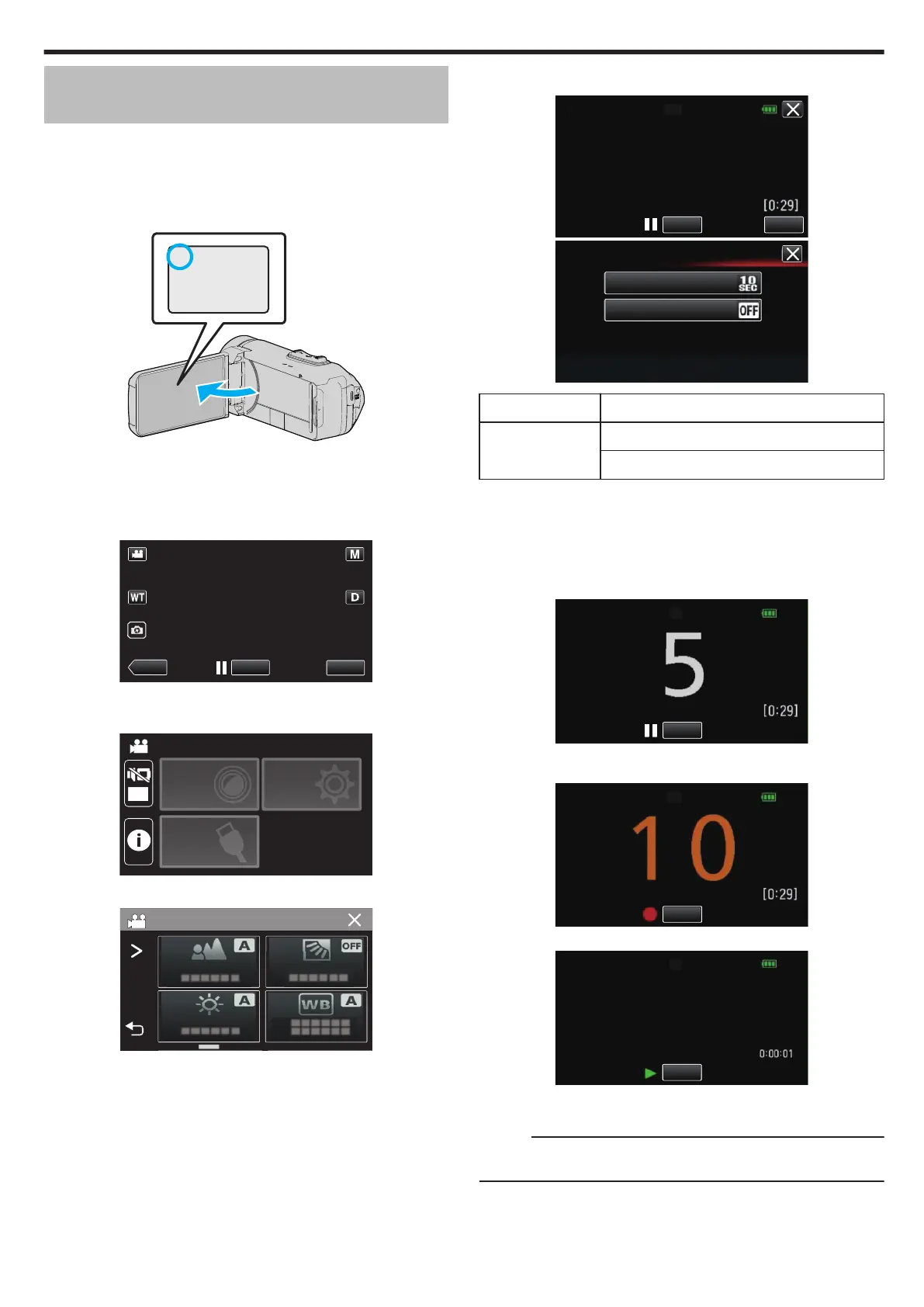
Open the LCD monitor.
.
0
Check if the recording mode is A.
0
If
the mode is B still image, tap B on the recording screen to display
the mode switching screen.
Tap A to switch the mode to video.
2
Tap “MENU”.
.
0
The top menu appears.
3
Tap “RECORD SETTING”.
.
OFF
TOP MENU
SETUP
CONNECTION
SETTING
RECORD
SETTINGS
4
Tap “SELF-CHECK REC/PLAY”.
.
0
If the icon is not displayed on the screen, tap 1 to scroll the screen.
0
Tap L to exit the menu.
0
Tap J to return to the previous screen.
5
Tap “SET”.
.
SELF-CHECK REC/PLAY
5(&25',1*7,0(㸸6(&
$872'(/(7(㸸2))
START
SET
.
SET
RECORDING TIME
AUTO DELETE
RECORDING TIME 10 to 40 seconds (Can be set in 5-second interval.)
AUTO DELETE Off: The recorded video is retained.
On: The recorded video is deleted.
0
Tap L to return to the previous screen.
0
This operation is not necessary if you do not intend to change the
current setting displayed.
6
Tap “START”.
0
There is a 5 second countdown before recording starts at the
beginning of the operation only.
.
0
When the recording starts, the color of the number changes and the
remaining number of seconds for recording is displayed.
.
0
When recording is complete, playback starts automatically.
.
0
When playback ends, the next recording starts automatically.
0
Tap “STOP” to exit “SELF-CHECK REC/PLAY”.
Memo :
0
The
START/STOP button cannot be used during the “SELF-CHECK REC/
PLAY” operation.
Recording
45








 To Next Page