Operation Method
o
Operation on this camera
Memo :
0
Prior to use this function, a smartphone application needs to be installed
on the smartphone.
“Installing Smartphone Applications” (A p. 122)
1
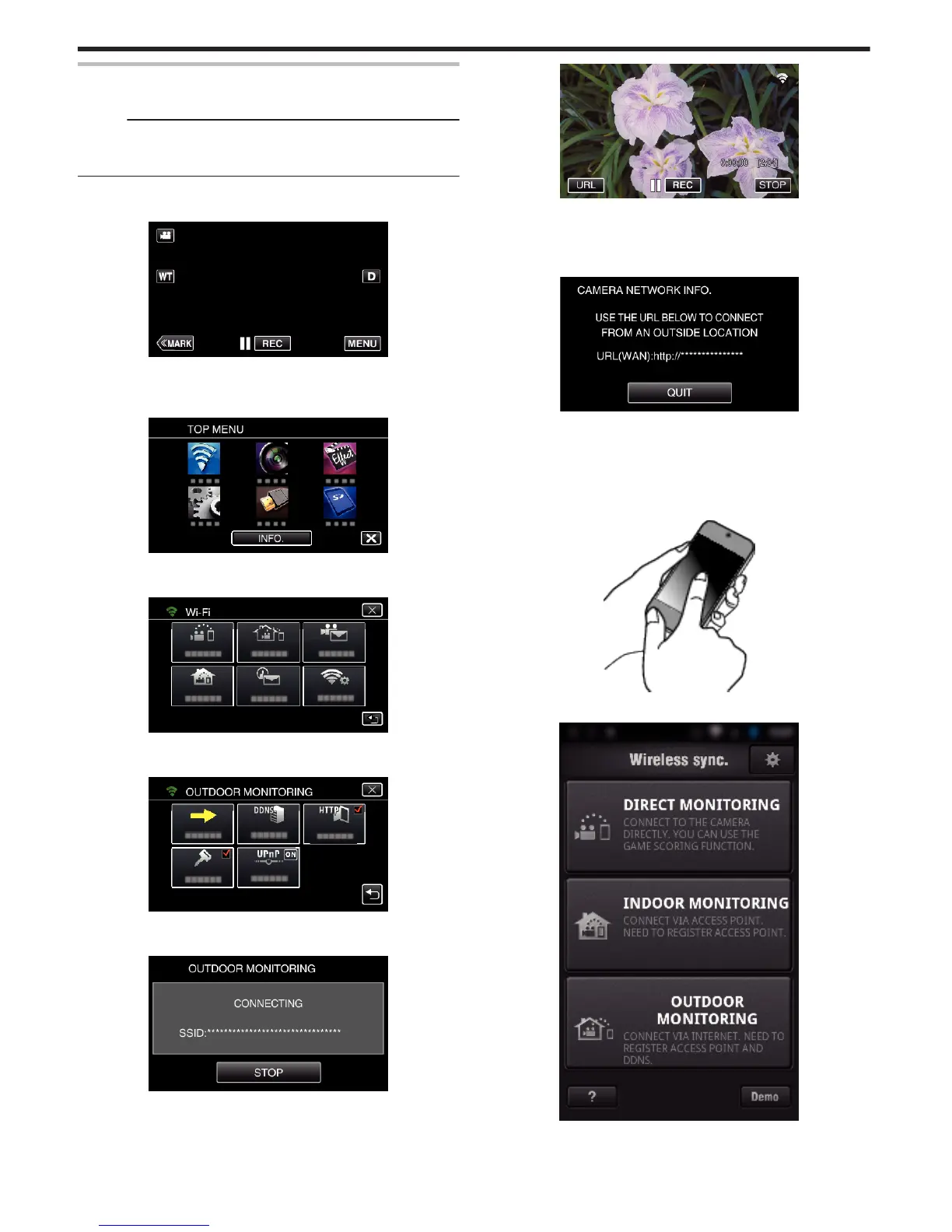
Tap “MENU”.
(Operation on this camera)
.
0
The top menu appears.
2
Tap the “Wi-Fi” (
Q
) icon.
(Operation on this camera)
.
3
Tap “OUTDOOR MONITORING” (M).
(Operation on this camera)
.
4
Tap “START” (I).
(Operation on this camera)
.
5
Start making a connection.
(Operation on this camera)
.
0
Name (SSID) of the access point (wireless LAN router) in connection
is displayed.
6
The following is displayed when the camera is connected to the access
point.
.
0
The URL (WAN) for the smartphone to connect to appears.
(Does not appear if DDNS is not set or set incorrectly.)
0
“LUPnP” is displayed when UPnP cannot be used.
7
Check the URL (WAN).
.
0
After checking the URL, tap “QUIT” to return to the previous screen.
0
“LUPnP” is displayed when UPnP cannot be used.
o
Operation on the smartphone
1
Start “Wireless sync.” on the smartphone after setting “OUTDOOR
MONITORING”.
.
2
Tap “OUTDOOR MONITORING”.
.
3
Log in with your username and password.
(if authentication cannot be achieved)
Using Wi-Fi
96



 To Next Page
 Loading...