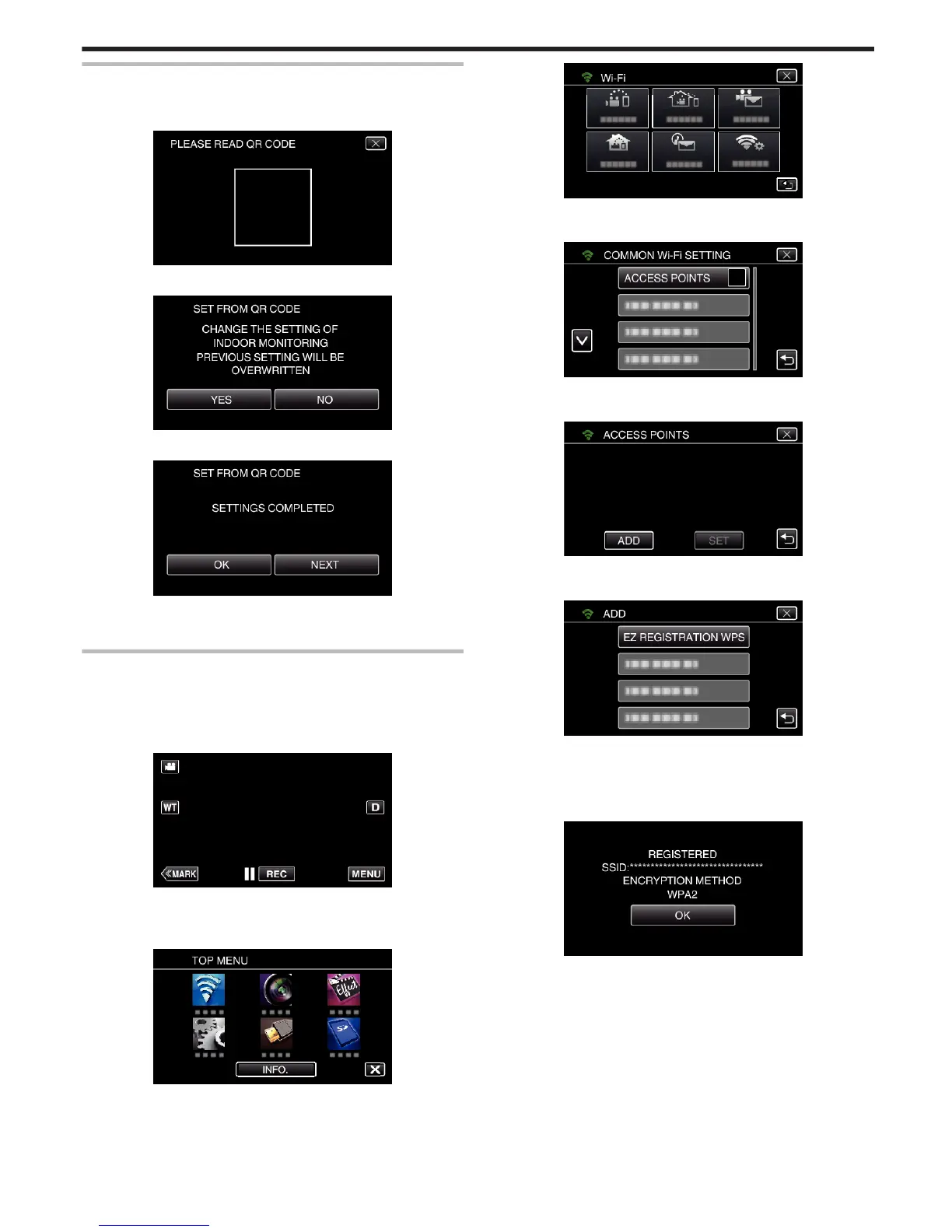
Read a QR code.
1
Read a QR code.
(Operation on this camera)
.
2
Tap “YES”.
.
3
Tap “OK”.
.
0
Tap “NEXT” to return to the screen to read the QR code.
0
Set contents are saved.
Registering the access points (wireless LAN router) to this
unit
o
Wi-Fi Protected Setup (WPS) Registration
1
Tap “MENU”.
(Operation on this camera)
.
0
The top menu appears.
2
Tap the “Wi-Fi” (
Q
) icon.
(Operation on this camera)
.
3
Tap “COMMON Wi-Fi SETTING”.
(Operation on this camera)
.
4
Tap “ACCESS POINTS”.
(Operation on this camera)
.
5
Tap “ADD”.
(Operation on this camera)
.
6
Tap “EZ REGISTRATION WPS”.
(Operation on this camera)
.
7
Activate WPS of the access point (wireless LAN router) within 2 minutes.
0
To activate WPS, refer to the instruction manual of the device in use.
8
After registration is complete, tap “OK” on the camera’s screen.
(Operation on this camera)
.
Using Wi-Fi by Creating a QR Code
153


 To Next Page
 Loading...