12 EN
Master Page: Left
GR-DVX707EG_09-17.fm Page 12
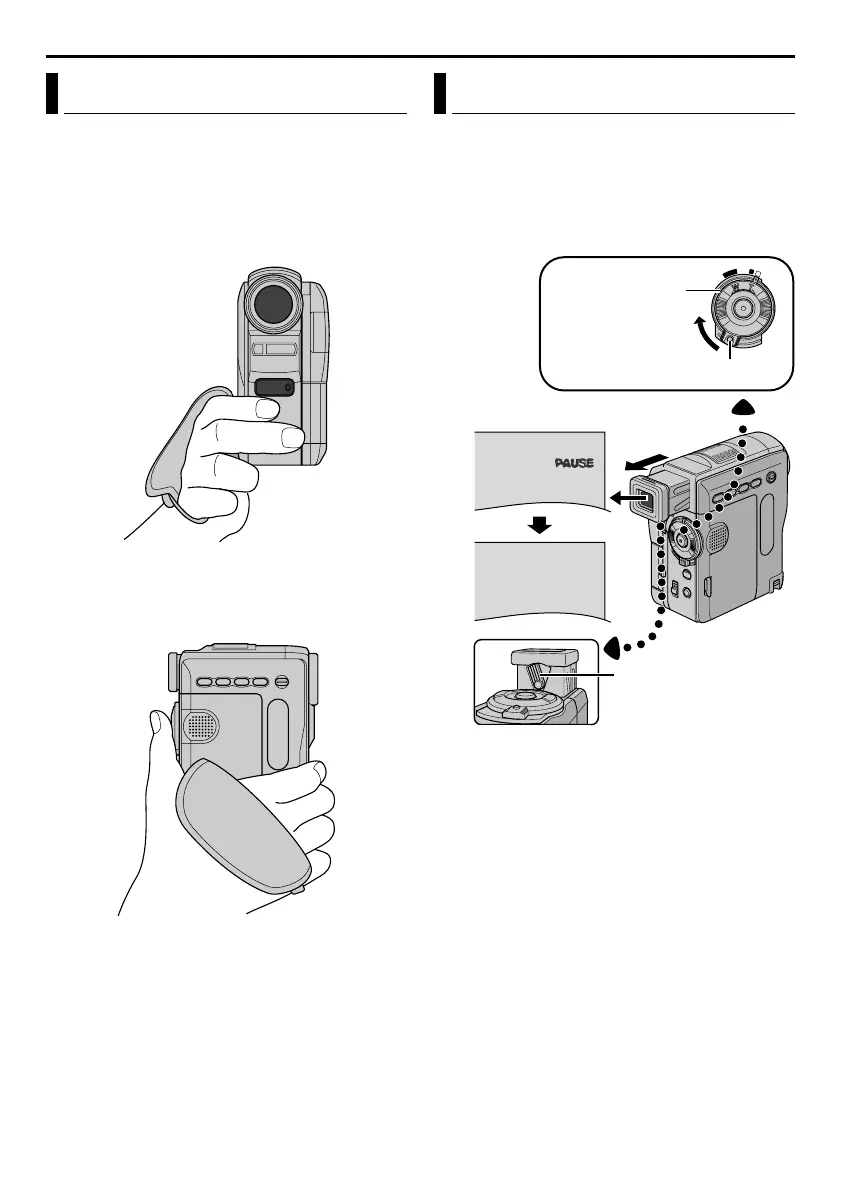
1 Loosen the belt.
2 Pass your right hand through the loop and grasp
the grip.
3 Hung your third and little fingers on the finger
support so that the tally lamp or the flash
(GR-DVX707/507 only) is unobstructed with
your fingers.
4 Adjust your thumb and fingers through the grip to
easily operate the Recording Start/Stop Button,
Power Switch and Power Zoom Ring. Be sure to
tighten the belt to your preference.
1 Set the Power Switch to “A” or “M” while
pressing down the Lock Button located on the
switch.
2 Pull out the viewfinder fully.
3 Turn the Dioptre Adjustment Control until the
indications in the viewfinder are clearly focused.
Grip Adjustment Viewfinder Adjustment
OFF
PLAY
A
M
Power Switch
Lock Button
Dioptre Adjustment
Control
GETTING STARTED (cont.)
GR-DVX707EG_09-17.fm Page 12 Thursday, January 31, 2002 12:54 PM


 To Next Page