24 EN
Master Page: Left
GR-DVX707EG_18-25.fm Page 24
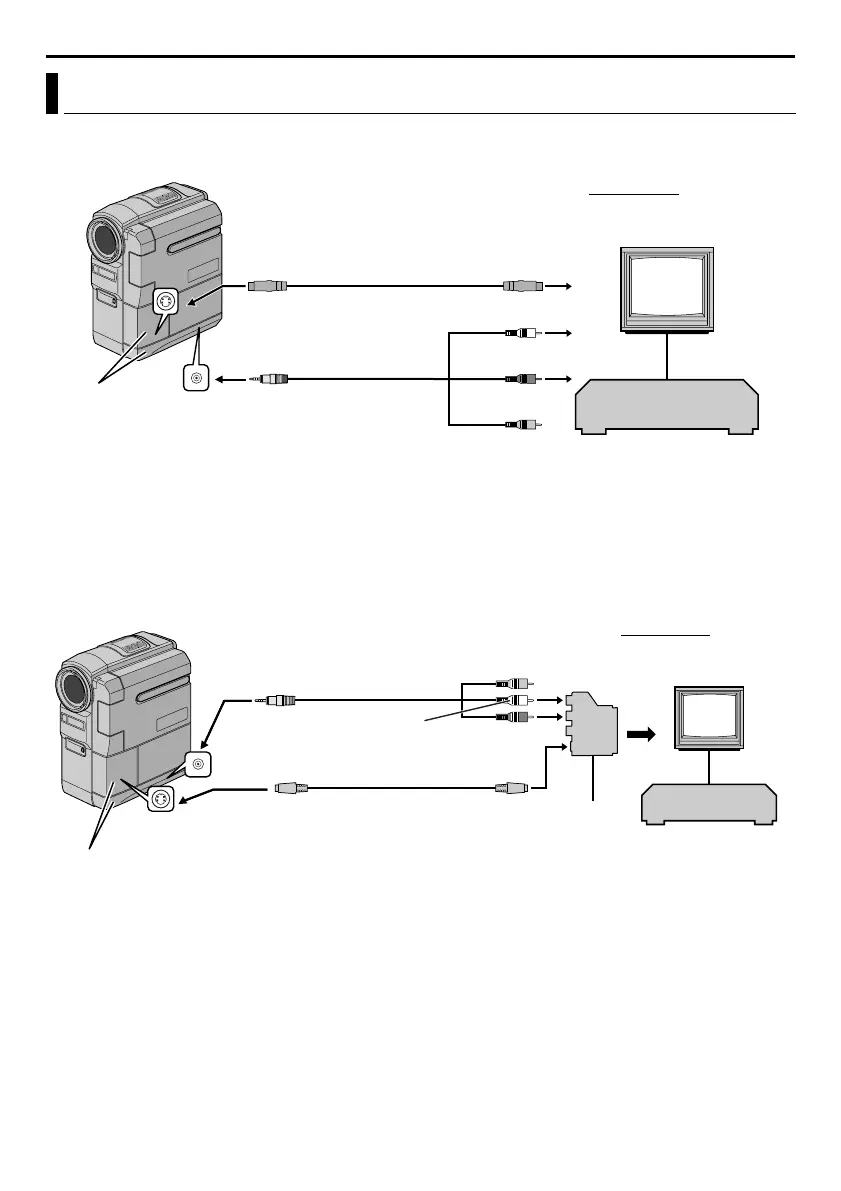
A. Use the provided Audio/Video cable and optional S-Video cable.
* The Audio cable is not required for watching still images only.
** Connect when an S-Video cable is not used.
*** When connecting the cables, open these covers.
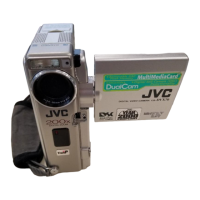
B. If your TV/VCR has a 21-pin connector
Use the provided Cable Adapter.
* The Audio cable is not required for watching still images only.
** Connect when an S-Video cable is not used.
*** When connecting the cables, open these covers.
NOTE:
Set the video out select switch of the cable adapter as required:
Y/C: When connecting to a TV or VCR which accepts Y/C signals and uses an S-Video cable.
CVBS: When connecting to a TV or VCR which does not accept Y/C signals and uses an audio/video cable.
Connections To A TV Or VCR
TV
White to AUDIO L IN*
Red to AUDIO R IN*
VCR
To AV
Audio/Video cable [mini-
plug to RCA plug]
(provided)
Connector
Covers***
To S-VI DEO
Yellow to VIDEO
IN**
To S-VIDEO IN
S-Video cable
(optional)
To TV or VCR
To TV or VCR
TV
White to AUDIO L IN*
Yellow**
VCR
To S-VI DEO
Red to AUDIO R IN*
To S-IN
Audio/Video cable [mini-
plug to RCA plug]
(provided)
Connector Covers***
S-Video cable
(optional)
“Y/C”/“CVBS”
Video Out
Select Switch
TV
Cable
Adapter
To AV
VIDEO PLAYBACK (cont.)
GR-DVX707EG_18-25.fm Page 24 Thursday, January 31, 2002 11:52 AM


 To Next Page