EN 5
Master Page: Right-Safety
GR-DVX707EG_02-08.fmPage 5
* Attach the battery mount cover to protect the battery connector when the battery pack is removed. For the
attachment/detachment, refer to “Charging The Battery Pack” (墌 pg. 10).
NOTE:
In order to maintain optimum performance of the camcorder, provided cables may be equipped with one or
more core filter. If a cable has only one core filter, the end that is closest to the filter should be connected to
the camcorder.
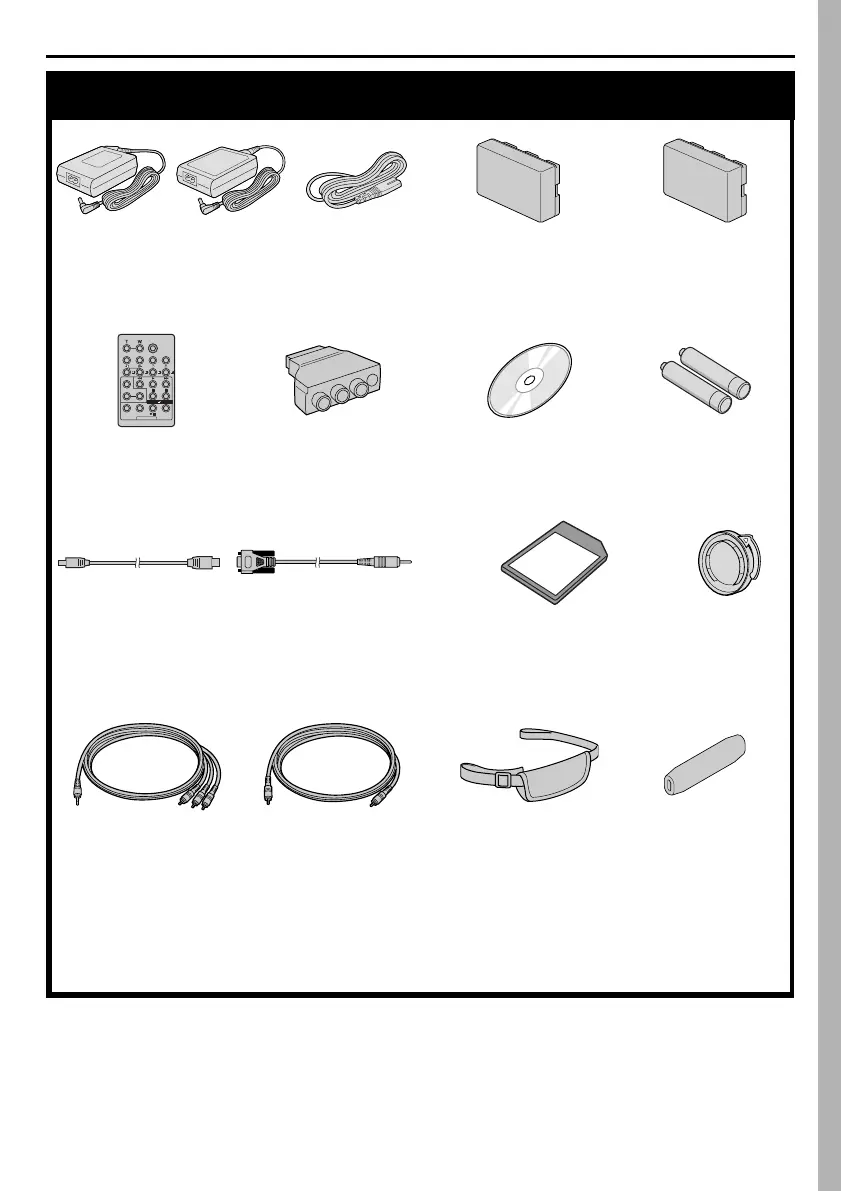
Provided Accessories
● AC Adapter
AP-V10EG or AP-V12EG
● Power Cord ● Battery Pack
BN-V306U
● Battery Mount
Cover*
(Already attached on
the camcorder)
● Remote Control
Unit
RM-V717U
● Cable Adapter ● CD-ROM ● AAA (R03) Battery
x 2 (for remote
control unit)
● USB Cable
(GR-DVX707/507
only)
● PC Connection
Cable
(GR-DVX407/400
only)
● Memory Card 8 MB
(GR-DVX707/507 only)
(Already inserted in the
camcorder)
● Lens Cap
(墌 pg. 7 for
attachment)
● Audio/Video Cable
(ø3.5 mini-plug to
RCA plug)
● Editing Cable
GR-DVX707/507:
Both plugs have 1 ring
around the pin.
GR-DVX407/400:
One plug has 3 rings
around the pin and
the other has 1 ring
around the pin.
● Grip Belt
(墌 pg. 6 for
attachment)
● Finger Support
(墌 pg. 6 for
attachment)
GR-DVX707EG_02-08.fm Page 5 Tuesday, February 5, 2002 1:43 PM


 To Next Page