EN 65
Master Page: Right
GR-DVX707EG_37-79.fm Page 65
Still images can be dubbed from a tape to a memory
card.
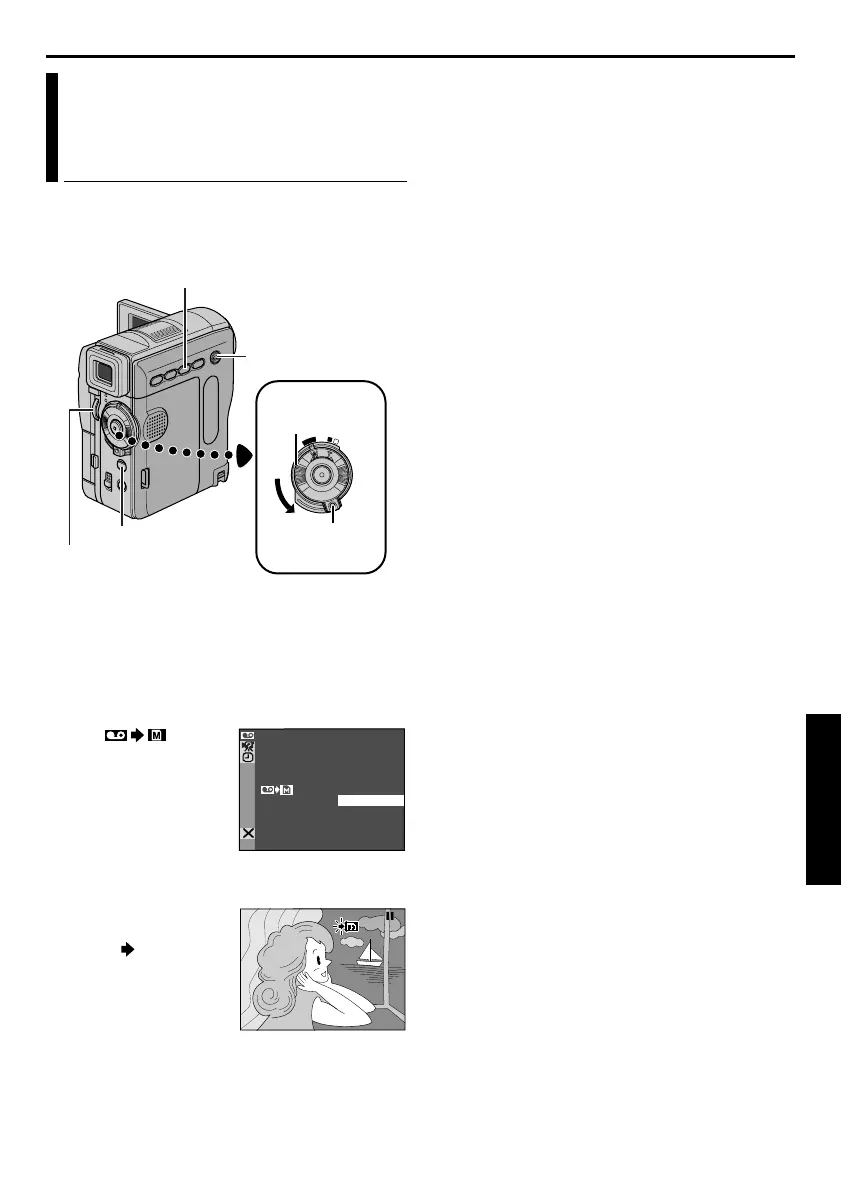
1 Load a cassette. (墌 pg. 16)
2 Load a memory card. (墌 pg. 17)
3 Set the VIDEO/MEMORY Switch to “VIDEO”.
4 Set the Power Switch to “P” while pressing
down the Lock Button located on the switch.
5 Set “ COPY”
to “ON”.
(墌 pg. 38, 51)
6 Press 4/9 to start
playback.
7 At the point you want
to dub, press 4/9
again to engage Still
Playback.
8 To dub the image,
press SNAPSHOT.
● The ” ” indication
blinks during
dubbing.
● The selected image
is stored in the
memory card.
NOTES:
● If SNAPSHOT is pressed in step 8 when a memory
card is not loaded, the message “COPYING
FAILED” is displayed.
● If an image recorded on the tape using “WIDE
MODE” (墌 pg. 46) is dubbed to a memory card,
the WIDE mode identifying signal is not dubbed
with it.
● To use Playback Special effects with a video image
you wish to dub, perform up to step 8 using the
remote control (provided). (墌 pg. 69)
● Images are dubbed in 640 x 480 pixels.
Dubbing Still Images Recorded On
A Tape To A Memory Card
(GR-DVX707/507 only)
OFF
P
LA
Y
A
M
Power Switch
SNAPSHOT Button
Lock Button
VIDEO/MEMORY
Switch
MENU Wheel
Play/Pause Button (4/9)
COP Y OF F
ON
–
SPSP
GR-DVX707EG_37-79.fm Page 65 Thursday, January 31, 2002 2:07 PM


 To Next Page