Connecting from a Web
Browser a
You can access the web functions of this camera
recorder via a web browser on devices such as a
smartphone, tablet terminal, or PC.
Make the
necessary preparations for connection in
advance.
(A P150 [Connect an appropriate adapter
according to the intended use to the [HOST]
terminal at the rear of the camera recorder.] )
1
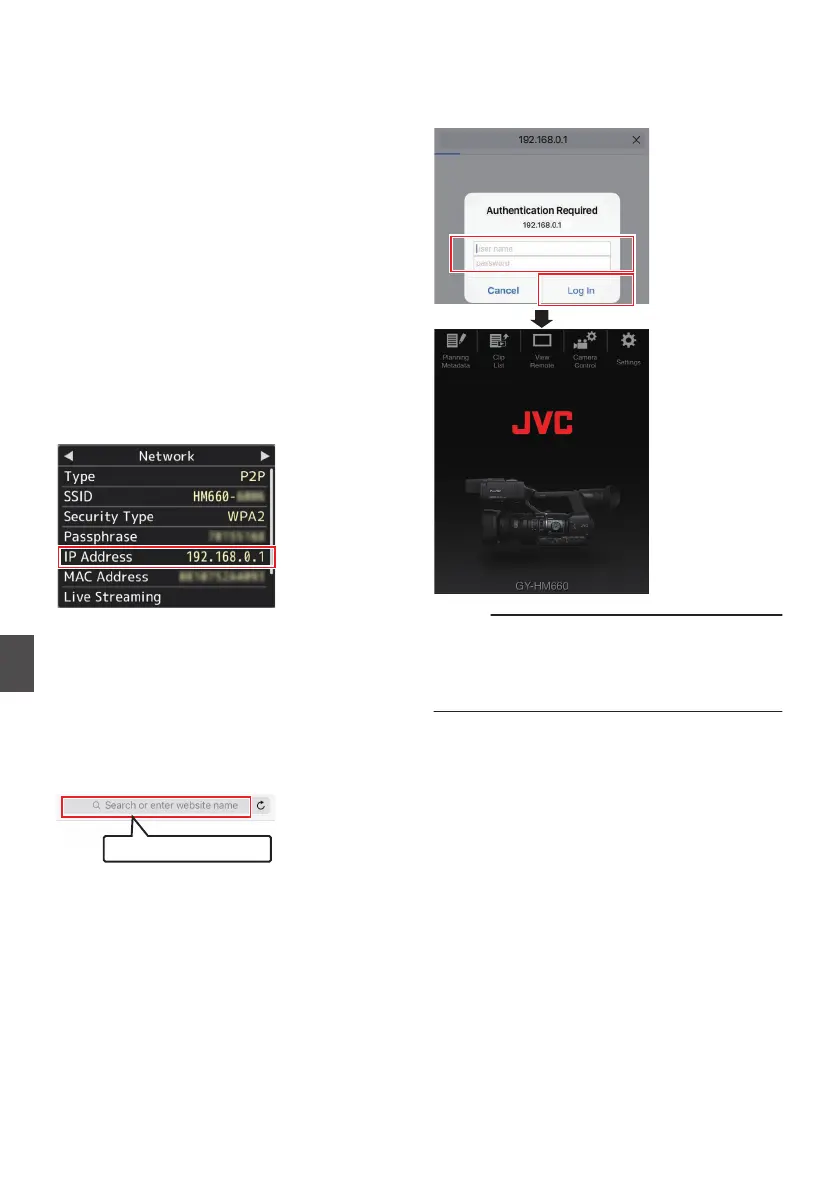
Set the camera recorder to the Camera
mode, and display the
[Network]
(status)
screen.
0
Press the [STATUS] button on the camera
recorder to display the status screen.
Press the cross-shaped button (HI
) to
display the [Network] screen.
0
Check the displayed
[IP Address].
.
2
Start up the web browser on the terminal
you wish to connect to the camera
recorder, and enter the
[IP Address
] in the
address field.
(Example: 192.168.0.1)
If “192.168.0.1” is displayed in [IP Address],
enter “http://192.168.0.1”.
.
3
Enter the user name and password.
Enter the user name (prohd) and the password
(initial password: 0000) on the login screen to
display the main page of the camera.
.
Memo :
0
The password can be altered in [Main Menu]
B
[System] B [Network]/[Settings] B [Web] B
[Change Password].
(A P
122 [ Change Password ] )
158
Connecting to the Network
a


 To Next Page
 Loading...