Status Screen
0
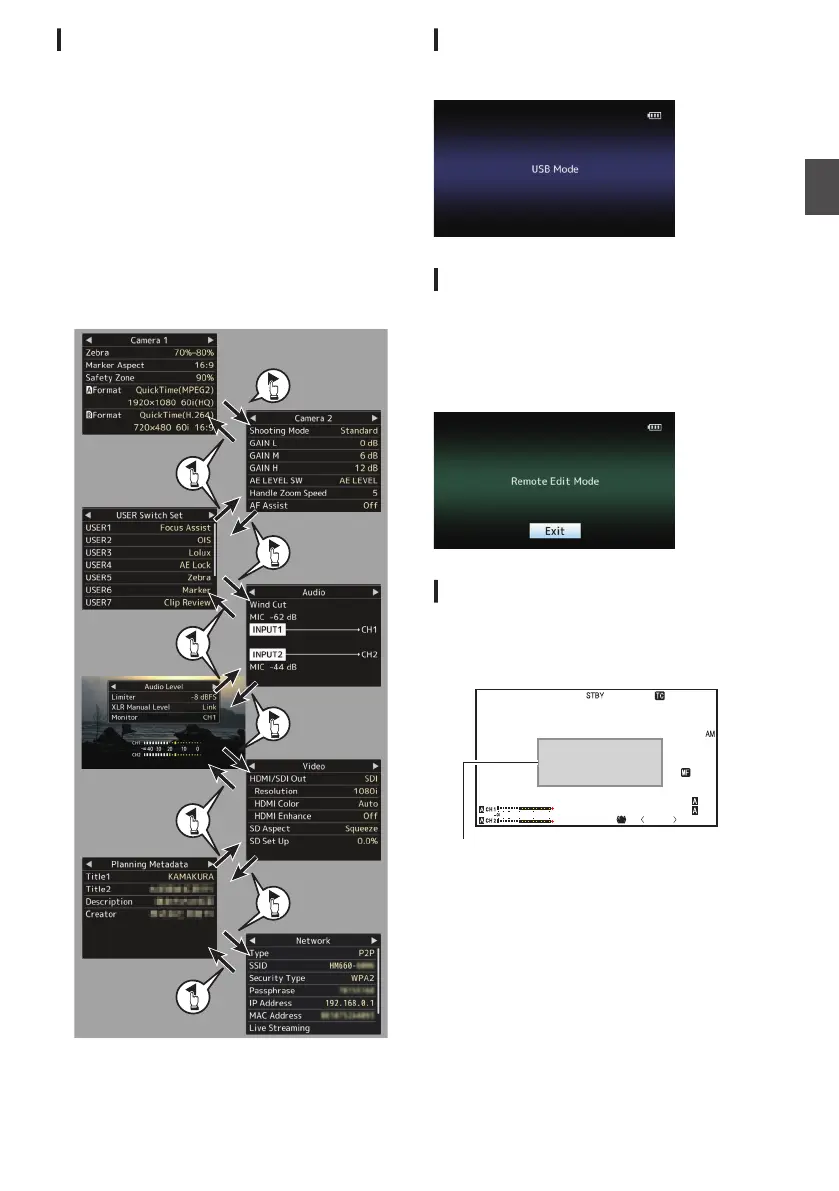
This screen allows you to check the current
settings.
0
To display the status screen, press the
[STATUS]
button in the normal screen.
0
The status display differs according to the
operation mode (two types).
(A P18 [Operation Modes] )
0
Press the [STATUS] button to switch to the
display screen.
0
Press the
[MENU/THUMB] button at each status
screen (other than the [Camera 1]/[Camera 2]
screen) to enter the setting screen.
0
Use the cross-shaped button (HI) to switch
between the screens.
.
* These are screen examples of GY-HM660. The
contents displayed
are different depending on the
model and settings.
USB Mode Screen
This screen displays the USB mode.
.
Remote Edit Mode Screen a
This is a mode for accessing the page for editing
the metadata that is recorded in a clip via a web
browser on devices such as a smartphone, tablet
terminal, or PC.
(A P160 [ Clip Metadata ] )
.
Warning Display
Warning display is displayed in the display screen
(Camera mode, Media mode).
(A P178 [Error Messages and Actions] )
.
P13000K
1/100
F1. 6
0
dB
AE+6
ND 1 /6 4
5 . 6 f t
12 :34 :56
Jan 12, 2016
00:00: 00.00
4030 20
10
0
Warning Display Area
35
Preparations



 To Next Page
 Loading...