Editing Metadata a
You can create the metadata to be inserted into a
recorded file,
or rewrite the metadata of a recorded
clip.
Planning Metadata
You can access the page for editing the camera
recorder’s
metadata
via a web browser on devices
such as a smartphone, tablet terminal, or PC, and
edit the metadata that is to be applied to clips to be
recorded.
1
Access the main page of the camera.
Access the page via a web browser on devices
such as a smartphone, tablet terminal, or PC.
(A P158
[Connecting from a Web Browser
a
] )
2
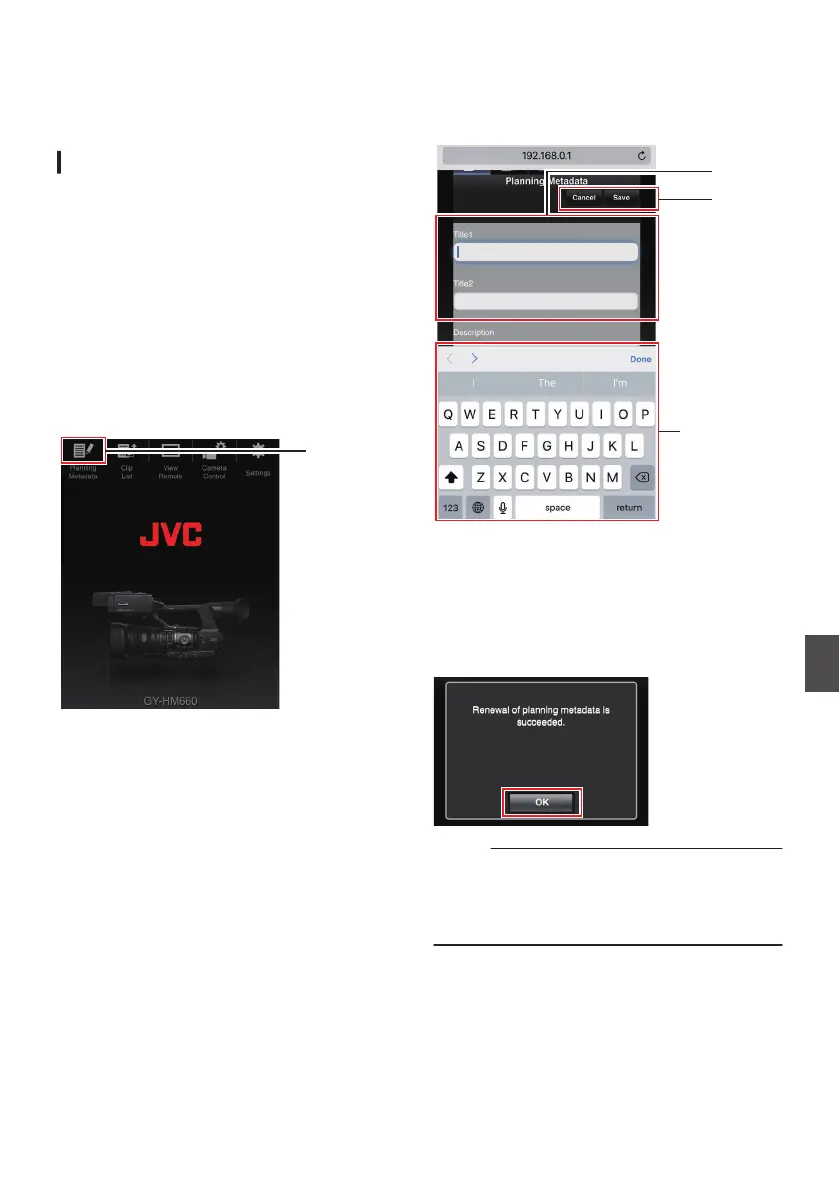
Tap (click) the [Planning Metadata] tab to
open the [Planning Metadata] screen.
.
3
Edit the metadata.
A
Enter information for the necessary fields.
B
After input is complete, tap (click) [Save
] to
overwrite the metadata.
.
4
Tap (click) [
OK
] on the confirmation screen.
0
Update of the [Planning Metadata] starts.
0
After update is complete, “Renewal of
planning metadata is succeeded.
” is
displayed. Tap (click) [OK].
0
Returns to the screen in step 3.
.
Memo :
0
If update
failed, “Renewal of planning metadata
is failed.” is displayed.
Tap (click) [Close] to return to the screen of step
3.
159
Connecting to the Network
a


 To Next Page
 Loading...