Masterpage:Left-FullCol
58 EN
Filename [HM-100U_Eng_05Index.fm]
VIDEO NAVIGATION (cont.)
E Finding blank space
You can find a tape whose remaining time is enough for a
program you want to record.
Use the Remote to do the following operations.
1 Access Video Navigation screen
Press [NAVI].
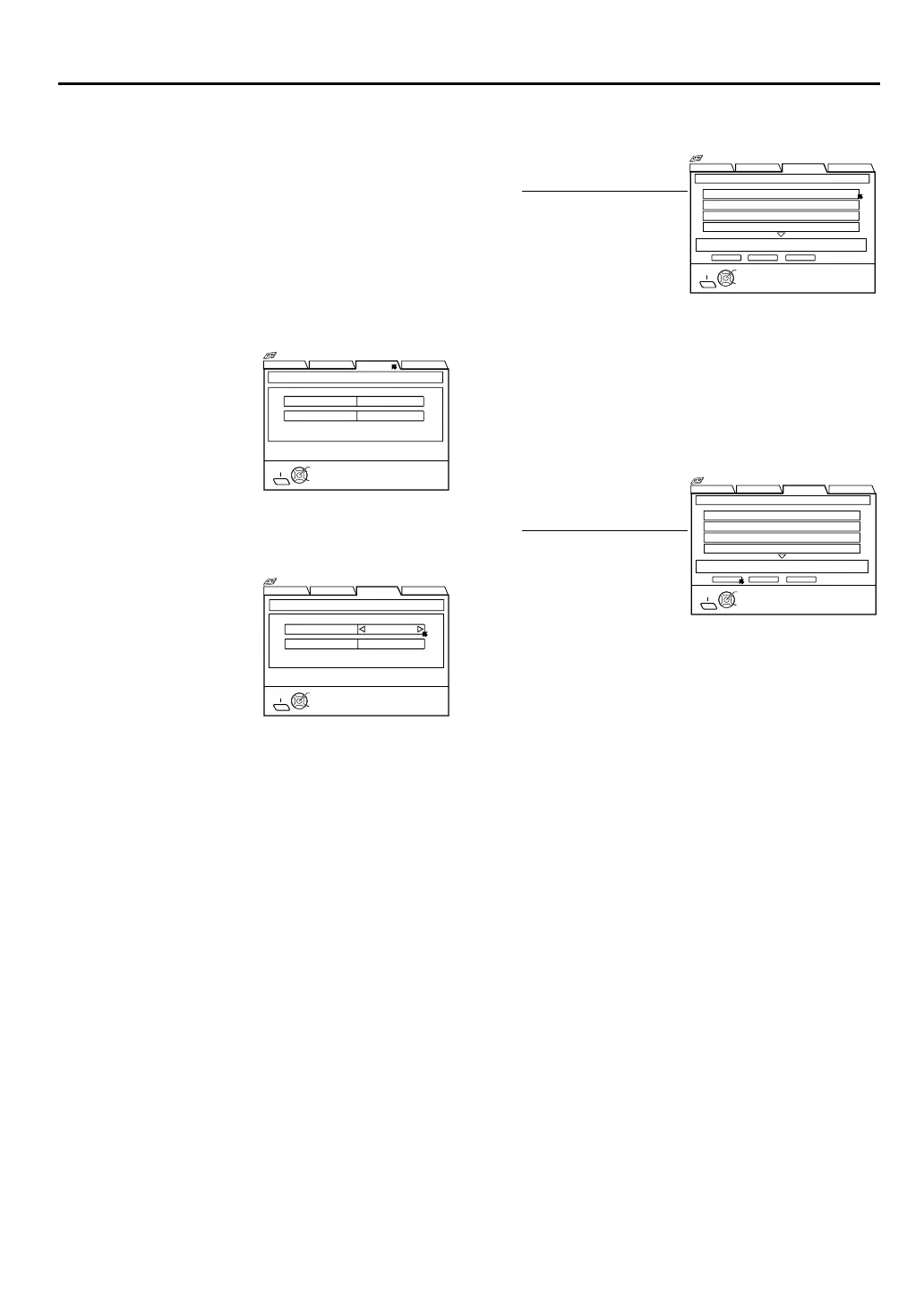
2 Access Blank Space List screen
3 Set condition
4 Select tape number
5 Load a cassette
Insert the cassette whose number you have found in
step 4.
6 Select blank
7 Prepare for recording
See page 35 for recording.
Press [FGD E] to
move the arrow to
“BLANK”, then press
[G] or [OK].
Press [FG] to move the
arrow to “RECORDING
MODE”, then press
[D E] to select the
recording speed.
Press [FG] to move the
arrow to “BLANK
TIME”, then press
[D E] to select the
blank time. Then press
[OK].
BLANK NAVI. SET UP
SEARCH LIBRARY
SELECT
OK
EXIT
NAVI
RECORDING MODE
BLANK SPACE LIST RECORDING CONDITION
LS3
BLANK TIME 2:00
SELECT WITH ARROW KEYS
THEN PRESS [OK]
Navigation
BLANK NAVI. SET UP
SEARCH LIBRARY
RECORDING MODE
BLANK SPACE LIST RECORDING CONDITION
LS3
SELECT
OK
EXIT
BLANK TIME 2:00
NAVI
SELECT WITH ARROW KEYS
THEN PRESS [OK] TO LIST
Navigation
Press [FG], then press
[OK].
•To go to another page
of the lists, press [<]
or [>].
Press [D E] to move
the arrow to “STOP”,
then press [OK].
•The VCR will start
search for the
beginning of the
blank part, then stop.
BLANK NAVI. SET UP
SEARCH LIBRARY
0003 10:00 BLANK
0004 23:00 BLANK
0001 17:00 BLANK
0002 12:00 BLANK
SEARCHSTOP RETURN
BLANK SPACE LIST 10:00 LS5
1 / 3
SELECT
OK
TITLE
11/01/99 MON 11:34 AM
EXIT
NAVI
SELECT WITH ARROW KEYS
THEN PRESS [OK]
Navigation
BLANK NAVI. SET UP
SEARCH LIBRARY
0003 10:00 BLANK
0004 23:00 BLANK
0001 17:00 BLANK
0002 12:00 BLANK
SEARCHSTOP RETURN
BLANK SPACE LIST 10:00 LS5
SELECT
OK
TITLE
11/01/99 MON 11:34 AM
EXIT
NAVI
SELECT WITH ARROW KEYS
THEN PRESS [OK]
1 / 3
Navigation
HM-DH100U_Eng.book Page 58 Thursday, August 5, 2004 1:54 PM



 To Next Page
 Loading...