Masterpage:Right-FullCol
EN 21
Filename [HM-100U_Eng_05Index.fm]
Setting channels manually
— Manual Channel Set (Digital)
You can add the channels you want or delete the
channels you do not want manually.
A
Access Digital Set Up Menu screen
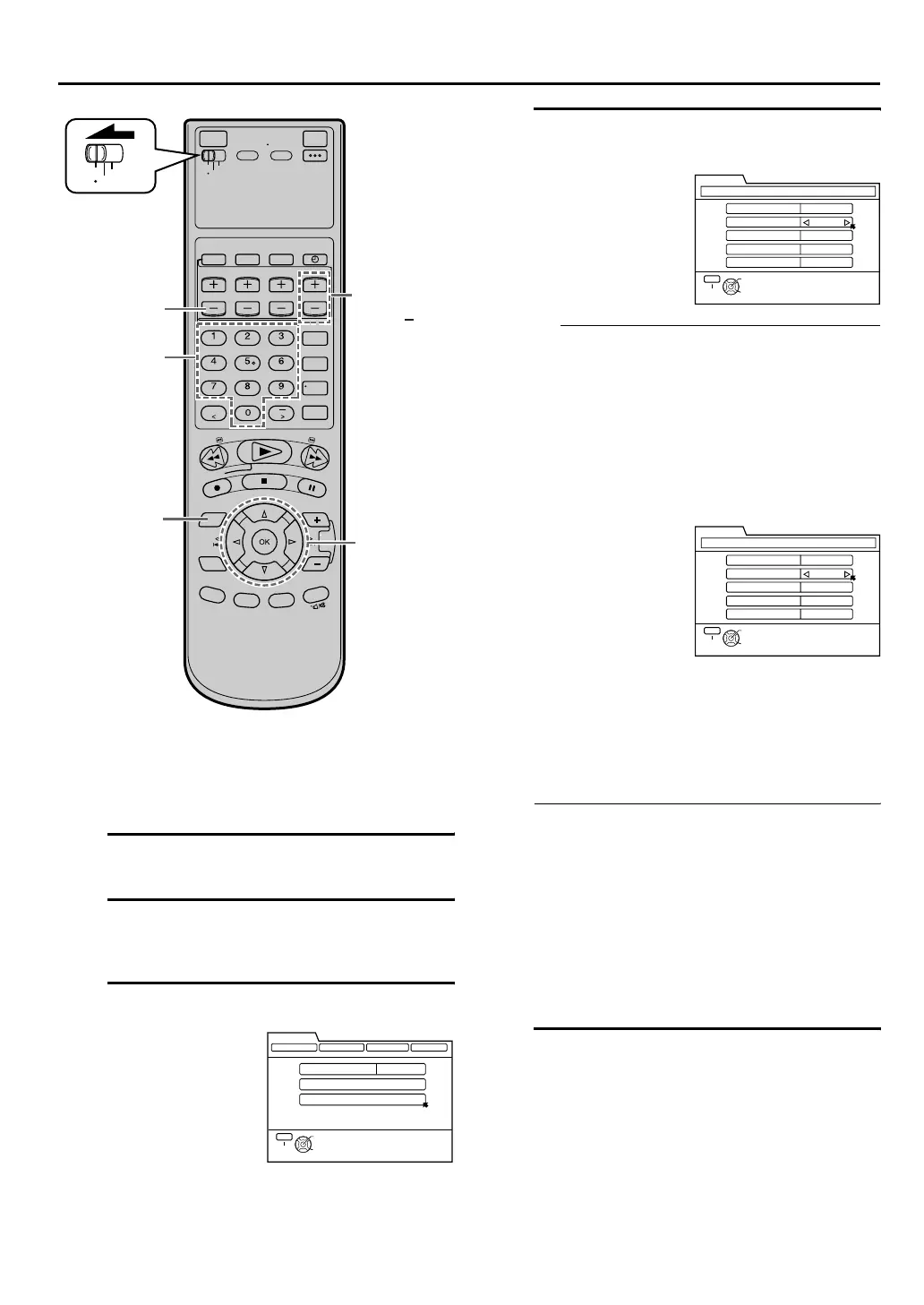
Press [DTV MENU].
B Access Tuner screen
Press [D E] to move the arrow to “TUNER”, then
press [G] or [OK].
C
Access Manual Channel Set screen
D Add or skip desired channels
To add channels
•When a digital broadcast (ATSC) channel is
received, the channel number will be
displayed at “DTV CH”.
If digital broadcast cannot be received, the
received RF channel number will be
displayed instead.
B Press [FG] to move the arrow to “ADD/SKIP”,
then press [D E] to set to “ADD”.
C Repeat A and B to add other channels.
To skip channels
Press [
FG
] to move the arrow to “DTV CH”, then
press [TV/VCR CH +/–] to select a receiving DTV
channel you want to skip.
B
Press [
FG
] to move the arrow to “ADD/SKIP”, then
press [
D E
] to set to “SKIP”.
C Repeat A and B to skip other channels.
• The numeric value displayed at the “SIGNAL
STRENGTH” item indicates the strength of the
digital broadcast signal received. The signal
strength value range is from 0 to 100.
• At the “CH” item, the added RF channels can be
selected when you press [TV/VCR CH +/-].
Pressing the ‘Number’ keys allow you to select
all available RF channels.
•
At the “DTV CH” item, pressing [TV/VCR CH +/-]
allows you to select the main channel of a DTV
channel. The sub channels of a DTV channel
cannot be selected.
E Return to normal screen
Press [MENU].
END of Tuner Setting.
INITIAL SETTING (cont.)
Press [FG] to move
the arrow to
“MANUAL CH SET”,
then press [OK].
D
A
E
B - D
VCR
TV
CABLE
/DBS
[TV/VCR
CH +/ ]
Number‘ Keys
THEN PRESS [OK]
SELECT WITH ARROW KEYS
SELECT
OK
EXIT
MENU
DIGITAL SET UP
DIGITAL PROGRAM CLOSED CAPTION
TUNER PARENTAL
BAND
AUTO CH SET
MANUAL CH SET
TV
A
Press [
FG
] to move
the arrow to “CH”,
then press the
‘Number’ keys to
select a receiving
RF channel.
A
Press [
FG
] to move
the arrow to “CH”,
then press [TV/VCR
CH +/
–
] to select an
RF channel you
want to skip.
OR
CH [TV]
ADD/SKIP ADD
DTV CH
44
74
MANUAL CH SET
SIGNAL STRENGTH
8-1
RETURN
THEN PRESS [OK]
SELECT WITH ARROW KEYS
SELECT
OK
EXIT
MENU
DIGITAL SET UP
CH [TV]
ADD/SKIP SKIP
DTV CH
44
74
MANUAL CH SET
SIGNAL STRENGTH
8-1
RETURN
THEN PRESS [OK]
SELECT WITH ARROW KEYS
SELECT
OK
EXIT
MENU
DIGITAL SET UP
HM-DH100U_Eng.book Page 21 Thursday, August 5, 2004 1:54 PM



 To Next Page
 Loading...