22 EN
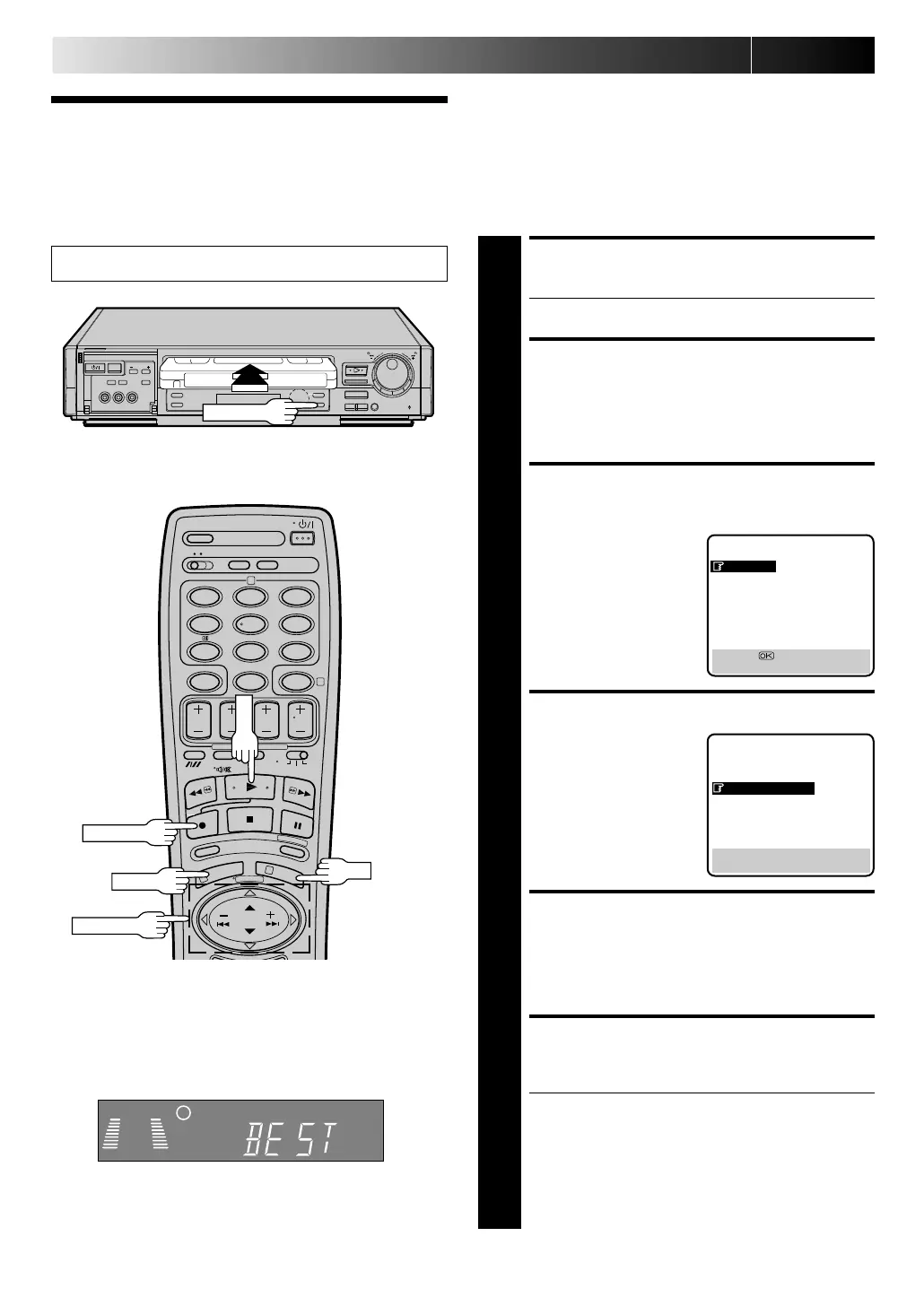
B.E.S.T. Picture
System
The B.E.S.T. (Biconditional Equalised Signal Tracking) system
checks the condition of the tape in use during recording and
playback, and compensates to provide the highest-possible
recording and playback pictures. The default setting for both
recording and playback is “ ON” .
Recording
LOAD A CASSETTE
1
Insert a cassette with the record safety tab intact.
● The recorder power comes on automatically.
ACCESS MAIN MENU
SCREEN
2
Press M EN U twice.
ACCESS MODE SET
SCREEN
3
Move the highlight bar
(pointer) to "MODE SET"
by pressing PU SH JO G
%fi, then press O K.
CONFIRM B.E.S.T. STATUS
4
The default setting is
“ON”. If this is the case, go
to step 5. If not, press
PU SH JO G
fi
to move the
highlight bar (pointer) to
“B.E.S.T.” , then press
PU SH JO G to set to
“ON”.
RETURN TO NORMAL
SCREEN
5
Press M EN U.
START RECORDING
6
Press and hold RECO RD and PLAY on the remote, or
press RECORD on the recorder.
● The recorder spends approximately 7 seconds
assessing the condition of the tape, then begins
recording.
● When the "BEST" indicator begins blinking, that
means adjustment is complete.
● Pressing the recorder's RECORD button while "BEST"
is displayed does not start Instant Timer Recording
(Z pg. 27).
RECORDING (cont.)
5
MAIN MENU
MODE SET
AUTO CH SET
MANUAL CH SET
GUIDE PROG SET
CLOCK SET
JLIP ID NO. SET
[5
∞
] =
[MENU] : EXIT
MODE SET
AUTO TIMER : OFF
O. S. D. : ON
B. E. S. T. : ON
AV2 SELECT : AV2
TIME SCAN : ON
AUDIO
[
5
∞] = [ ] : ON/OFF
[MENU] : EXIT
Turn on the TV and select the VIDEO channel (or AV mode).
5
/
8
¡
1
8
q
6
12
45
3
6
8
0
7
9
2
4
1
3
RECO RD
PU SH JO G
OK
M EN U
%
As the tape check progresses, the “– –” marks on the display
panel increase upward. Once the "BEST" indicator starts
blinking, the check is complete.
Display Panel Indication
RECO RD
Downloaded from: https://www.usersmanualguide.com/



 To Next Page