30 EN
TIM ER RECORDING(cont.)
Regula r Timer
Progra mming
Remember, the clock must be set before you can
programme the timer (Z pg. 49).
If you don’t know the SHOWVIEW number for the programme
you wish to record, use the following procedure to set your
recorder to timer-record the programme. Or you can use the
Illumi-Guide feature, where the remote control tells you which
button to press next by lighting it up. To use the Illumi-Guide
feature, with the TV/ SAT./ VCR switch set to "VCR", press
ILLU M I GUID E before performing step 1. (PRO G., REW , PLAY,
FF light up at this time.)
If you aren't going to use the Illumi-Guide feature, go directly to
step 1.
Before performing the following steps:
● Insert a cassette with the safety tab in place. The recorder
will come on automatically.
● Turn on the TV and select the VIDEO channel (or AV mode).
5
/
8
¡
1
8
q
6
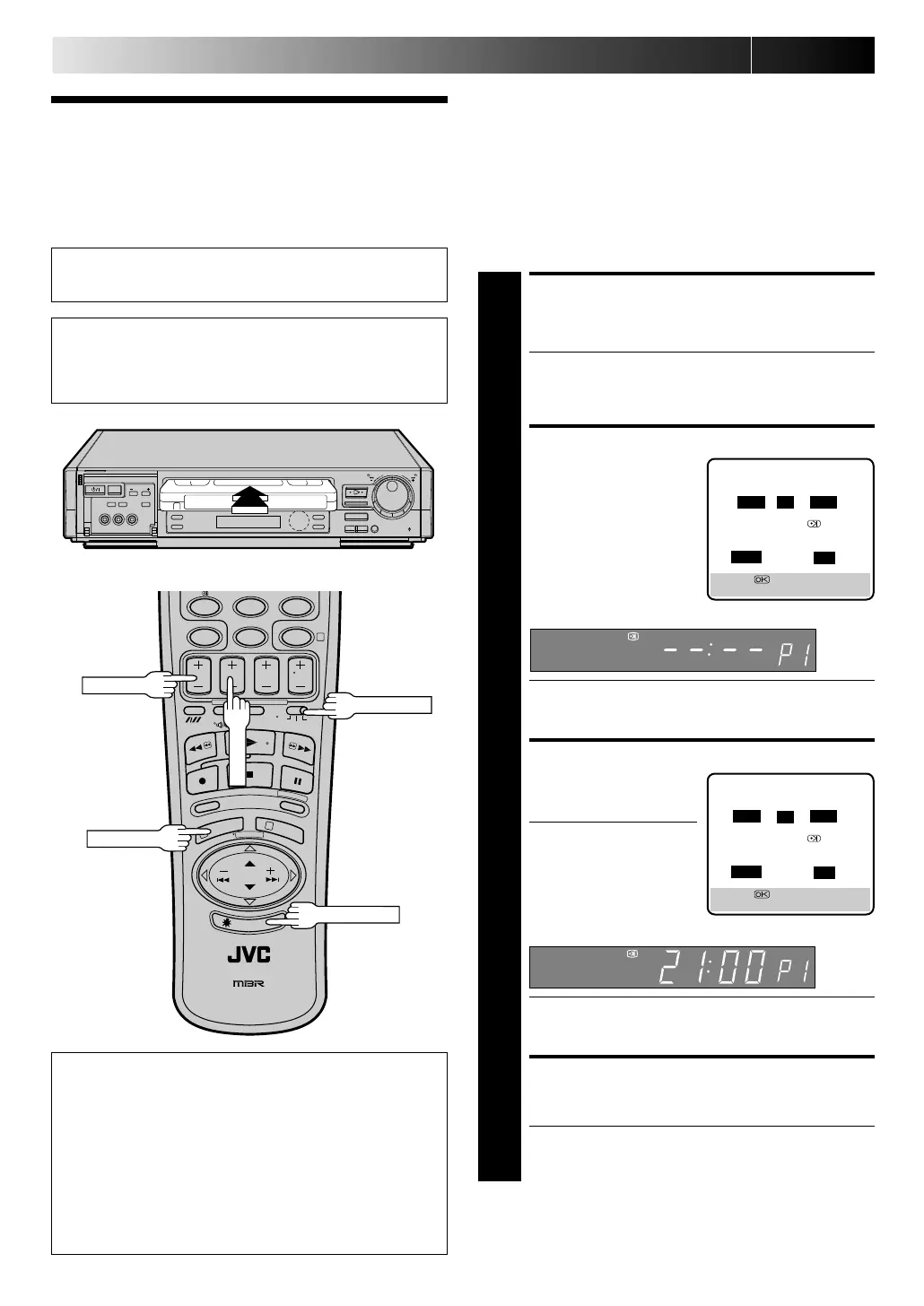
ACCESS TIMER
PROGRAMMING SCREEN
1
Press PRO G.
● If you are using the Illumi-Guide feature, the following
buttons will light up: NU M BER keys (0–9), START +/ –,
STOP +/ –, DATE +/ –, TV PRO G . +/ –, M EN U and
CANCEL.
ACCESS PROGRAMME SCREEN
2
Press START +/ –. (If you’re
just starting out, “P1”
appears.)
The front display panel looks like this:
● If you are using the Illumi-Guide feature, the following
buttons will light up: START +/ –, STOP +/ –, DATE +/ –,
TV PROG. +/ – and MEN U.
ENTER PROGRAMME START TIME
3
Press START +/ – to enter
the time you want
recording to start.
● Press and hold START
+/ – to move in 30-
minute increments, or
press and release
repeatedly to move 1
minute at a time.
The front display panel looks like this:
● If you are using the Illumi-Guide feature, the following
buttons remain lit: START +/ –, STOP +/ –, DATE +/ –,
TV PROG. +/ – and M ENU.
ENTER PROGRAMME STOP TIME
4
Press STO P +/ – to enter the time you want recording to
stop.
● If you are using the Illumi-Guide feature, the following
buttons remain lit: START +/ –, STOP +/ –, DATE +/ –,
TV PROG. +/ – and M ENU.
– P1 –
START STOP
–:– – = –:– –
SP
ON
DATE TV PROG
25.12 – –
[+/–] =
[MENU] : EXIT
SP
– P1 –
START STOP
21:00 = –:– –
SP ON
DATE TV PROG
25.12 – –
[+/–] =
[MENU] : EXIT
SP
W hen Using The Illumi-Guide Feature
● Buttons light or blink on the remote control for
approximately 10 seconds. If the button or buttons extinguish
during timer programming, press ILLUM I GUID E and the
button or buttons previously lit or blinking come back on. If
the button or buttons do not re-light or start blinking again,
press M EN U and re-perform the timer programming
procedure from the beginning.
● If for some reason the remote control's signal is not received
by the video recorder, press M EN U and re-perform the timer
programming procedure from the beginning.
8
0
7
9
4
1
3
TV/ SAT./ VCR
PROG./ M ENU
START+/ –
ILLU MI GUIDE
Downloaded from: https://www.usersmanualguide.com/



 To Next Page