EN 41
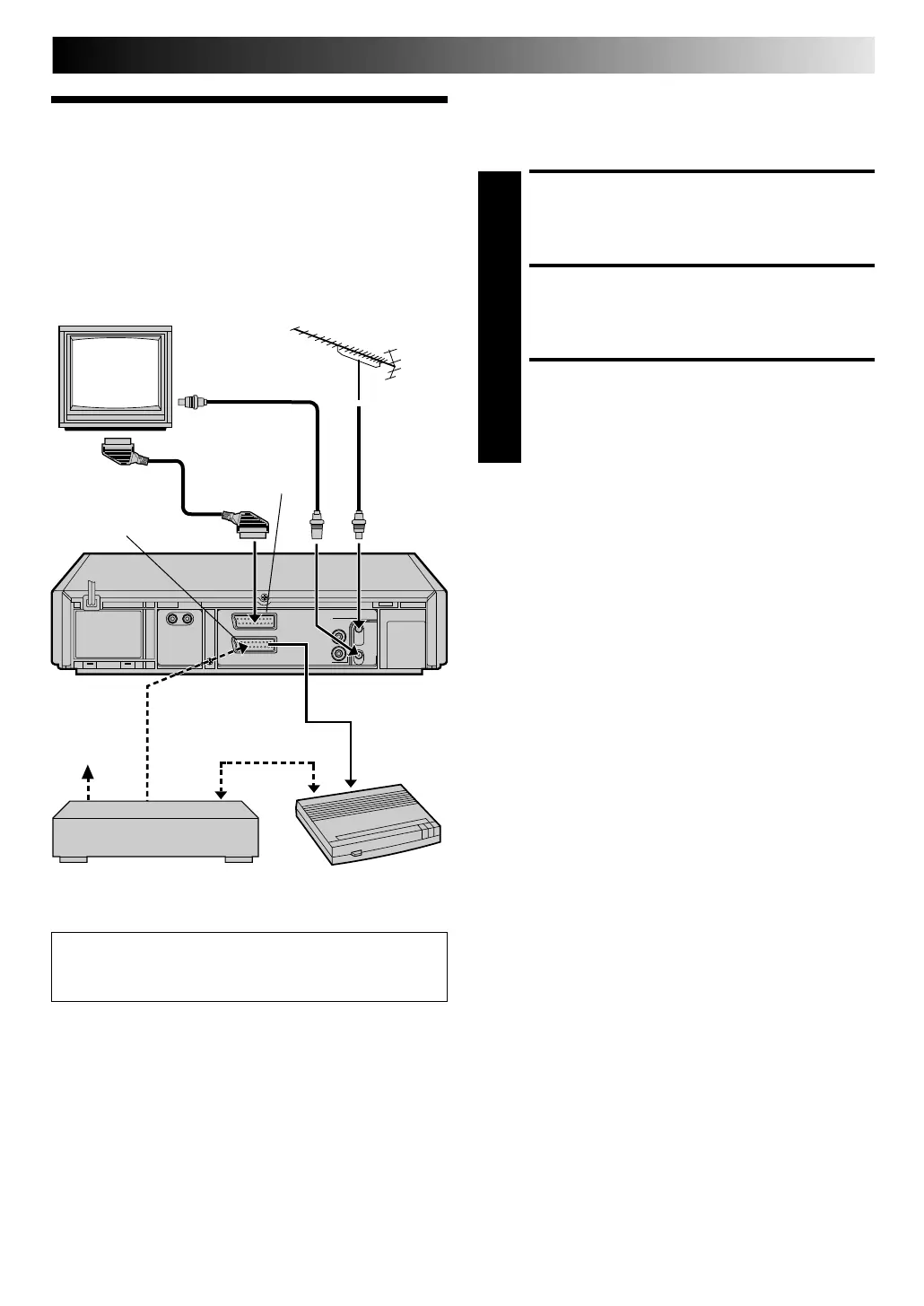
The AV2 IN/DECODER connector can be used as an input
terminal for an external decoder (descrambler). Simply connect
a decoder and you can enjoy the variety of programming that is
available through scrambled channels.
SELECT INPUT MODE
1
Set "AV2 SELECT" to "DECODER". (Z pg. 34)
CONNECT DECODER
2
Connect your recorder's AV2 IN/DECODER connector
to the decoder's Euroconnector using a 21-pin SCART
cable.
SET TUNER
3
Perform the procedure as described in "When Receiv-
ing A Scrambled Broadcast" on page 46.
N OTE:
W hen Connecting A Satellite Tuner . . .
. . . if you don't have a decoder connect the satellite tuner
directly to the video recorder's AV2 IN/DECODER connector.
. . . if you have a decoder, first connect the decoder to the
decoder input of the satellite tuner, then connect the satellite
tuner's output to the recorder's AV2 IN/DECODER connector.
Refer to the instruction book for the satellite tuner and decoder.
. . . set "AV2 SELECT
" to "AV2". (
Z
pg. 34)
. . . to view a programme via the satellite tuner, select AU 2
mode by pressing
NU M BER keys and/or TV PROG. so that
"AU-2" appears on the display panel.
SYSTEM CONNECTIONS
Connecting/
Using A
Decoder
TV Receiver
TV Aerial
Cable
RF Cable (provided)
AV1 IN/OUT
Satellite
antenna
Satellite tuner
Decoder
AV2 IN/DECODER
For Customers in Australia and N ew Zealand:
When connecting the AV cable, use the input and/or output
cable adapter.
Downloaded from: https://www.usersmanualguide.com/



 To Next Page