28 EN
TIM ER RECORDING
SHOW VIEW
Timer
Recording
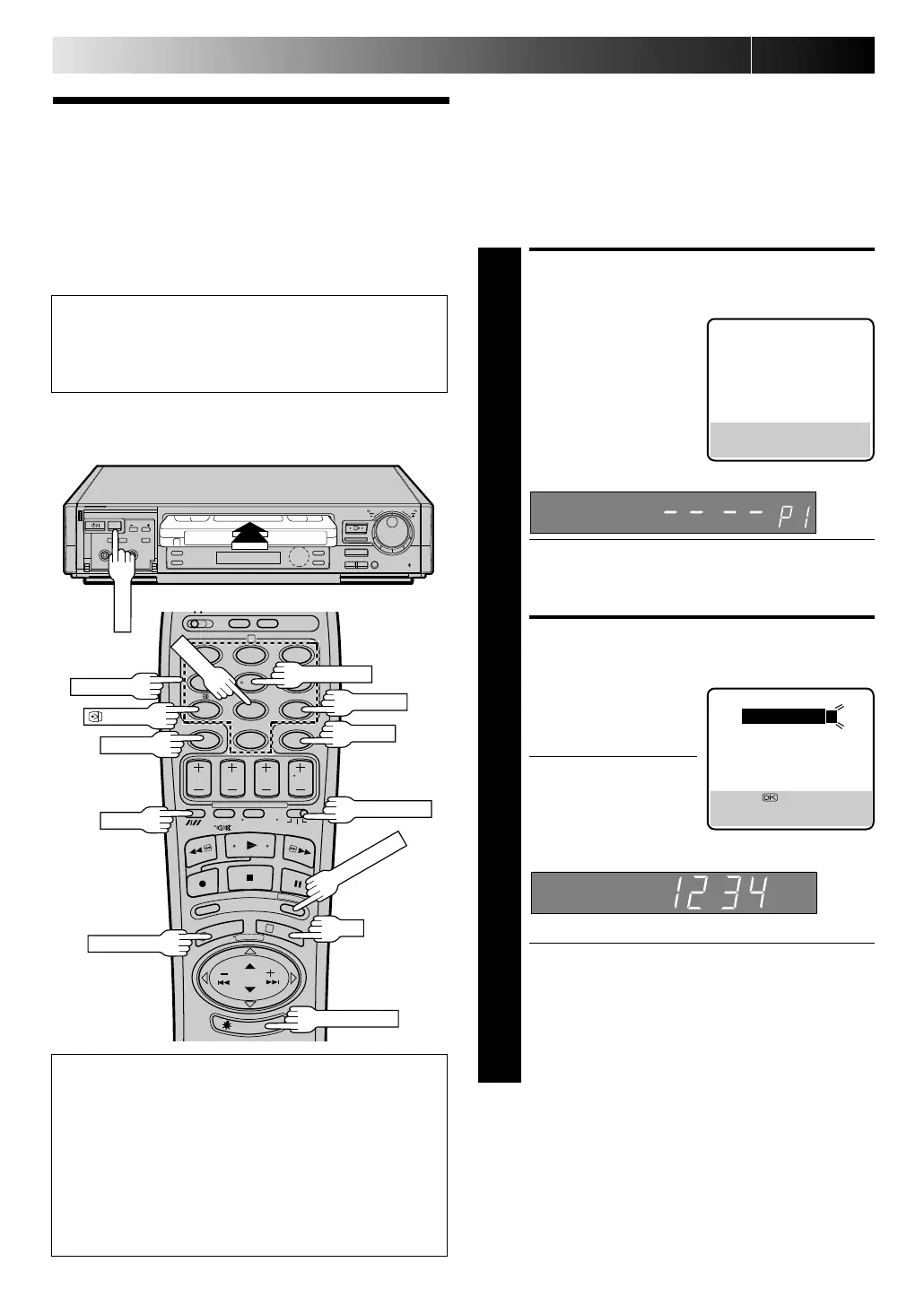
During SHOW VIEW and regular timer programming, the Illumi-
Guide feature tells you which button on the remote control
must be pressed next by lighting it up. To use this feature, with
the TV/ SAT./ VCR switch set to "VCR", press ILLU MI GUID E
before performing step 1. (PRO G., REW, PLAY, FF light up at
this time.)
If you aren't going to use the Illumi-Guide feature, go directly to
step 1.
ACCESS TIMER PROGRAM-
MING SCREEN
1
Press PRO G..
The front display panel looks like this:
● If you are using the Illumi-Guide feature, the following
buttons will light up: NU M BER keys (0–9), START +/ –,
STOP +/ –, DATE +/ –, TV PRO G . +/ –, M ENU and
CANCEL.
ENTER SHOW VIEW
NUMBER
2
Press the NU M BER keys to
enter the SHOWVIEW
number of a programme
you wish to record.
● If you make a mistake,
press CAN CEL to
backspace and then
input the correct number.
The SHOWVIEW number
you enter appears on the front display panel:
The display panel can only show 4 digits at a time.
● If you are using the Illumi-Guide feature, OK blinks
when the following buttons are lit: NU M BER keys (0–
9), CANCEL and MEN U.
ATTEN TION :
SHOWVIEW Timer Programming cannot be performed
correctly for programmes whose SHOW VIEW number
start with "0".
TIMER PROGRAMMING
[0 – 9] : SHOWVIEW
[+/–] : EXPRESS PROGRAMMING
[MENU] : MAIN MENU
SHOWVIEW
12345678
[0 – 9] =
[CANCEL] : DELETE
[MENU] : EXIT
W hen Using The Illumi-Guide Feature
● Buttons light or blink on the remote control for
approximately 10 seconds. If the button or buttons extinguish
during timer programming, press ILLUM I GUID E and the
button or buttons previously lit or blinking come back on. If
the button or buttons do not re-light or start blinking again,
press M EN U and re-perform the timer programming
procedure from the beginning.
● If for some reason the remote control's signal is not received
by the video recorder, press M EN U and re-perform the timer
programming procedure from the beginning.
5
/
8
¡
1
8
q
6
12
45
3
6
8
0
7
9
2
4
1
3
OK
CANCEL
:PD C/ VPS
ADD TIM E
W EEKLY
TIM ER
ILLU MI GUIDE
PROG./ M ENU
TV/ SAT./ VCR
NU M BER
SP/ LP
Before performing SHOWVIEW timer recording:
● Be sure to read "SHOWVIEW Setup" (Z pg. 10).
● Insert a cassette with the safety tab in place. The recorder
will come on automatically.
● Turn on the TV and select the VIDEO channel (or AV mode).
* For Customers in Australia and New Zealand:
With this recorder, the G-Code system is identified as
"SHOW VIEW".
Downloaded from: https://www.usersmanualguide.com/



 To Next Page