32 EN
12
45
3
6
8
0
7
9
2
4
1
3
OK
CANCEL
START+/ –
TV PROG.
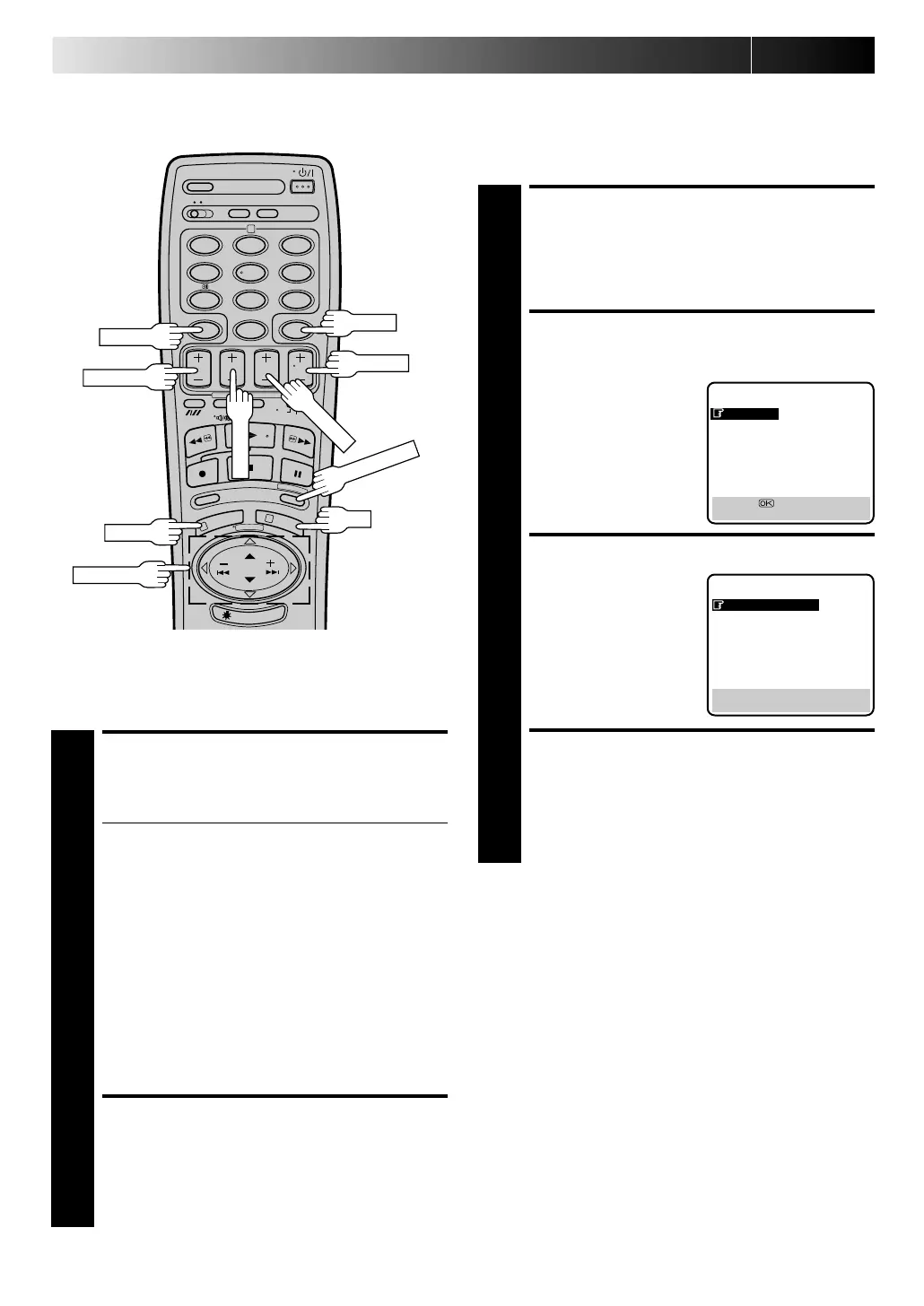
Auto Timer
When the Auto Timer is set to ON the timer is automatically
engaged when the recorder power is turned off and automati-
cally disengaged when the recorder is powered back on.
ACCESS MAIN MENU
SCREEN
1
Press M EN U twice.
ACCESS MODE SET
SCREEN
2
Press PUSH JO G %fi to
move the highlight bar
(pointer) to "MODE SET",
then press OK.
SELECT MODE
3
Press PUSH JO G to select
either "ON" or "OFF".
RETURN TO NORMAL
SCREEN
4
Press M EN U.
N OTE:
For safety, when Auto timer is set to "OFF", all other recorder
functions are disabled while the Timer mode is engaged. To
disengage the timer, press TIM ER.
%
M EN U
5
MODE SET
AUTO TIMER : OFF
O. S. D. : ON
B. E. S. T. : ON
AV2 SELECT : AV2
TIME SCAN : ON
AUDIO
[5
∞
] = [ ] : ON/OFF
[MENU] : EXIT
MAIN MENU
MODE SET
AUTO CH SET
MANUAL CH SET
GUIDE PROG SET
CLOCK SET
JLIP ID NO. SET
[5
∞
] =
[MENU] : EXIT
TIM ER RECORDING (cont.)
TIM ER
PU SH JO G
Check And Ca ncel
Progra mmes
ACCESS PROGRAMME
DISPLAY AND/ OR SCREEN
1
Press PRO G. CHECK.
● The display panel shows the programme start time.
Pressing O K changes the display to the programme
stop time, then the date and channel position.
● If the recorder is turned on and the TV is set to its
VIDEO channel or AV mode, you can check program
information on screen as well.
● Each time you press PROG. CHECK, the next
programme's information appears.
If All Information Is Correct . . .
. . . programming is completed.
If You Wish To Revise Data . . .
. . . with the recorder's power turned on, go to step 2.
If You Wish To Cancel A Program . . .
. . . with the recorder's power turned on, press CANCEL.
All information you input is deleted.
REVISE PROGRAMME
INFORMATION
2
Input the appropriate data using the START +/ –, STOP
+/ –, D ATE +/ – and TV PRO G. +/ – buttons on the
remote control.
Downloaded from: https://www.usersmanualguide.com/



 To Next Page