12
ENGLISH
Finding the beginning of a tune
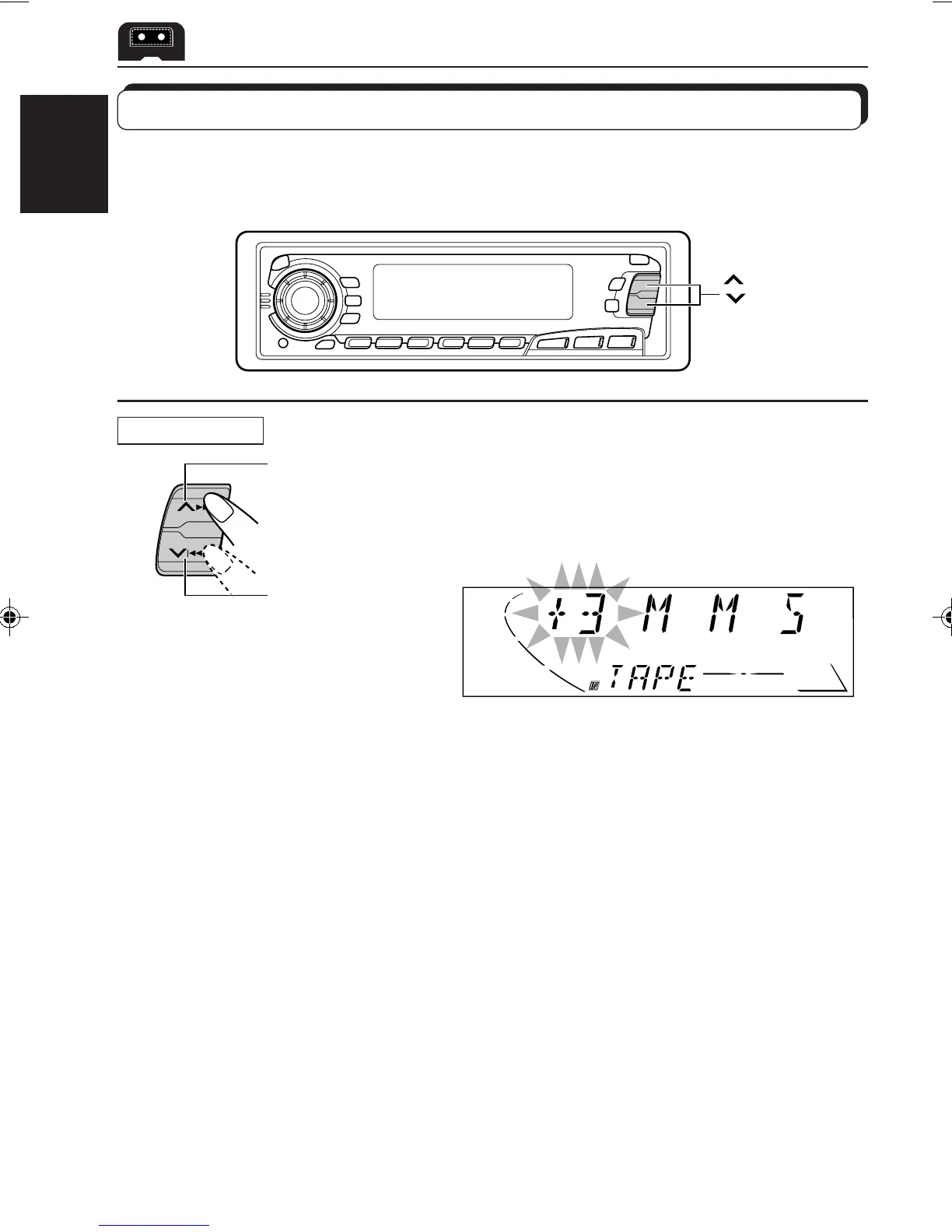
Multi Music Scan allows you to automatically start playback from the beginning of a specified
tune. You can specify up to 9 tunes ahead of or before the current tune.
¢
4
Specify where (how many tunes
ahead of or before the current tune)
the tune you want is located.
Each time you set the tune, the number changes
up to ±9.
When the beginning of the specified tune is located, playback starts automatically.
Notes:
• While locating a specified tune:
– If the tape is rewound to its beginning, playback starts from the beginning of that side.
– If the tape is fast-forwarded to the end, it is reversed and played from the beginning of the other
side.
• In the following cases, the Multi Music Scan function may not operate correctly:
– Tapes with tunes having long pianissimo passages (very quiet parts) or non-recorded portions
between tunes.
– Tapes with short non-recorded sections.
– Tapes with high level of noise or humming between tunes.
– The Dolby NR setting does not match. For example, if Dolby B NR is on and the tape was recorded
with no Dolby NR.
During playback
To locate a tune
ahead of the current
tune on the tape
To locate a tune
before the current
tune on the tape
EN10-13.KS-FX450[J] 99.11.26, 7:03 PM12



 To Next Page