14
ENGLISH
SOUND ADJUSTMENTS
Adjusting the sound
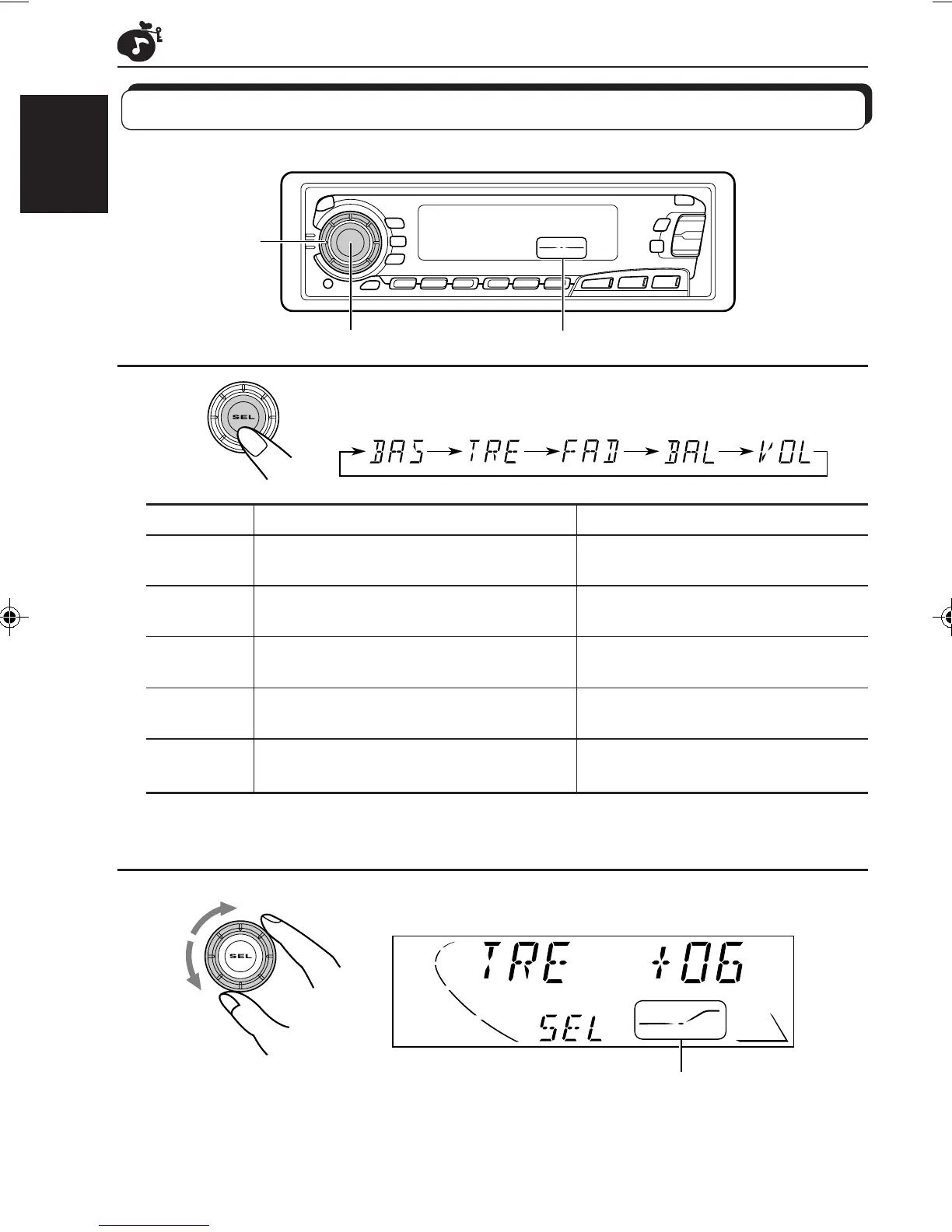
You can adjust the treble/bass sound and the speaker balance.
Equalization pattern indicator
1
Select the item you want to adjust.
Indication To do: Range
BAS Adjust the bass –06 (min.) — +06 (max.)
(Bass)
TRE Adjust the treble –06 (min.) — +06 (max.)
(Treble)
FAD Adjust the front and rear speaker R06 (rear only) — F06 (front only)
(Fader)* balance
BAL Adjust the left and right speaker L06 (left only) — R06 (right only)
(Balance) balance
VOL Adjust the volume 00 (min.) — 50 (max.)
(Volume)
Note:
* If you are using a two-speaker system, set the fader level to “00.”
2
Adjust the level.
Note:
Normally the control dial works for volume adjustment. So you do
not have to select “VOL” to adjust the volume level.
Equalization pattern changes as
you adjust the bass or treble.
1
2
EN14-18.KS-FX450[J] 99.11.26, 7:04 PM14



 To Next Page