4
ENGLISH
BASIC OPERATIONS
Note:
When you use this unit for the
first time, set the built-in clock
correctly. (See page 19.)
1
3
2
/I
A
TT
/
1
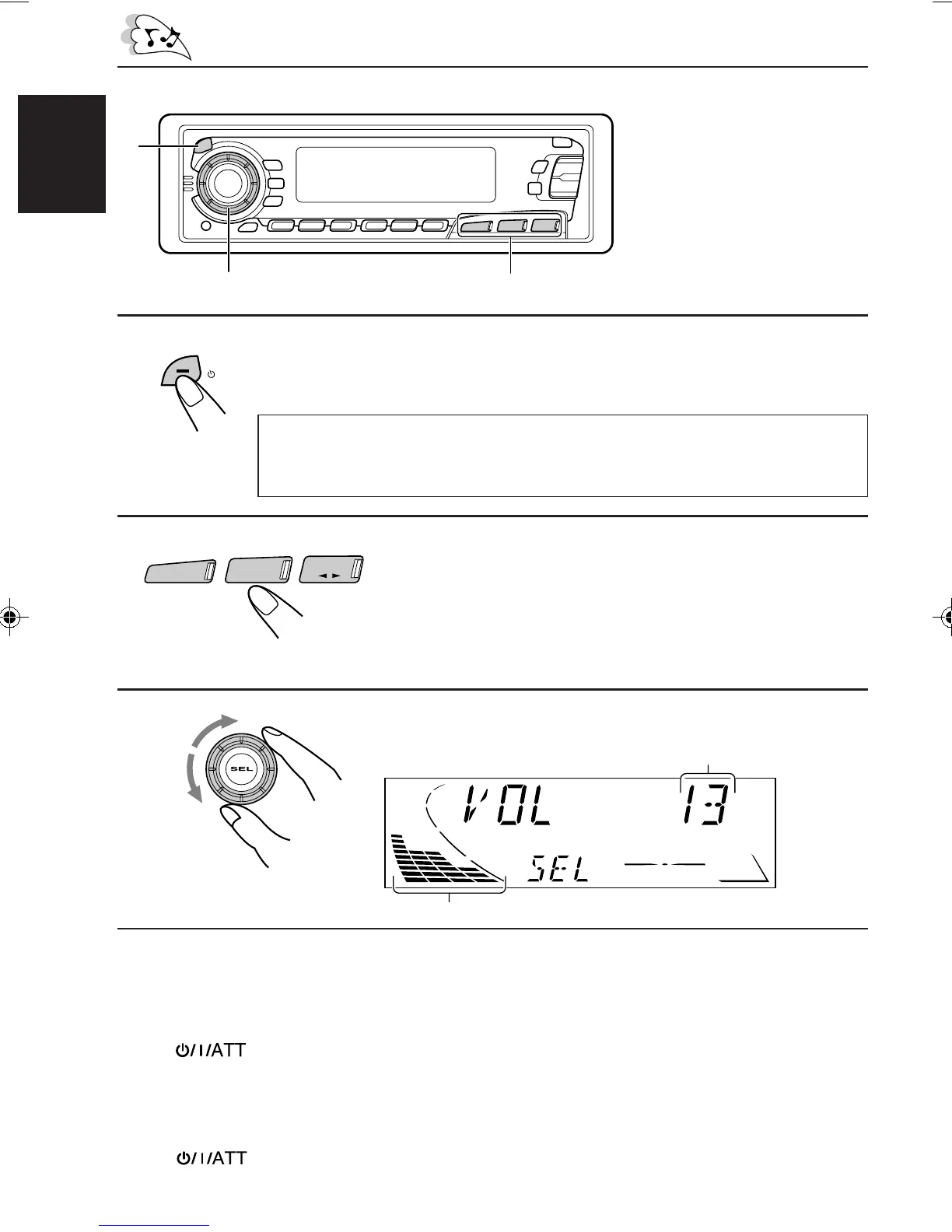
Turn on the power.
“HELLO” appears on the display.
2
Select the source.
To operate the tuner, see pages 5 – 9.
To operate the cassette deck, see pages 10 – 13.
To operate the CD changer, see pages 25 – 27.
To operate the external component, see page 28.
3
Adjust the volume.
4
Adjust the sound as you want (see pages 14 – 18).
To drop the volume in a moment
Press briefly while listening to any source. “ATT” starts flashing on the display, and
the volume level will drop in a moment.
To resume the previous volume level, press the button briefly again.
To turn off the power
Press for more than 1 second.
Note on One-Touch Operation:
When you select a source in step 2 below, the power automatically comes on.
You do not have to press this button to turn on the power.
Volume level indicator
Volume level appears
CD-CH
FM/AM
TAPE
EN02-04.KS-FX450[J] 99.11.26, 7:02 PM4



 To Next Page