13
÷ Handling
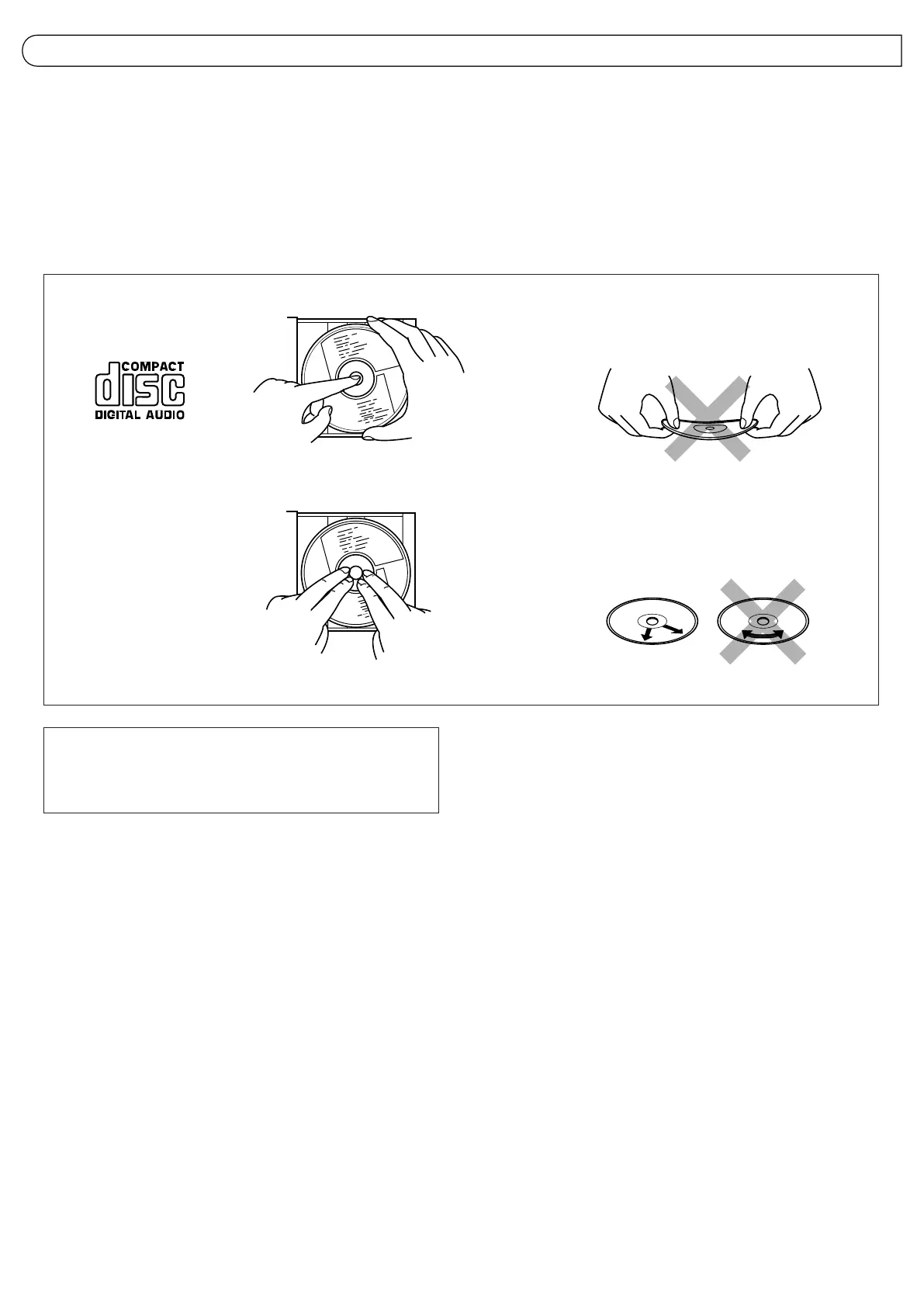
÷ Removing the CD from its storage case and loading it.
Incorrect
Correct
Incorrect
÷ Cleaning
÷ Press to secure the CD.
÷ Press the center and lift out.
Note:
CDs shaped like a heart, flower, etc. (specially-shaped CDs) cannot
be used with this unit. If this type of CD is loaded, it may cause a
malfunction to occur.
Since dirty, damaged and warped CDs may damage the unit, take care
regarding the following:
1. Usable CDs
Use CDs with the Compact Disc mark shown below.
2. Notes on handling CDs
÷ Do not touch the reflective recorded surface.
÷ Do not stick or write anything on the label side.
÷ Do not bend CDs.
3. Storage
÷ After removing a CD from the unit, be sure to put it back in its case.
÷ Do not expose CDs to direct sunlight, high temperatures (such as
from a heater), high humidity, or dust.
4. Cleaning CDs
÷ Before loading a CD, wipe off any dust, dirt or fingerprints with a
soft cloth. CDs should be cleaned by wiping radially from the center
to the edge.
÷ Never use thinner, benzine, record cleaner or antistatic spray.
HANDLING CDs



 To Next Page
 Loading...