22
12
3
4
CLOCK
DOWN UP
SET
SLEEP
CLOCK TIMER
TIMER
ON/OFF
PROGRAM
DOWN UP SET
ON
OFF
1
2
3
54
678
9
pq
CLOCK ADJUSTMENT
(USING THE REMOTE CONTROL UNIT)
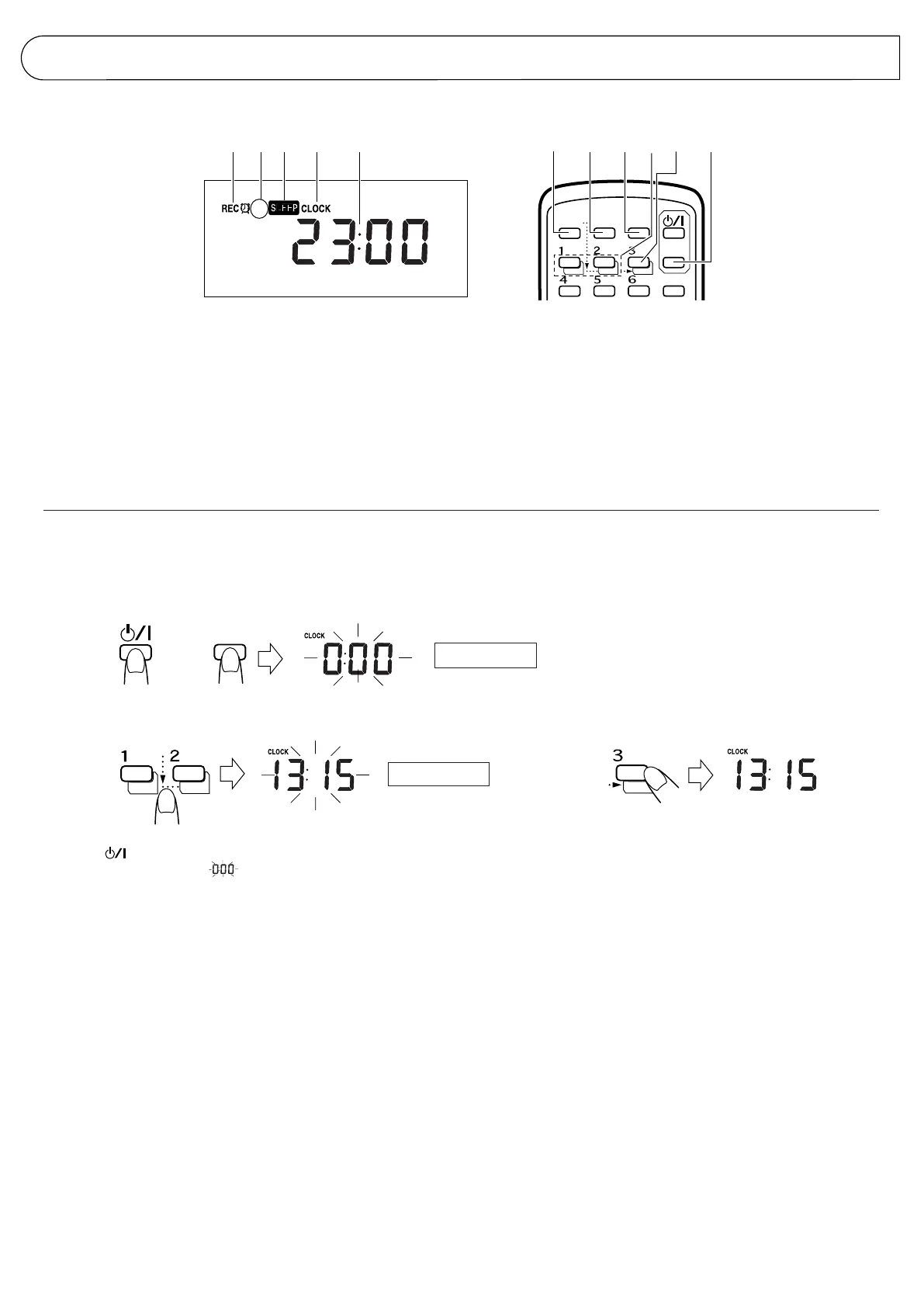
Names of parts in the clock/timer section, and their functions:
Setting the current time (when this unit is used for the first
time)
(Example: To set the clock to 13:15.)
1 Timer mode indicator
2 Timer indicator (ON/OFF)
3 SLEEP indicator
4 CLOCK indicator
5 Time display
6 CLOCK button
7 TIMER button
8 TIMER ON/OFF button
9 DOWN/UP buttons
p SET button
q SLEEP button
Within 2 minutes.
Within 2 minutes.
÷ To confirm the time while listening to a CD or radio broadcast
Press the DISPLAY button briefly on the remote control unit. Press it
again to return to the previous display.
Notes:
÷ Before performing timer recording or playback, it is necessary to set
the current time.
÷ If memory back-up batteries are exhausted or not installed, and the
power cord is plugged in again after being disconnected, or power is
restored after a power failure, “CLOCK” will blink in the display. Set the
current time again.
1 Set the button to ON.
2 Press the CLOCK button; “ ” will blink in the display.
3 Set to 13:15 by pressing the DOWN/UP buttons.
(When the button is kept pressed, the minute/hour indication changes
continuously.)
4 Press the SET button; the time will light in the display.
÷ To set to the nearest second...
Press the SET button when you hear the time signal from a TV or
radio.



 To Next Page
 Loading...