AndroidAndroid
This unit supports the Android™ application, JVC
Music Play. When you use JVC Music Play via this unit,
you can search for audio files by genre, artist, album,
playlist and song.
• For more information about JVC Music Play, visit
<http://www.jvc.net/cs/car/>.
Preparation
Installing JVC Music Play
Install the Android™ application, JVC Music Play, on
your Android device beforehand.
• When a compatible Android device is connected,
“Press [VIEW] to install JVC MUSIC PLAY APP” is shown
on the Android device. Follow the instructions to
install the application.
• You can also install the latest version of JVC Music
Play on your Android device before connecting.
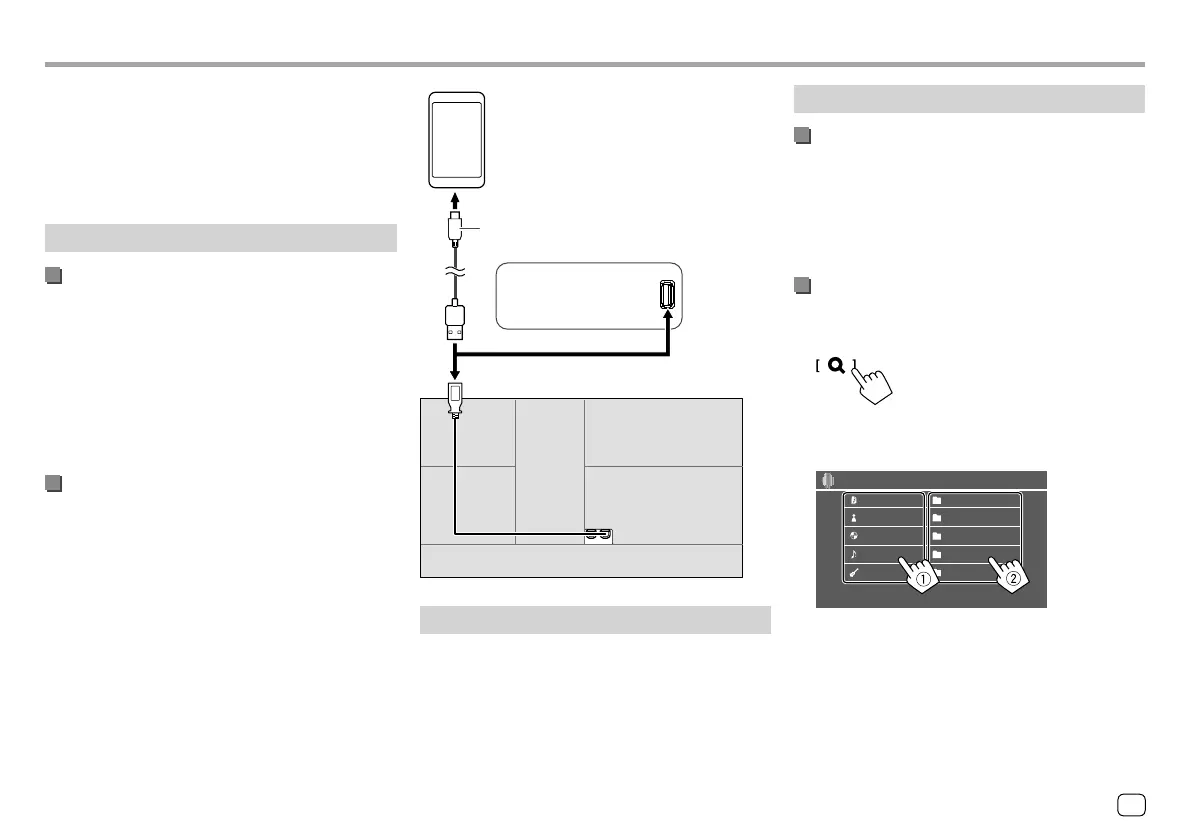
Connecting an Android device
This unit supports Android OS 4.1 and above.
• Some Android devices (with OS 4.1 and above) may
not fully support Android Open Accessory (AOA) 2.0.
• If the Android device supports both mass storage
class device and AOA 2.0, this unit always plays back
via AOA 2.0 as priority.
Android (commercially available)
KW-V340BT
: On the rear panel
KW-V140BT/KW-V240BT
:
On the monitor panel
USB cable (commercially available)
Start playback
1 Turn on JVC Music Play on your Android
device.
2 Select “Android” as the source.
Playback operations
Playback information and key operation
• For playback information, see “Source control screen”
on page 7.
• For key operations on the touch panel, see “Common
operation keys on source control screen” on
page 8.
Selecting a track from the menu
1 Display the audio menu.
On the source control screen, touch as follows:
2 Select a category (1), then select a
desired item (
2).
Playlists
Android
Artist
Album
Songs
Genres
Artist 1
Artist 2
Artist 3
Artist 4
Artist 5
Select an item in each layer until you reach and
select the desired file.
15
ENGLISH
ENKW-V2018STKR.indb15ENKW-V2018STKR.indb15 2017/05/259:042017/05/259:04



 To Next Page