SettingsSettings Remote Controller Remote Controller
<System Information>
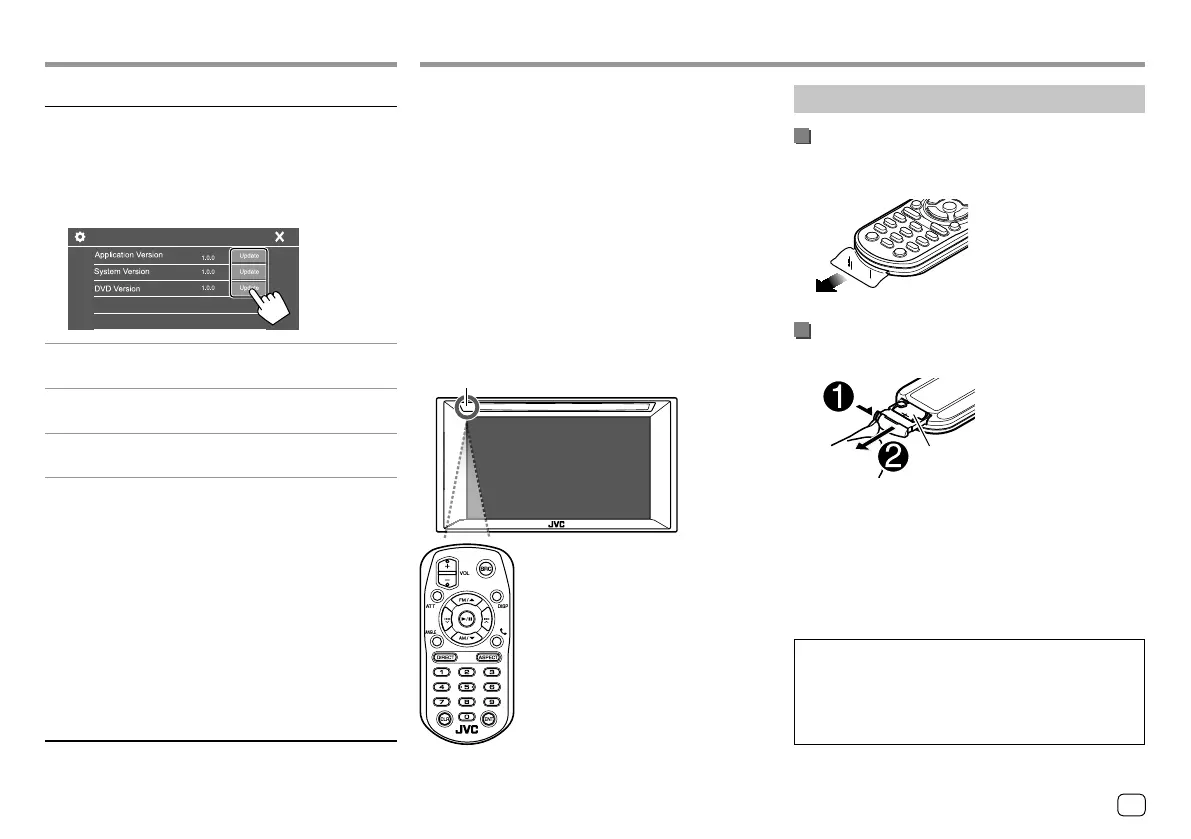
Update the system by connecting a USB device
containing an update file.
• To obtain the update file, visit
<http://www.jvc.net/cs/car/>.
Connect a USB device with the update file to the unit.
System Information
<Application Version>
Updates the system application.
<System Version>
Updates the system.
<DVD Version>
Updates the DVD system application.
The system update starts. It may take a while.
If the update has been completed successfully,
“Update Completed” appears, then reset the unit.
• Do not disconnect the USB device while updating.
• If the update has failed, turn the power off and then
on, and retry the update.
• Even if you have turned off the power during the
update, you can restart the update after the power
is turned on. The update will be performed from the
beginning.
<Open Source Licenses>
Shows the Open Source Licenses.
Remote controller RM-RK258 is supplied for
KW-V240BT Region 4.
• For KW-V140BT/KW-V240BT Region 1/KW-V340BT:
To use the remote controller, purchase optional
remote controller, RM-RK258.
Refer to the instruction manual supplied with the
remote controller.
• For KW-V240BT Region 4: The unit is equipped
with a steering wheel remote control function.
(Page 48)
– See page 54 for connection.
– Operations may differ depending on the type of
steering wheel remote control.
* DO NOT expose the remote sensor to bright
light (direct sunlight or artificial lighting).
Remote sensor*
RM-RK258
Preparation
Removing the battery sheet
Pull the battery sheet out from the remote controller
to activate the battery.
Changing the battery of the remote
controller
CR2025 (+side)
• Use a commercially available button battery
(CR2025).
• Insert the battery with the + and – poles aligned
properly.
– If the effectiveness of the remote controller
decreases, replace the battery.
CALIFORNIA, USA ONLY
This product contains a CR Coin Cell Lithium Battery
which contains Perchlorate Material — special
handling may apply. See <www.dtsc.ca.gov/
hazardouswaste/perchlorate>.
49
ENGLISH
ENKW-V2018STKR.indb49ENKW-V2018STKR.indb49 2017/05/259:052017/05/259:05



 To Next Page