Component Names and OperationsComponent Names and Operations
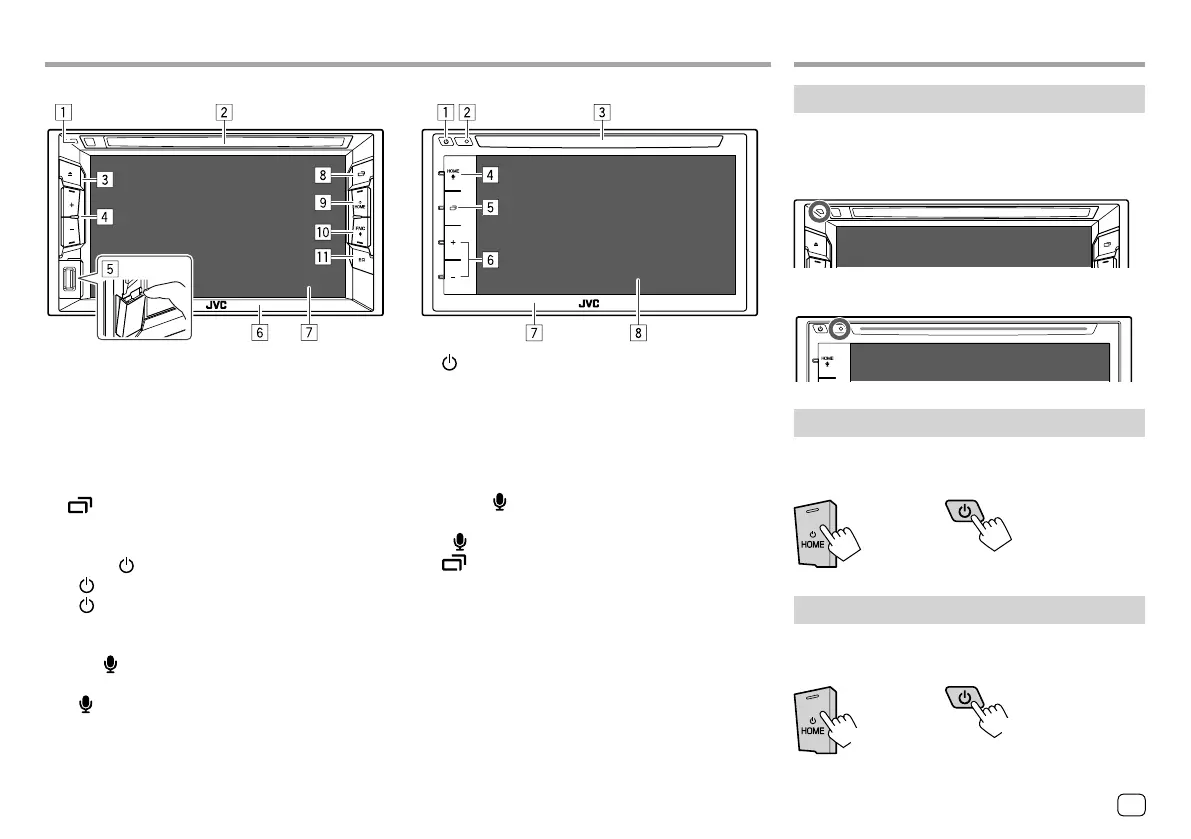
KW-V140BT/KW-V240BT
1 Reset button
2 Loading slot
3 M button
4 Volume +/– buttons
5 USB input terminal
6 Monitor panel
7 Screen (touch panel)
8 button
• (Press) Displays the current source control screen.
• (Hold) Turns off/on the screen.
9 HOME/ button
• (Press): Turns on the power.
• (Hold): Turns off the power.
• HOME (Press): Displays the Home screen while
the power is on.
p FNC/
button
• FNC (Press): Pops up the short-cut menu.
•
(Hold): Activates the voice dialing.
q EQ button
• (Press) Displays the <Equalizer> screen.
KW-V340BT
1 button
• (Press) Turns on the power.
• (Hold) Turns off the power.
• (Press) Pops up the short-cut menu while the
power is on.
2 Reset button
3 Loading slot
4 HOME/ button
• HOME (Press): Displays the Home screen.
• (Hold): Activates the voice dialing.
5 button
• (Press) Displays the current source control screen.
• (Hold) Turns off/on the screen.
6 Volume +/– buttons
7 Monitor panel
8 Screen (touch panel)
Basic OperationsBasic Operations
How to reset your unit
If the unit fails to operate properly, press the reset
button.
KW-V140BT/KW-V240BT
KW-V340BT
Turning on the power
KW-V140BT
KW-V240BT
KW-V340BT
Turning off the power
KW-V140BT
KW-V240BT
KW-V340BT
(Hold)
(Hold)
3ENGLISH
ENKW-V2018STKR.indb3ENKW-V2018STKR.indb3 2017/05/259:042017/05/259:04



 To Next Page