Installation and ConnectionInstallation and Connection
Installing the unit
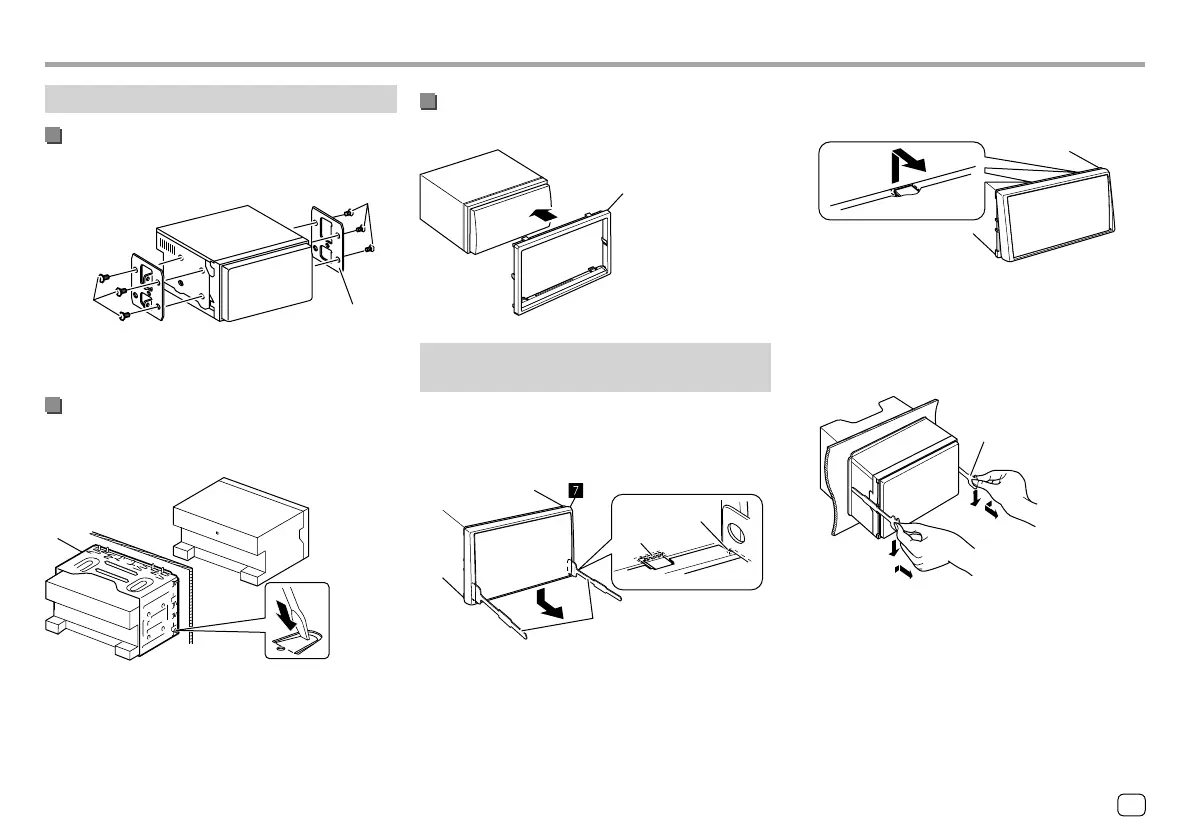
Installing the unit using the mounting
bracket removed from the car
π / [
π / [
Car bracket
Note: Select the appropriate screws (supplied) for the
mounting bracket.
Installing the unit using the mounting
sleeve
(Only for KW-V240BT Region 4)
]
Bend the tabs of the mounting sleeve with a
screwdriver or similar utensil and attach it in place.
Installing the trim plate
(Only for KW-V240BT Region 4)
‘
Removing the unit
(Only for KW-V240BT Region4)
1 Engage the catch pins on the extraction
keys (
\) and remove the two locks on the
lower part of the trim plate (
‘).
\
Catch
Lock
2 Remove from the upper two catches of
the trim plate (
‘).
The frame can be removed from the top side in the
same manner.
3 Remove the unit by inserting the two
extraction keys (
\), then pulling them as
illustrated.
\
Be careful to avoid injury from the catch pins on
the extraction key.
53
ENGLISH
ENKW-V2018STKR.indb53ENKW-V2018STKR.indb53 2017/05/259:052017/05/259:05



 To Next Page