<Initialize>
Initialize all settings you have made. Touch and hold
[Enter] to initialize the settings.
• After initializing the settings, adjust the settings on
the <Initial Settings> screen.
<Serial Number>
(Only for KW-V340BT)
Displays the serial number.
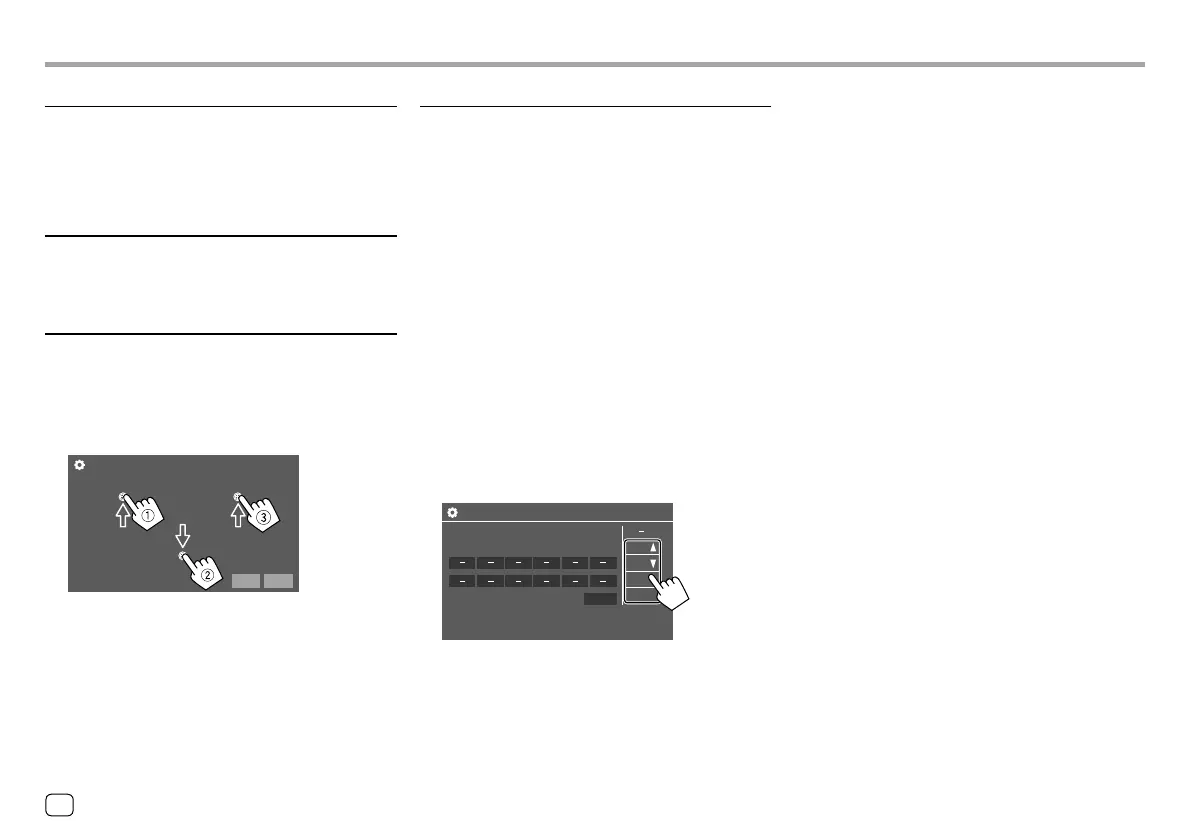
<Touch Panel Adjust>
Adjust the touch positions of the buttons on the
screen.
Touch the center of the marks at the upper left (1),
the lower center (2), then the upper right (3) as
instructed.
Cancel Reset
Touch Panel Adjust
• To reset the touch position, touch [Reset].
• To cancel the current operation, touch [Cancel].
SettingsSettings
4
Repeat steps 2 and 3 to register other
buttons.
5 Touch [Done] to finish procedure.
• The unit can register/change all of the buttons’
functions at the same time. To do this, press all
buttons in turn and after pressing all of them, touch
[Done] on the <Steering Remote Control Setting>
screen. However, new functions cannot be learned
after this operation.
• When changing the functions already learned, touch
the assigned function you want to change in step 3
and then touch to select the new function from the
function list.
• Confirm the contents of the settable functions in the
function list. You cannot edit the function list.
To initialize the setting: Touch [Initialize] for
<Steering Remote Control Setting>.
• A confirmation message appears. Touch [Yes].
– To cancel the initialization, touch [No].
<Steering Remote Control Setting>
(Only for KW-V240BT Region 4)
Assign functions to the keys of the remote controller
on the steering wheel.
• This function is available only when your car is
equipped with the electrical steering remote
controller.
• You can only register/change the functions while
you are parked.
• If your steering remote controller is not compatible,
learning may not be completed and an error
message may appear.
1 Touch [Set] for <Steering Remote Control
Setting> to display the setting screen.
2 Press and hold a button on the steering
remote controller to register or change.
3 Select a function to assign to the selected
button.
Sterring Remote Control Setting
VOL
Please select the function to assign to the button.
VOL
ATT
SRC
Done
48 ENGLISH
ENKW-V2018STKR.indb48ENKW-V2018STKR.indb48 2017/05/259:042017/05/259:04



 To Next Page